Buying Guide
Choosing among the best 3d printer controllers starts with understanding what your build actually needs. A controller that works perfectly for a stock Ender-3 upgrade may be the wrong choice for a high-speed Voron or a multi-tool custom rig. Before you commit, match the board’s physical size, driver capacity, firmware support, and expansion options to your printer’s frame and your own comfort level with wiring and firmware.
Control boards come in several sizes, and not all of them will bolt into your electronics enclosure. Compact boards like the SKR Mini E3 series use a footprint similar to Creality’s stock boards, which means they often drop into existing mounting holes without drilling. If you are working inside a small Voron V0 or a portable printer, a pico-sized board saves valuable space and reduces cable clutter. On the other hand, full-size boards such as the Octopus Pro or SKR Pro require more room and usually demand a custom mounting solution. Measure your electronics bay and check mounting hole spacing before you order, because a powerful board is useless if you cannot secure it safely away from moving parts.
Driver Configuration and Noise
Stepper motor drivers are the single biggest factor in how quietly a printer runs. Controllers with integrated TMC2209 UART drivers are popular because they communicate digitally with the firmware, allowing features like stealthChop and automatic current tuning. Most users upgrading from older A4988 or DRV8825 setups notice an immediate noise reduction. Some advanced boards offer socketed drivers instead of soldered ones, which lets you swap in TMC5160 units for higher current or replace a failed driver without replacing the entire motherboard. If you plan to push large steppers on a CoreXY or a heavy direct-drive gantry, look for boards that support external driver modules or higher-voltage operation rather than relying on basic integrated chips.
Firmware Ecosystem: Marlin vs Klipper
Not every controller plays equally well with every firmware. Many BIGTREETECH boards officially support both Marlin and Klipper, but some are clearly optimized for one ecosystem. Boards marketed with Raspberry Pi compatibility or integrated compute-module sockets are usually aimed at Klipper users who want the controller to handle motion while a Linux host manages the gcode and web interface. If you prefer the simplicity of an SD card and a standalone LCD, a traditional Marlin-focused board is often easier to set up and troubleshoot. Think about your long-term workflow: Klipper offers advanced input shaping and pressure advance, while Marlin remains the standard for plug-and-play reliability when you do not want to manage a separate host computer.
Axis Support and Expansion Headroom
Most cartesian and bed-slinger printers only need four stepper channels for X, Y, Z, and one extruder. However, if you are planning dual extrusion, a tool-changing setup, or independent dual-Z motors, you need a board with enough driver slots. Five-axis controllers cover dual-Z or simple dual-extruder designs, while eight-axis monsters are built for ambitious projects with multiple filament drives and motorized chamber accessories. Even if you do not need extra axes today, having one or two spare slots gives you room to add a second Z motor or a filament cutter later without buying another board.
Installation and Setup Considerations
Drop-in replacement boards are attractive because they reuse existing wiring harnesses and screen cables. When a controller uses the same pin layout as your original board, installation can take under an hour. Universal boards require more patience: you will need to map thermistors, fans, endstops, and stepper cables to new ports, then compile or configure firmware to match. If you are new to printer electronics, start with a board that has a detailed wiring diagram and a large community user base. Also verify whether your preferred display is supported; some boards work beautifully with TFT touch screens but lack native support for basic 12864 monochrome LCDs.
Maintenance and Reliability Signals
A controller lives in a harsh environment filled with vibration, heat, and electrical noise. Look for boards that include replaceable fuses, properly rated MOSFETs for heated beds, and adequate cooling provisions. In owner reviews, pay attention to repeated mentions of thermal shutdowns, dead driver channels, or flaky USB connections. A board with thousands of installations and a steady stream of positive long-term feedback is usually safer than a brand-new design with impressive specs but only a handful of reviews. Good documentation matters too: if the manufacturer provides clear schematics, pinout diagrams, and sample firmware configurations, you are less likely to get stuck during troubleshooting.
How to Compare Owner Reviews
When reading reviews for 3d printer controllers, focus on patterns rather than outliers. One failed board could be a shipping accident, but ten reports of smoked stepper drivers suggests a design or quality-control issue. Check whether negative reviews stem from user error, such as wiring a fan to the wrong voltage, or from genuine hardware limits. Also note the date of the review; early production runs sometimes have bugs that are fixed in later revisions. Finally, look for community activity on forums and social channels. A board with an active user base means you can find answers quickly when something goes wrong.
Final Recommendations
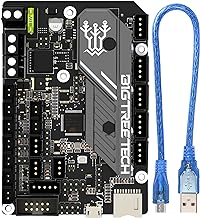
If you want the simplest, most reliable upgrade for a stock Creality machine, the SKR Mini E3 V3.0 offers the best balance of silent drivers, drop-in fit, and community support. The V2.0 remains an excellent alternative if you want a proven design at a similar tier. For those who also want a modern touchscreen interface, the bundled V3.0 and TFT35 combo delivers a cohesive experience without hunting for compatible accessories.
Builders working on a tight budget or an educational Arduino-based project should consider the GRBL CNC kit, which provides a complete set of drivers, endstops, and motors to get a custom machine moving. If you need a flexible mid-range board that supports multiple display types and driver upgrades, the SKR Pro V1.2 is a solid workhorse.
Klipper enthusiasts have two distinct paths. The BTT Pi V1.2 acts as a dedicated host companion for an existing motherboard, while the SKR PICO and Manta M8P integrate control and host functions into compact or high-performance packages respectively. For experimental multi-axis or tool-changing printers, the Octopus Pro provides enough stepper channels to grow into, and the SKR 3 EZ introduces a convenient plug-in driver system for users who expect to iterate on their hardware frequently.