Buying Guide
Choosing among the best audio video selector boxes starts with understanding your source devices, your display’s available inputs, and how much you value convenience over expandability. Because these devices are passive or minimally powered, their build quality and port layout matter far more than flashy features.
How Many Ports Do You Need?
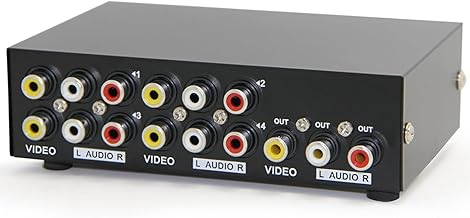
Before selecting a switch, count every analog source you plan to connect. A two-port box is perfect if you only alternate between a DVD player and a single retro console. Most households benefit from a four-port model, which leaves room for a game system, a set-top box, and a spare input for occasional sources like a camcorder. Eight-port selectors are built for collectors or dedicated retro-gaming racks where consoles stay plugged in permanently. Keep in mind that unused ports do not harm signal quality, but an overcrowded switch behind your TV can become a cable-management headache, so balance future-proofing with physical space.
Composite vs. Component: Know Your Cables
The majority of audio video selector boxes handle composite video, the classic yellow RCA connector paired with red and white stereo audio. Composite switches are universally compatible with VCRs, older DVD players, and classic gaming systems. If you own an Xbox 360, Wii, or PlayStation 3 and want to preserve a sharper analog image, a component switch uses green, blue, and red connectors for video plus red and white for audio and can support up to 1080P. Do not mix the two formats without an adapter; buying the wrong switch type is the most common mistake when shoppers search for audio video selector boxes.
Passive vs. Powered Switching
Most RCA selector boxes are passive, meaning they draw no external power and simply reroute signals mechanically. Passive designs are reliable because there are no power bricks to fail, but they can introduce slight signal loss if cable runs are long. Some larger switches or component models benefit from a powered amplifier to maintain brightness and color accuracy across multiple outputs. If your television sits more than six feet from the switch, verify that owners report clean video at distance, or consider a model with an optional power adapter.
Build Quality and Reliability Signals
A good selector box should feel solid when you press its input button. Plastic housings are common and perfectly adequate for light use, but metal enclosures dissipate heat better and survive being bumped in a crowded cabinet. Reliability signals in user reviews often mention “no ghosting,” “no buzz,” or “colors stayed vivid.” If multiple reviews cite loose ports or intermittent audio dropouts after a few weeks, that indicates poor solder joints or cheap internal switches. Prioritize listings with several hundred reviews over those with only a handful, because a small sample size can hide manufacturing variance.
Installation and Cable Management
Installing an AV selector is straightforward: connect your sources to the inputs and run a single output cable to your television. However, the back of your entertainment center can become chaotic quickly. Look for switches with clearly labeled ports and a logical button layout on the front face. Some models include an infrared remote, though most manual push-button units are preferred for retro setups where simplicity counts. Use short, high-quality RCA cables between the source and the switch to minimize clutter, and label each input if the box itself does not provide channel names.
Maintenance and Longevity
Passive selector boxes require almost no maintenance beyond occasional dusting. If you live in a humid climate, check the RCA ports every few months for oxidation, which can manifest as a snowy picture or muffled audio. A quick unplug and replug usually scrapes away minor corrosion. Avoid hanging heavy cables directly off the switch ports, because leverage can crack the internal board over time. If you notice crosstalk—audio from one source bleeding into another—it is usually a sign that the mechanical switch contacts are wearing out and the unit should be replaced.
How to Compare Reviews Effectively
When reading feedback on audio video selector boxes, focus on reviews that mention specific consoles or devices matching your own setup. A five-star rating from someone using the exact same DVD player or SNES model as you is more relevant than a generic praise. Watch for patterns: one complaint about a dead port could be a fluke, but five similar reports suggest a design flaw. Also note the review date; older switches may have undergone silent revisions that improved durability. Finally, ignore reviews that conflate the selector with unrelated issues such as bad source cables or incompatible television inputs.
Final Recommendation
If you maintain a large collection of retro consoles and need maximum flexibility, an eight-way composite switch offers the cleanest single-cable solution to your television. For the average user with a modest media shelf, a four-port RCA selector hits the sweet spot between capacity and compactness. Those with only two primary sources should not overbuy; a simple two-port box keeps wiring minimal and switching instantaneous. If your setup includes component-capable devices like the Wii or Xbox 360, prioritize a component-rated switch even if it offers fewer inputs. Ultimately, match the port count to your actual gear, favor models with broad user feedback, and choose a housing robust enough to survive daily button presses. The right audio video selector box should disappear into your setup—present only as a convenient button press between you and your favorite game or movie.