Buying Guide
The best iphone xs max phone charging stations are usually Qi wireless docks or stands that explicitly list the iPhone XS Max among compatible models. The phone can charge wirelessly without a Lightning cable at the handset, but the station still needs its own power connection. The products above range from single-phone stands to three-device Apple docks, so the right format depends on how many devices you want to place in one charging area.
Start with documented iPhone XS Max support
Compatibility is the first filter. Several stations in this comparison name the iPhone XS Max directly, including Anlmz, CIYOYO, Barpecyou, ANYLINCON, OINMELY, YUWISS, AUKUSE, and JoyGeek. mooas also lists XS support within its iPhone compatibility range, while OneCut documents broad Qi phone support and iPhone XS charging modes. Direct listing evidence is preferable to relying only on a generic wireless-charging label.
Also inspect case guidance. Anlmz, OINMELY, YUWISS, AUKUSE, and JoyGeek document support for cases around 5 mm or 0.2 inch. This does not mean every case will work: Anlmz specifically advises removing metal, magnets, or cards, and several products warn that magnetic or metallic attachments can interrupt charging. A case with a ring plate, wallet compartment, or thick raised section may require removal or repositioning.
Choose a station type
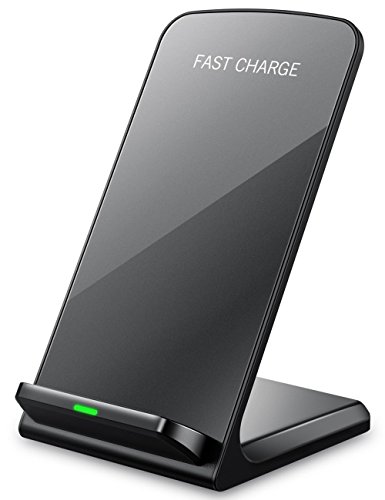
A single-phone stand is the simplest option. OINMELY, YUWISS, and OneCut focus on charging one handset while keeping it upright for calls, messaging, or video viewing. These stands generally take less space than a multi-device dock and make sense when an Apple Watch and AirPods are charged elsewhere. Their dual-coil or multi-position designs can make portrait and landscape placement easier.
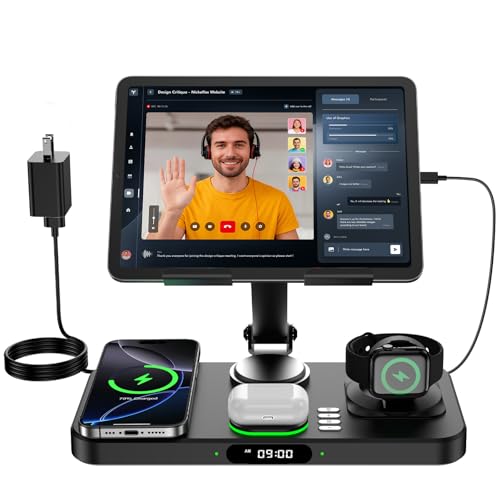
A three-in-one dock combines a phone area with Apple Watch and AirPods charging locations. Anlmz, CIYOYO, Barpecyou, ANYLINCON, mooas, AUKUSE, and JoyGeek document this arrangement. These designs can reduce the number of charging points on a nightstand, but they also require you to place each device on its designated area. Check that your AirPods have a wireless charging case and that your watch is an Apple Watch model supported by the listing.
Consider portrait and landscape placement
Dual-coil designs appear in CIYOYO, Barpecyou, mooas, AUKUSE, and JoyGeek, and these listings describe portrait or landscape charging. That layout is useful if you want to glance at the screen while the iPhone XS Max is charging or place it horizontally for media viewing. An adjustable angle, documented by mooas, adds another positioning option.
The single-coil or centered-placement approach can still be suitable. Anlmz identifies its dock as non-MagSafe and asks users to center the phone. That is an important distinction from magnetic alignment: the phone rests on the charging surface rather than attaching to it. If you frequently pick up the phone while it charges, a stand with a wider charging area or dual coils may be more convenient.
Review safety and indicator details
The listed stations commonly include protections such as over-current, over-voltage, temperature, overcharging, short-circuit, or foreign-object detection. These are design features documented by the manufacturers, not results from independent testing. Barpecyou adds cooling openings, while mooas lists a temperature sensor and bottom ventilation. AUKUSE documents foreign-object detection and cooling, and JoyGeek identifies temperature control and object detection.
Indicator lights can help confirm placement, but brightness and behavior differ. Anlmz uses a soft blue status light, CIYOYO describes sleep-friendly indicators that turn off, and mooas includes a separate warm-white nightlight. If the station will sit beside a bed, check whether the listing describes the indicator as sleep-friendly or gives you a way to turn it off. A nightlight can be useful, but it also adds a function that may not be needed on a work desk.
Check what power accessories are included
An included adapter simplifies setup. Anlmz, CIYOYO, Barpecyou, ANYLINCON, AUKUSE, and JoyGeek each document an included adapter, while YUWISS documents a built-in 5-foot USB cable. For OINMELY and OneCut, the supplied power arrangement is not clearly stated in the evidence here, so verify the package contents before choosing a compatible wall adapter.
The adapter’s stated wattage is not the same as the phone’s actual charging rate. For example, an 18W adapter may power a dock that divides output among several charging areas. Treat the adapter specification as part of the station’s setup requirements rather than a promise of a particular charging speed. The same principle applies to multi-device docks: simultaneous charging is documented, but the evidence does not always provide separate output figures for every pad.
A charging dock needs enough room for the iPhone XS Max and any attached case, plus the watch and earbud case if it is a three-in-one model. Aluminum models such as ANYLINCON emphasize a metal body, while the other stations use compact dock or stand layouts. A single-phone stand may be easier to place on a narrow desk; a multi-device dock may better organize a nightstand with several Apple products.
Look for anti-slip details when the phone will be handled on the stand. Barpecyou, OINMELY, YUWISS, OneCut, and mooas document anti-slip pads or bases. These features can help keep the station positioned, although the supplied evidence does not establish performance on every surface.
Final Recommendation
AUKUSE K6 3-in-1 Wireless Charging Station ranks first overall in this specification-based comparison under the published weighted criteria.
Anlmz CW350 3-in-1 Charging Station is the highest-scoring returned product and the first overall specification-based choice among the best iphone xs max phone charging stations. It directly lists iPhone XS Max compatibility, charges three Apple device types, includes an 18W adapter and USB-C cable, supports cases up to 5 mm, and documents foreign-object detection and heat-dissipation features.
For users who want the top iphone xs max phone charging stations with portrait and landscape flexibility, CIYOYO, Barpecyou, AUKUSE, and JoyGeek provide the clearest dual-coil or orientation evidence. ANYLINCON is the better fit for an aluminum-alloy body, while mooas adds a two-level nightlight and adjustable angle. For a simpler phone-only arrangement, OINMELY, YUWISS, and OneCut avoid the extra footprint of watch and earbud charging areas.
Before choosing, confirm your case thickness, remove metallic attachments when required, check whether your AirPods case supports wireless charging, and verify the included adapter or cable. These checks align the station’s documented design with your actual Apple-device setup.
Frequently Asked Questions
Do these charging stations support the iPhone XS Max?
Yes. The selected stations were chosen because their titles, features, or technical details document iPhone XS Max support directly or establish support through compatible Qi iPhone charging. Anlmz, CIYOYO, Barpecyou, ANYLINCON, OINMELY, YUWISS, AUKUSE, and JoyGeek explicitly name the model. mooas lists XS compatibility, and OneCut describes Qi support with iPhone charging modes.
Is a MagSafe case required for the best iphone xs max phone charging stations?
No. The iPhone XS Max uses Qi wireless charging, and the selected stations are primarily Qi charging stands or docks. Anlmz specifically identifies its design as non-MagSafe and uses centered placement. A magnetic case or metal accessory may interfere with charging, so follow the individual station’s case guidance.
Can one station charge an iPhone, Apple Watch, and AirPods together?
Yes, the three-in-one models in this comparison document simultaneous charging for those device categories. You need an Apple Watch supported by the station and AirPods with a wireless charging case. Single-phone stands such as OINMELY, YUWISS, and OneCut do not provide the same multi-device layout.
Can I charge the iPhone XS Max in portrait and landscape positions?
Several selected stations document both positions. CIYOYO, Barpecyou, mooas, AUKUSE, and JoyGeek use dual-coil or flexible stand designs for portrait and landscape placement. Anlmz instead specifies centered placement, so its orientation behavior should be considered different from those dual-coil models.
What should I check before setting up a charging station?
Confirm the station lists your phone, inspect case thickness and metallic accessories, check whether the power adapter is included, and make sure any AirPods case supports wireless charging. Place the phone on the documented charging area and use the supplied cable or adapter when the listing provides one.