Buying Guide
The best hot and cold laminators are easier to compare when you separate the machine’s physical capacity from its operating features. Start with the largest item you expect to laminate, then check pouch thickness, cold-mode requirements, warm-up time, jam handling, and included tools. A machine with a wide feed may be unnecessary for flash cards and letter documents, while a compact A4 machine can become limiting when you need posters, menus, or tabloid sheets.
Choose the right feed width
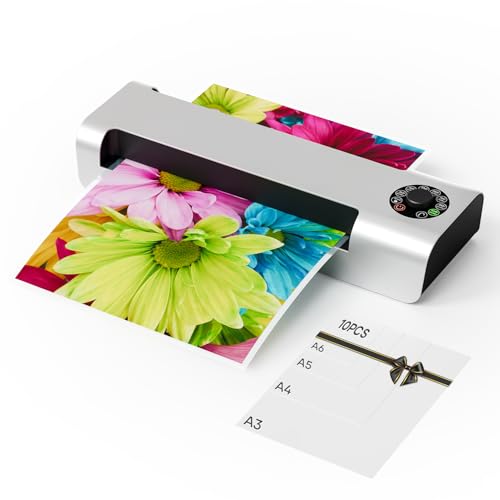
A 13-inch or approximately 12.6-inch feed is more suitable for A3 and 11x17 projects. Most selected models document support for A3, Legal, Letter, business cards, photos, or smaller sizes. This width is useful for classroom charts, menus, certificates, signage, and larger artwork. Measure your available workspace as well as your documents; wider machines may need room behind and in front for feeding and receiving sheets.
The selected models also cover smaller materials such as A4, A5, A6, cards, and photos. The Eficentline YE381, for example, is specified for A3/A4/A6 formats and includes a trimmer for finishing smaller pieces. A wider machine can therefore handle both large and small projects, although it may take more desk space than a dedicated compact unit.
Understand hot and cold operation
Hot lamination uses heat to seal thermal pouches around a document. It is the normal choice for many paper documents, cards, menus, photos, and certificates. Cold lamination avoids heating and is intended for heat-sensitive items, but the evidence repeatedly notes that it requires self-adhesive cold pouches. Those pouches are not always included, so check the package contents before planning a cold-lamination project.
Every product in this comparison documents both modes, but that does not mean every material is automatically suitable. Follow the stated pouch and material limits. The V350 roll laminator is the selected design that specifically documents paper, PVC, and cardboard support, along with single-sided and double-sided hot operation. That makes it a different proposition from the pouch-oriented machines.
Match pouch thickness to your work
Pouch compatibility is one of the most important specification differences. Several models support 3 and 5 mil pouches, a common range for routine documents and photos. The MAXDONE 13-inch model lists 2.5-4 mil support, while the Crenova four-roller model documents seven settings from 3 to 10 mil. If you laminate a mix of lightweight papers and thicker cards, the broader range can reduce the need to choose materials around the machine.
Do not assume that a thicker pouch is always better. Check the total thickness limits and the manufacturer’s directions. MAXDONE specifically cautions against exceeding its stated combined thickness, and other models distinguish between pouch thickness and the item inside. Cold pouches also work differently from thermal pouches, so verify that the selected machine and adhesive pouch are compatible.
Compare speed realistically
Warm-up time matters when you laminate only a few documents at a time. The fastest documented warm-up in this selection is 60 seconds on several wide-format models, while other machines list 70, 78, 90, or 95 seconds. These figures are product-listing specifications rather than independent measurements.
Laminating speed is also relevant for batches. The selected models list speeds from 250 mm/min to 450 mm/min, with the fastest figures appearing on several 13-inch machines. A higher stated speed may be useful for classroom preparation or office batches, but feeding documents straight and using the correct pouch can matter just as much to the overall workflow.
Look for jam-release features
ABS or reverse-release systems appear throughout the selected group. They are designed to help remove a misfed pouch after switching off the machine and activating the release control. This is a useful safeguard because pulling a stuck pouch forcefully may damage the document or leave material inside the rollers.
Feeding guidance can add another layer of control. The kejector model includes scale markings for common sizes and documented sealing-margin guidance. The OidoZac models include support plates intended to guide sheets and reduce bending. These features do not guarantee a perfect result, but they can make alignment more manageable when used as directed.
Many of these machines are sold as kits rather than laminators alone. Common additions include paper cutters, corner rounders, hole punches, binder rings, and starter pouches. The Eficentline model includes a three-pattern trimmer, while several 9-in-1 and 11-in-1 models combine cutting and rounding functions with sheets.
Accessories are useful if you are preparing classroom materials or finishing cards immediately after lamination. They can also take up storage space and may not replace a dedicated heavy-duty paper cutter. If you already own those tools, prioritize the machine’s feed width, pouch range, temperature control, and jam-release design instead.
Consider roller design and controls
Dual-roller designs are common in the selected group and are described as helping apply heat and pressure. The Crenova four-roller model adds a larger roller count and seven thickness settings. The V350 uses a roll-style arrangement with adjustable film tension and roller pressure, plus a digital temperature display.
Temperature control features vary. NTC control appears on several pouch machines, while the V350 lists automatic temperature protection and display precision. These are useful specifications, but they should not be treated as independent proof of finished quality. Use the correct pouch, allow the machine to reach its stated operating condition, and follow its feeding instructions.
Final Recommendation
Crenova 13-inch 4-Roller Laminator ranks first overall in this specification-based comparison under the published weighted criteria.
The final choice among the best hot and cold laminators depends on the documented features that match your intended use.
Crenova 13-inch 4-Roller Laminator is the highest-scoring returned product and the first overall specification-based choice. Its seven pouch settings, four-roller design, 13-inch A3 format, hot and cold modes, and documented 60-second warm-up give it the broadest technical flexibility in this comparison. For a more balanced wide-format setup, VEVOR 12.6-inch A3 Laminator combines a fast listed workflow with a useful accessory kit. Elysine 13-inch 11-in-1 Laminator is a strong alternative when included tools and organized storage matter most.
For smaller documents, the Eficentline YE381 provides A3/A4/A6 coverage, a three-pattern trimmer, and a substantial starter pouch bundle. The PeiXWming V350 is better suited to buyers specifically seeking a roll laminator with adjustable tension and pressure rather than a simple pouch machine. Together, these options cover the main needs found among the top hot and cold laminators: larger formats, everyday documents, varied pouch thicknesses, cold-compatible projects, and more controlled roll work.
Frequently Asked Questions
Among the best hot and cold laminators, are hot and cold laminators suitable for photos?
The selected listings describe hot and cold use for photos, but the correct mode depends on the photo or print and the pouch being used. Cold mode is intended for heat-sensitive items and requires compatible self-adhesive pouches on models where that requirement is stated. For thermal pouches, follow the machine’s thickness and material guidance.
Is a 13-inch laminator better for A3 documents than a smaller model?
It is better only if you need A3, 11x17, Legal, or other wider materials. The selected 13-inch machines also handle A4, A5, A6, cards, and photos, so they can cover smaller work when you have enough desk space. A wider machine may be unnecessary if your projects never exceed ordinary letter-size documents.
What pouch thickness should I choose?
Choose a thickness supported by the specific laminator and appropriate for the material. Many selected machines document 3-5 mil support, while the Crenova 4-Roller model lists 3-10 mil settings. Do not exceed the stated combined thickness of the pouch and item, and remember that cold self-adhesive pouches are not interchangeable with ordinary thermal pouches.
Do all hot and cold laminators include cold pouches?
No. Some listings include thermal starter sheets, while others explicitly state that self-adhesive cold pouches are not included. Check the supplied accessories and the cold-mode instructions before buying. A starter bundle can help with hot projects, but it does not necessarily provide the supplies needed for cold lamination.
What should I do if a pouch jams?
Turn off the laminator and use its ABS, reverse, or quick-release control as directed by the product listing. Several selected models document a release lever or button for removing stuck material. Avoid forcing the pouch through the rollers, and align the sealed edge and document correctly before trying again.