Buying Guide
The best female cable gender changers are not interchangeable just because they share a female-to-female layout. The connector family, pin arrangement, electrical purpose, and available clearance determine whether an adapter is suitable. Start by identifying the connector on both cable ends and confirm that the adapter uses the same standard.
Match the connector family first
For legacy computer and industrial equipment, DB9, DB15, and DB25 are different formats. A DB9 adapter cannot substitute for a DB25 or DB15 unit. The selected StarTech, LinkStable, and Fielect products are DB9 serial changers, while VGA products use the HD15 family. DVI is a separate video connector with its own pin layout, and XLR, 1/4-inch, and 3.5mm products are audio formats that should not be mixed.
Connector naming can vary. VGA may also appear as HD15, DE-15, HDB-15, RGB, or DB-15 in product descriptions. The LNHCAW listing specifically identifies several of these terms, while the CK RF and VCE listings use standard VGA or HD15 language. When a device label is unclear, count pins and compare the physical connector before selecting a changer.
Confirm the female-to-female layout
A female-to-female adapter provides two socket ends. It is commonly used to join two cables that both terminate in male plugs, or to change the accessible gender of a port. The selected products consistently document this arrangement, but the surrounding use case differs: DVI and VGA models are primarily cable couplers, while DB9 models target serial equipment and XLR or audio-jack models target sound connections.
A gender changer does not automatically convert a signal standard. It changes the connector interface. For example, the Cable Matters DVI unit is described for DVI-I and DVI-D cables, but it does not turn DVI into HDMI or DisplayPort. Similarly, an XLR adapter does not change balanced audio into an unrelated connector format.
Consider video specifications
Video couplers need more than a general connector label when the display setup is demanding. The Cable Matters DVI model documents dual-link use and resolutions up to 2560x1600, including 1080p. The LNHCAW VGA model lists several resolutions through 1920x1200 and 1080p, while CK RF identifies support up to 1920x1080. These statements help with initial matching, but they do not replace checking the capabilities of the cables and connected equipment.
VGA is an analog display interface, and DVI variants differ in pin configuration. The Cable Matters DVI listing specifically calls out DVI-I, DVI-D, 24+5 identification, and single- or dual-link cable use. That level of detail is useful when a connector looks similar to another DVI type but does not have the same pin arrangement.
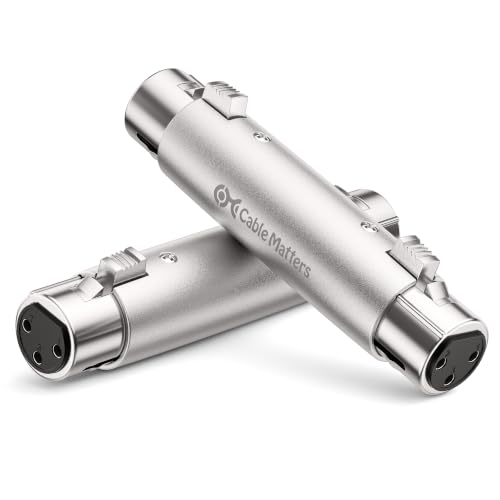
Construction details can matter when the adapter will be connected behind a desk, in a rack, or to equipment that is frequently repositioned. The CK RF VGA coupler uses a metal housing and nickel-plated contacts. The Cable Matters DVI model lists gold-plated connectors, grip treads, and thumb screws. The XLR selections use metal housings, while HUALEU additionally documents riveted construction and silver-plated copper connectors.
Shielding is particularly relevant in the evidence for the Fielect DB9 and LNHCAW VGA products. Both listings describe EMI/RFI shielding, although the Fielect description contains a conflicting VGA reference despite its DB9 title and pin specification. Treat that item as a connector-match purchase: verify that the equipment is genuinely DB9 serial before installation.
Check space and fastening needs
A slim or compact adapter may fit more easily behind a monitor or serial device. The StarTech GC9SF is explicitly described as slimline, and its listed dimensions can help with clearance planning. A bulkier metal housing may provide a more substantial grip, but it can require more room around adjacent ports. DVI models with thumb screws are useful when a secured connection is preferred, provided the connected cables have matching screw points.
For VGA, DVI, and serial connections, inspect whether the cable ends or equipment ports include fastening hardware. A changer with no screw detail may still connect normally, but it may not provide the same retention arrangement as a model that documents thumb screws or a tight fit.
Decide how many adapters you need
Pack contents vary from one unit to four. The VCE VGA set includes four couplers, while the LinkStable, Cable Matters DVI, Cable Matters XLR, HUALEU XLR, CK RF, LNHCAW, and Togconn products are two-unit sets. The StarTech and Fielect choices are single-unit listings. Select the quantity based on the number of cable junctions and whether a second adapter will be used in a separate setup; pack size does not change connector compatibility.
Installation is generally passive. LinkStable states that its DB9 changer needs no power, and VCE describes plug-and-play VGA installation. Togconn likewise describes a compact plug-and-play audio coupler. These adapters do not require drivers, but the connected equipment still needs to use compatible signaling and wiring.
Final Recommendation
Cable Matters DVI Female-to-Female Coupler 2-Pack ranks first overall in this specification-based comparison under the published weighted criteria.
Cable Matters 2-Pack DVI Coupler is the first overall specification-based choice for users who need detailed DVI-I and DVI-D compatibility, dual-link support, documented display resolutions, and a secured housing. Among the best female cable gender changers, it has the clearest technical coverage for a demanding video connection.
For VGA, CK RF provides a metal HD15 design and a stated 1080p ceiling, while LNHCAW supplies especially useful resolution and connector terminology. VCE is the practical multi-unit VGA option. For audio, Cable Matters is the focused standard XLR choice, HUALEU adds detailed 3-pin construction and DMX documentation, and Togconn covers both TRS and TS 6.35mm cables. LinkStable and StarTech are strong DB9 alternatives, with Fielect offering shielding information but requiring careful connector verification. Together, these are the top female cable gender changers when selection is based on documented connector and design specifications rather than subjective impressions.
Frequently Asked Questions
What should I check before choosing the best female cable gender changers?
Confirm the connector family, pin count, gender on both ends, and intended signal type. DB9 serial, VGA HD15, DVI, XLR, and 1/4-inch audio adapters serve different interfaces. Also check whether the adapter’s stated resolution, cable type, shielding, fastening hardware, and pack quantity match the setup.
Can a VGA female-to-female adapter connect DVI cables?
No. The selected VGA products are designed for VGA or HD15 connections, while the Cable Matters DVI coupler is documented for DVI-I and DVI-D cables. Similar-looking display connectors are not automatically interchangeable, so match the connector standard and pin arrangement.
Do these gender changers need power or drivers?
The selected products are passive couplers. LinkStable explicitly states that its DB9 changer needs no power, and VCE and Togconn describe plug-and-play installation. Passive connection does not guarantee compatibility if the cables or equipment use different wiring or signal standards.
Is XLR female-to-female the same as a 1/4-inch audio coupler?
No. XLR adapters use XLR connectors, while Togconn’s selected product is for 6.35mm TRS and TS jacks. Choose the adapter that matches the physical plug and socket on the audio cables. An XLR gender changer cannot replace a quarter-inch coupler.
They may help with physical protection and interference management in the situations described by the listings. Fielect and LNHCAW document EMI/RFI shielding, while CK RF, Cable Matters, and the selected XLR products identify metal housings or plated contacts. These features do not remove the need to use the correct connector and compatible equipment.