Buying Guide
The best female-to-female usb adapters are passive connection pieces, but their specifications still differ in ways that affect compatibility. Start by identifying the male plugs on the two cables you want to join. A USB-A female-to-female coupler requires two USB-A male ends. A USB-C female-to-female coupler requires two USB-C male ends. A mixed USB-A-to-USB-C adapter has one female port of each type and is intended for a different connection pattern.
Choose the connector arrangement first
USB-A couplers are the conventional choice for older computers, printers, keyboards, mice, flash drives, and other standard peripherals. Cable Matters, Posdou, Basesailor, and Pastall all document USB-A female-to-female designs. These adapters can extend a cable or move a rear-facing port to a more accessible position, but they do not change the connector at the end of a cable.
USB-C couplers are better suited to USB-C cable extensions. AuviPal and GHQXZT document USB-C female-to-female designs with support for demanding USB-C functions. Their stated video and power capabilities require compatible cables and host devices, so the adapter should not be treated as a universal upgrade for every USB-C connection.
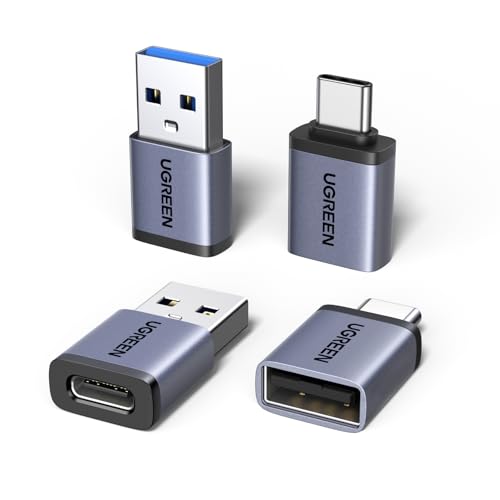
Mixed-port adapters solve another problem. Poyiccot and Duttek provide USB-C female and USB-A female ports, while Togconn describes bi-directional use. These are useful when a USB-C peripheral or cable must connect with a USB-A host or charger. Check the required direction and device port before selecting one.
Match the speed specification
The transfer-rate number is meaningful only when the cables, source, destination, and host ports support the same standard. Cable Matters, Posdou, and Pastall list speeds up to 5Gbps. Basesailor, Poyiccot, and Duttek list up to 10Gbps. AuviPal and GHQXZT list up to 40Gbps for compatible USB-C and USB4 or Thunderbolt-related setups.
A coupler does not create a faster USB link than the slowest part of the chain. For example, a high-speed adapter connected to an older cable may operate at the older cable’s capability. Basesailor also describes its product as a passive coupler, which is a useful reminder that the adapter itself does not add USB functions.
Check charging and display claims carefully
Charging specifications vary considerably. Basesailor is intended for stable power pass-through with low-power devices and is not recommended for high-power devices or fast charging. Togconn lists 5V/2.1A, while Duttek lists a maximum 3A output. Pastall lists up to 5V/3A. These figures do not mean every connected device will draw that amount; the host, cable, charger, and device all remain part of the power system.
USB-C models can document more advanced functions. GHQXZT lists up to 100W power delivery, 40Gbps data, and 8K video, while AuviPal lists up to 240W, 40Gbps, and 8K at 60Hz. Those claims are conditional on compatible cables and equipment. The AuviPal and GHQXZT listings also mention that cable orientation may affect an initial video or data connection.
Do not assume that a USB-A coupler carries video. Basesailor, Pastall, and several other USB-A listings specifically exclude display or video output. Poyiccot and Duttek also state that their mixed USB-A/USB-C adapters do not support video and audio. If display output is essential, choose a product whose listing explicitly documents that function and verify the rest of the connection chain.
Consider housing and installation style
Aluminum-alloy housings appear across several selected adapters, including AuviPal, GHQXZT, Basesailor, Poyiccot, Duttek, and Togconn. These models are compact and intended for portable or desktop use. Cable Matters adds gold-plated connectors and easy-grip treads, while Halokny lists gold-plated internal copper contacts.
Halokny is a different design type: a panel-mount pass-through connector. Its installation-oriented construction suits a chassis, server, gaming console, docking station, or other enclosure project. It is not the most convenient format for casually carrying in a cable pouch, but it can provide a neater fixed interface.
Decide how many adapters you need
A two-pack can make sense when one adapter belongs at a desk and another stays in a travel kit. Cable Matters, Posdou, Togconn, GHQXZT, Poyiccot, AuviPal, and Halokny use two-unit packages. Basesailor provides three, Pastall provides four, and multi-unit packaging can help when several work areas use the same connector type.
Pack size should not replace connector and performance checks. A larger pack of USB-A couplers cannot substitute for a USB-C adapter, and a mixed-port adapter cannot replace a same-port USB-C coupler when both cable ends are USB-C.
Final recommendation
AuviPal USB-C 240W Coupler ranks first overall in this specification-based comparison under the published weighted criteria.
The final choice among the best female-to-female usb adapters depends on the documented features that match your intended use.
AuviPal USB-C 240W Coupler is the first overall specification-based choice among these selections, and it is aimed at users who need the broadest documented USB-C capability. It lists USB4 compatibility, 240W power delivery, 40Gbps data, 8K at 60Hz video, and an LED indicator. The connected cables and devices must support those functions.
For a USB-A setup, Basesailor USB-A 3.2 Coupler is the top female-to-female usb adapters choice for its stated 10Gbps transfer rate and clear passive-coupler design. Cable Matters is a more conventional USB-A alternative with broad backward compatibility and a two-pack. For mixed USB-A and USB-C connections, Poyiccot and Duttek provide the clearest 10Gbps-class specifications, while Togconn offers a simpler 5Gbps two-pack.
Choose GHQXZT when USB-C video, charging, and data pass-through matter but the documented 100W profile is sufficient. Choose Halokny for a fixed panel installation, Posdou for basic USB-A extension, and Pastall when several USB-A locations need matching couplers. In every case, confirm the male plug types, supported USB standard, charging requirements, and whether video or audio is explicitly supported.
Frequently Asked Questions
Among the best female-to-female usb adapters, what does a female-to-female USB adapter do?
It joins two male connectors of the required type, usually to extend a cable or relocate a port. A same-format USB-A coupler joins two USB-A male ends, while a USB-C coupler joins two USB-C male ends. A mixed USB-A-to-USB-C adapter has one female port of each format and serves a different connection arrangement.
Can these adapters increase USB transfer speed?
No. They can preserve a documented link capability when every other component supports it, but they do not make an older cable, host port, or device operate faster. Basesailor lists up to 10Gbps, while Cable Matters and Posdou list up to 5Gbps; the connected system determines the actual link.
Can a female-to-female USB adapter carry video?
Only when the product listing documents video support and the connected cables and devices also support the required signal. AuviPal and GHQXZT document USB-C video output, including 8K at 60Hz. Several USB-A and mixed-port products specifically exclude video, so connector shape alone is not enough.
Can these adapters be used for charging?
Some listings document charging or power pass-through, but the stated limits differ. Basesailor is not recommended for high-power devices or fast charging, while Togconn, Duttek, Pastall, GHQXZT, and AuviPal list different output or power-delivery figures. Check the adapter, cable, charger, and device specifications together.
Which connector should I choose for a USB-A computer and USB-C accessory?
Use a mixed USB-A-to-USB-C female adapter when the cable and device arrangement requires one female port of each type. Poyiccot, Duttek, and Togconn document this design. Confirm whether you need OTG, charging, data synchronization, or video before choosing, because the selected mixed-port products do not all support the same functions.