Buying Guide
The best female-to-male dvi cables are not interchangeable simply because they use a DVI-shaped connector. The other end may be HDMI male, HDMI female, or another DVI connector, and the DVI side may be DVI-D or DVI-I. Start by identifying the exact port on the computer or source device and the exact port on the monitor, projector, or television.
Match the connector genders first
Connector gender determines whether the product can plug directly into your equipment. A female DVI port accepts a male DVI plug, while a male DVI plug requires a female DVI port. The same check applies to HDMI. For example, the DTECH adapter uses a DVI-I female port and HDMI male connector. The MMOBIEL B0CDCDRX6M model uses HDMI male and DVI-I female ends in a short cable format. The StarTech.com B009YCASK2 reverses that general arrangement with HDMI female and DVI-D male ends, so it needs a separate standard HDMI cable.
A product with the wrong gender may still look mechanically similar but cannot complete the intended connection without another adapter. Before selecting one, write down the port arrangement as a simple sequence, such as “computer DVI female to monitor HDMI female.” That immediately indicates the need for a DVI male and HDMI male connection, or an adapter plus an additional cable depending on the selected design.
Check DVI-D versus DVI-I
DVI-D carries digital video, while DVI-I includes digital and analog contacts. The supplied products document both types. DTECH, MMOBIEL B0CDCDRX6M, and SAISN B0CR3R5N8Z identify DVI-I compatibility. The Cmple, BENFEI, StarTech.com models, and NFHK identify DVI-D configurations. Some listings say a DVI-I female port can accept DVI-D male connectors, but you should still compare the pin layout with your equipment.
Do not assume that a DVI-I connector will provide an analog VGA connection through every adapter. If the source or display uses VGA, a different conversion category is needed.
Consider resolution and refresh-rate wording
Resolution support varies across the group. Several adapters list 1920x1200 and 1080p, including Cmple, BENFEI, CableCreation, SAISN, and the MMOBIEL cables. DTECH documents support up to 4K at 30Hz as well as 1080p at 60Hz. That distinction matters: a listing that names a resolution does not necessarily promise the same refresh rate at every resolution.
For a conventional Full HD monitor, a product with stated 1080p support may fit the documented requirement. For a 1920x1200 display, select a model whose listing explicitly includes that mode. If you are considering a 4K display, note that DTECH is the selected product with supplied evidence for 4K, and its stated limit is 30Hz. None of these products should be treated as a general-purpose high-refresh gaming solution without matching the source, display, and connector specifications.
Decide between an adapter, dongle, and cable
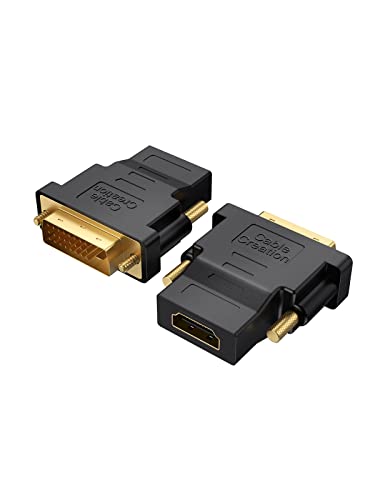
A compact adapter is useful when you already have a suitable HDMI or DVI cable. The CableCreation two-pack, BENFEI two-pack, and SAISN two-pack use this approach. They can be stored separately and connected when needed, but each setup includes another cable and another connection point.
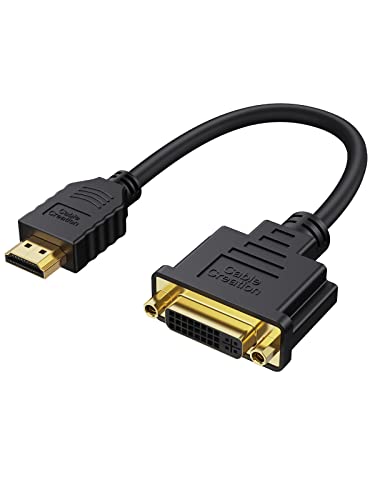
A short cable integrates the two connectors into one lead. CableCreation B01FM51PY2 uses a 15cm cable, while MMOBIEL B0CDCDRX6M uses a 0.3m cable. This can reduce the need for a separate HDMI lead and may be easier to route behind a monitor. The trade-off is that the fixed length may not reach across a desk.
The StarTech.com B009YCASK2 is an 8-inch dongle designed to reduce possible port blockage and strain. It is appropriate when a female HDMI socket is needed at the end of a short lead. For a native DVI extension, NFHK B0CMYRVYPZ uses male-to-female DVI-D connectors over 50cm and does not perform an HDMI conversion.
Review the physical connection details
DVI plugs commonly use screws to hold the connection in place. Cmple, BENFEI, CableCreation B01FM52438, DTECH, and SAISN B0CR3R5N8Z document hand-tightened screws or similar securing features. Grip treads can also make insertion and removal easier. These details are relevant when a monitor cable will remain connected or when the port is positioned behind equipment.
Cable construction is another differentiator. CableCreation B01FM51PY2 documents aluminum-foil and braid shielding plus an oxygen-free copper core. NFHK identifies a shielded undermold and full dual-link pinout. DTECH, Cmple, BENFEI, and SAISN document gold-plated connectors. These are construction details, not a guarantee of a particular result, so the final choice should still reflect the port layout and video requirement.
Remember the audio limitation
DVI does not natively carry audio in these listed configurations. The evidence for DTECH, Cmple, CableCreation, MMOBIEL, BENFEI, SAISN, and other HDMI-to-DVI products states that audio must be transmitted separately or that the connection carries video only. Plan for speakers, an audio cable, an optical connection, or another audio route when the source and display do not share a separate audio path.
Final recommendation
DTECH DVI-I Female to HDMI Male Adapter ranks first overall in this specification-based comparison under the published weighted criteria.
The final choice among the best female-to-male dvi cables depends on the documented features that match your intended use.
DTECH DVI-I Female to HDMI Male Adapter is the first overall specification-based choice among the returned products. It has the broadest documented resolution range, supports bidirectional use, and combines DVI-I compatibility with gold-plated connectors, grip treads, and screws. For a short integrated lead, CableCreation B01FM51PY2 is a practical alternative with detailed shielding information. For two installation points, BENFEI or CableCreation B01FM52438 provide two-adapter formats. Among the top female-to-male dvi cables and adapters, the right pick depends primarily on connector gender, DVI pin layout, and the display mode you need. For native DVI extension rather than HDMI conversion, NFHK B0CMYRVYPZ is the focused option.
Frequently Asked Questions
Among the best female-to-male dvi cables, do these female-to-male DVI products carry audio?
Generally, no. The supplied listings describe these connections as video-only or state that audio must be transmitted separately. Plan a separate audio route when connecting an HDMI source to a DVI display.
What is the difference between DVI-D and DVI-I?
DVI-D is specified for digital video, while DVI-I includes digital and analog contacts. The selected products identify their connector types, so compare the stated DVI-D or DVI-I format with the male or female port on your equipment. A DVI-I port does not automatically make every setup compatible with VGA.
Is a short cable better than a compact adapter?
Neither design is universally better. A short cable, such as CableCreation B01FM51PY2 or MMOBIEL B0CDCDRX6M, combines the connectors and can simplify routing. A compact adapter, such as Cmple or BENFEI, works when you already have the required cable and want a detachable connection.
Can these products connect HDMI and DVI in either direction?
Many selected models explicitly document bidirectional video conversion, including DTECH, CableCreation, MMOBIEL, Cmple, BENFEI, and SAISN. Confirm the connector genders at both ends before connecting. The NFHK model is different: it is a native DVI-D male-to-female extension cable rather than an HDMI converter.
What resolution should I look for?
Match the listing to the display mode. Many selected products document 1080p and 1920x1200, while DTECH documents up to 4K at 30Hz. Check both the source and display specifications, and do not infer a refresh rate that the product listing does not state.