Buying Guide
Choosing among the best iphone 7 charging stations starts with one technical detail: the iPhone 7 charges through Lightning. It does not charge wirelessly and it does not use USB-C at the phone. A station can still be a good match when it has USB-A or USB-C power outputs, but you need a compatible Lightning cable. Products with an included iPhone cable are more straightforward because the required connection is documented in the listing.
Decide whether you need a dock or a power station
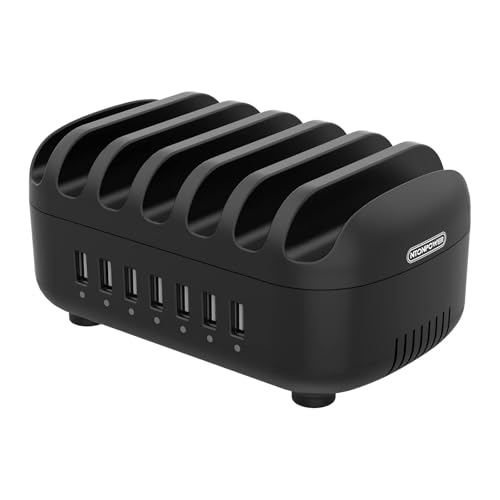
A slotted charging organizer keeps phones and tablets upright, while a power strip concentrates outlets and USB ports without necessarily holding devices. The MSTJRY, NTONPOWER, and Zobirez models are purpose-built organizers with dividers or dedicated bays. They are useful when several devices should remain visible and separated while charging.
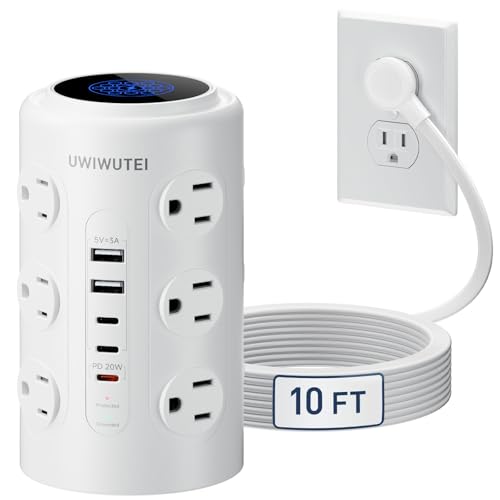
The YISHU, UWIWUTEI, Belkin, and ORICO products are closer to power stations or power strips. Their AC outlets can run adapters, lamps, monitors, and other equipment, while USB ports handle smaller electronics. This format is preferable when the charging area must serve more than phones. It also avoids filling every wall outlet with individual adapters.
Check Lightning support before setup
The clearest iPhone 7 matches in this comparison are the MSTJRY and NTONPOWER stations, whose listings explicitly name iPhone 7 or iPhone 7 Plus. The Zobirez M10 and M10C include cables identified for iPhone devices. Those details reduce uncertainty during setup.
For the other USB stations, the relevant evidence is the presence of USB-A or general USB charging ports. These can power an iPhone 7 through a Lightning cable, but the listings do not always state that a cable is included. Check the package contents and cable type before relying on a station as a complete charging kit. USB-C-only cables cannot connect directly to an iPhone 7.
Match capacity to the number of devices
Capacity should reflect the number and type of devices you expect to charge at the same time. Five to seven ports are suitable for a personal desk, couple, or small family. The MSTJRY has five USB-A ports, while the NTONPOWER provides seven USB-A charging slots. The BREEKET six-port station offers a balanced three USB-C and three USB-A layout.
The Zobirez M10 and M10C each document ten ports. Their wider bays and mixed cable kits make them more suitable for shared spaces, classrooms, or larger households. The UWIWUTEI tower documents seventeen total connections, but twelve are AC outlets rather than device-holding USB ports. That distinction matters: a high connection count does not necessarily mean seventeen phones can be placed on the unit.
Consider port types and power distribution
USB-A remains important for an iPhone 7 because Lightning cables with USB-A plugs are common. USB-C ports are useful for newer phones, tablets, laptops, and other modern equipment, but they do not replace a Lightning cable for the iPhone 7. Mixed-port stations such as the Zobirez models, BREEKET, Belkin, ORICO, and Anker provide broader equipment compatibility.
Pay attention to how output is described. Some listings specify total output, per-port output, or independent circuits. The NTONPOWER lists 2.4A per port and 70W total, while the BREEKET six-port model lists 100W total. The Zobirez models document higher-output USB-C ports for laptops and tablets. These figures describe the station’s specifications, not a charging time for every connected device.
Prioritize usable organization
A charging station works best when devices stay separated and cables do not cross the whole desk. Removable dividers on the MSTJRY and NTONPOWER allow some layout adjustment. The Zobirez M10 and M10C use one-piece slots, with wide bays for thicker tablets or laptops. The Anker Nano takes a different approach with two retractable USB-C cables and a compact body.
Power-strip formats need a little more planning. The Belkin has a five-foot cord and a flat plug, the ORICO uses a winding design and strap, and the UWIWUTEI tower uses a weighted non-slip base. These features help determine where the station can sit and how easily it can be kept clear of loose cables.
Review safety and placement features
The supplied listings describe several protective systems, including over-current, over-voltage, overheating, overload, short-circuit, and overcharge protection. Certifications are also documented for some models: NTONPOWER lists UL, CE, FCC, and RoHS, Belkin lists TUV certification, and YISHU lists ETL certification.
Treat these as listed design features rather than proof of independent performance testing. Keep the station on a stable, ventilated surface and use cables appropriate for the connected device. A cooling fan, ventilation openings, or flame-retardant housing may be useful design considerations, especially when many devices are connected.
Final recommendation
Zobirez M10 420W 10-Port Charging Station ranks first overall in this specification-based comparison under the published weighted criteria.
The final choice among the best iphone 7 charging stations depends on the documented features that match your intended use.
Zobirez M10 420W 10-Port Charging Station is the highest-scoring returned product and the first overall specification-based choice. Its ten ports, included iPhone cables, mixed USB types, wider bays, and one-piece slot design make it a well-documented option for a shared charging area.
For greater capacity, the Zobirez M10C 750W station provides ten ports, mixed USB types, and included iPhone cables. NTONPOWER is a seven-slot alternative with documented cooling and certifications. For travel, ORICO combines USB ports, AC outlets, a flat plug, and cord management. The top iphone 7 charging stations are not identical: choose a slotted organizer if device placement matters most, or a power-strip format if your desk also needs conventional AC outlets.
Frequently Asked Questions
Among the best iphone 7 charging stations, can an iPhone 7 use these charging stations?
Yes, when the station has a USB-A or USB-C power output and you connect an appropriate Lightning cable. MSTJRY and NTONPOWER explicitly list iPhone 7 compatibility. Some Zobirez models list included iPhone cables. For the remaining stations, verify whether your own Lightning cable matches the available port.
Does an iPhone 7 charge wirelessly on these stations?
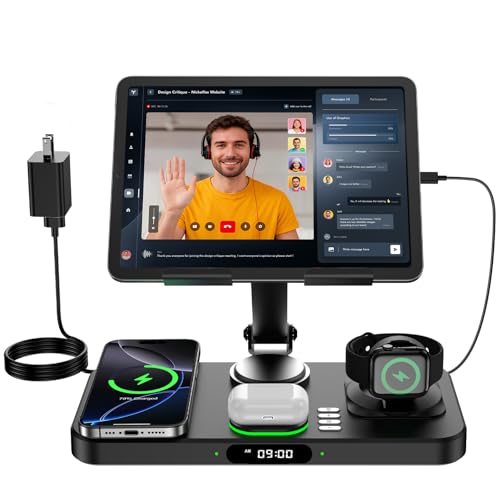
No. The iPhone 7 does not support wireless charging. Wireless charging pads documented for newer iPhones are not a direct iPhone 7 solution unless the station also provides a wired USB output and you use a Lightning cable. The products selected here are primarily wired USB or outlet-based stations for that reason.
How many ports are enough for an iPhone 7 charging area?
One port is enough for a single phone, but five to seven ports allow room for tablets, earbuds, watches, or another phone. Ten-port organizers such as the Zobirez models suit shared spaces. Remember that AC outlets and USB ports serve different purposes, so count the connection type you actually need.
Are included cables required?
They are not required if you already have a suitable Lightning cable. Included cables can simplify setup, but cable type and length still matter. Short cables work well with slotted organizers; longer cables may be preferable when the station sits farther from the device.
Should I choose USB-A, USB-C, or both?
USB-A is convenient for an iPhone 7 when paired with a USB-A-to-Lightning cable. USB-C adds flexibility for newer phones, tablets, and laptops. A mixed station is the most adaptable choice, while a USB-A-focused organizer may be simpler when the charging area mainly serves older Lightning devices.