Buying Guide
Choosing the best led laptop replacement screens is primarily a compatibility exercise. A panel can share the same diagonal measurement with the original and still fail to work because the connector, resolution, mounting arrangement, or touch function differs. The listings in this comparison repeatedly advise a like-for-like check, so the model number on the laptop is only one part of the process.
Start with the exact laptop model
Read the full model identifier from the laptop chassis, system information, or original screen documentation. The LCDBros Acer Aspire 5 A515-45-R74Z panel, for example, is not presented as a universal Acer replacement; it is tied to that exact model. Likewise, the LCDBros Lenovo IdeaPad 1 15AMN7 listing identifies Model 82VG. These details matter because one laptop family can be sold with different screen versions.
The same principle applies to model families. Broad coverage is useful only when the specific laptop appears in the compatibility information.
Match connector count and position
Connector information is one of the most important specifications. Many selected panels use a 30-pin interface, but that does not make them interchangeable. The best led laptop replacement screens in this list still require the connector on the original panel to match. Connector location can also matter when the cable must reach the laptop motherboard without strain.
The JHK listing identifies a bottom-right 30-pin connector, while several other listings state 30 pins without specifying the position. It is a genuine replacement screen, but its design is not a substitute for a 30-pin non-touch panel.
Confirm resolution and display size
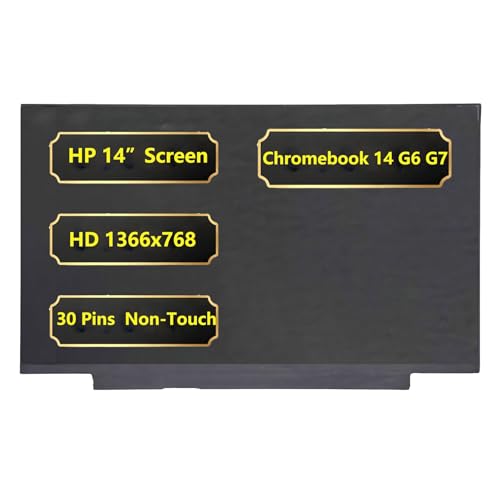
A 14-inch HD screen and a 14-inch FHD screen are different replacement specifications. HD generally means 1366x768 in the supplied listings, while FHD means 1920x1080. The SCREENARAMA HP Chromebook 14a Screen and Jxjslp HP Chromebook 14 G6/G7 Screen are HD options.
Do not assume that a higher resolution is automatically compatible. The original laptop and its display cable must support the replacement configuration. A correct HD panel is preferable to an incompatible FHD panel, so compare the original screen label and the laptop’s documented specification before selecting one of the top led laptop replacement screens.
Check touch status and panel type
Touch and non-touch panels require separate attention. The HP Chromebook options selected here are likewise non-touch.
Panel technology is another useful distinction when it is supplied. Other listings specify LCD LED display without naming IPS or TN. Do not infer panel technology from brand, resolution, or finish when the listing does not state it.
Choose matte or glossy based on the original
Matte is a design specification that may help limit visible reflections, but the replacement should still match the laptop’s intended configuration. The Jxjslp listing does not identify a surface finish, so its fit should be verified through the panel label and model information.
Glossy designs also appear in the supplied candidate pool, including certain 14-inch HD panels, but they are not needed for this selected comparison. A different surface can alter the appearance of the repaired laptop even when the size and resolution match.
Review what is included for installation
Most selections are screen panels rather than complete lid assemblies. Expect to reuse the original bezel, back cover, control board, cable, and other laptop parts unless the listing says otherwise. The BRIGHTFOCAL ThinkPad listing specifically states that the package includes the screen and toolkit but not the bezel, back cover, or control board.
Tools and adhesive tape are documented for the Acer, Lenovo IdeaPad, JHK, NIMO, SCREENARAMA, and BRIGHTFOCAL HP options. The PEHDPVS listing instead cautions that replacement requires professional tools and technique. Disconnecting power and the battery connection before installation is also advised in the JHK listing. These details do not replace a model-specific repair guide, but they help set expectations for the work.
Use the original panel as the final reference
Before ordering, compare the original screen’s diagonal size, resolution, connector count, touch status, backlight type, and visible mounting details. Several listings warn that internal panel models can vary within the same laptop model.
The best led laptop replacement screens are therefore ranked here for the completeness and clarity of their supplied specifications, not as universal recommendations. A lower-ranked screen may be the right choice when its model and panel label match your laptop exactly.
Final Recommendation
Among the top led laptop replacement screens, the ranked products differ under documented compatibility specificity, connector fit, resolution clarity, panel and surface details, and installation support.
LCDBros Acer Aspire 5 A515-45-R74Z Screen ranks first overall in this specification-based comparison under the published weighted criteria.
The final choice among the best led laptop replacement screens depends on the documented features that match your intended use.
LCDBros Acer Aspire 5 A515-45-R74Z Screen is the highest-scoring returned product and the first overall specification-based choice. Its listing supplies an exact laptop model, 15.6-inch size, FHD resolution, matte surface, 30-pin connector, and installation tools. That makes the fit requirements comparatively clear, provided the original panel confirms the same specifications.
The BRIGHTFOCAL Lenovo ThinkPad T580 Screen is a practical match when the included toolkit matters. For HD Chromebook or compact HP repairs, SCREENARAMA HP Chromebook 14a Screen, Jxjslp HP Chromebook 14 G6/G7 Screen, and BRIGHTFOCAL HP 14-DF0014DS Screen provide model-specific alternatives.
No listing should be treated as universal. Confirm every visible specification against the original panel before installation, and remember that most options are replacement screens only rather than complete display assemblies.
Frequently Asked Questions
How do I confirm that one of the best led laptop replacement screens will fit?
Match the laptop model, original screen size, resolution, connector pin count, touch or non-touch function, and mounting details. Also compare the panel label when possible.
Are all 30-pin laptop screens interchangeable?
No. A 30-pin label alone does not confirm compatibility. Connector placement, cable type, resolution, panel dimensions, touch function, and laptop model also matter. The JHK panel documents a bottom-right connector, while other selected listings identify only the pin count. Use the original screen as the final reference.
Can I replace an HD screen with an FHD screen?
Not automatically. HD selections in this guide use 1366x768, while FHD selections use 1920x1080. The laptop, cable, firmware, mounting arrangement, and connector must support the intended replacement. Choose the same resolution as the original unless the laptop documentation specifically supports another configuration.
Do these replacement screens include a bezel or back cover?
Generally, no. The BRIGHTFOCAL ThinkPad listing explicitly says its package includes the screen and toolkit but not the control board, bezel, or back cover. Several other listings similarly describe a screen-only package. Plan to reuse compatible original laptop parts unless the individual listing states otherwise.
Are matte panels available for these repairs?
Yes. Surface finish must still match the intended laptop configuration, and a matte designation does not confirm compatibility by itself.