Buying Guide
The best led 2-in-1 laptops differ most in display construction, hinge design, processor class, and operating system. The products above are genuine convertible computers or detachable laptop-tablet systems supported by the supplied listings. This is a specification-based comparison rather than a hands-on test, so the scores reflect documented features only.
Choose the display first
A convertible display affects both viewing comfort and tablet usability. The Dell 16 AI Powered 2-in-1 has the most advanced documented panel here: a 16-inch Mini LED WQXGA touchscreen with a 90Hz refresh rate. Mini LED is specifically stated in its listing, making it the clearest choice for shoppers prioritizing that display technology.
Several other selected models use IPS touchscreen panels. The HP OmniBook X Flip 16 lists 400 nits, 120Hz, DisplayHDR, and 100% DCI-P3, giving it unusually detailed color and motion specifications. The HP OmniBook 7 Flip 16 lists a 400-nit WUXGA IPS touchscreen, while the Lenovo IdeaPad 5i 2-in-1 16 lists a 300-nit IPS panel at 60Hz. The Dell Inspiron 14 7440 identifies its panel as LED WVA, with a 250-nit brightness figure.
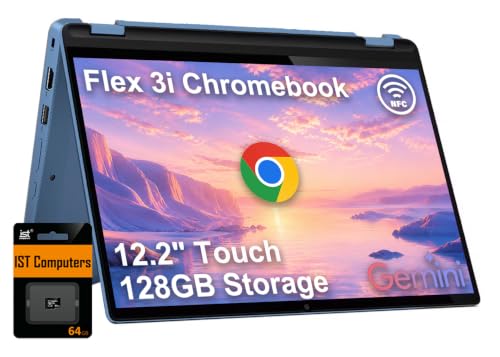
Resolution also affects the amount of information visible on screen. Most selected Windows systems use a 16:10 1920x1200 layout, which provides useful vertical space for documents and browser windows. The Dell Mini LED model moves up to 2560x1600. The Lenovo IdeaPad Flex 3i Chromebook 12.2 still provides 1920x1200 resolution despite its smaller size.
Match the processor to the workload
For demanding multitasking, the Dell 16 AI Powered 2-in-1 uses an Intel Ultra 9-288V with eight cores and Intel Arc 140V integrated graphics. The HP OmniBook 7 Flip 16 and HP OmniBook X Flip 16 use Intel Core Ultra 7 processors, and both listings identify integrated Arc 140V graphics. These models are well aligned with users who want newer Intel processing and AI-related hardware.
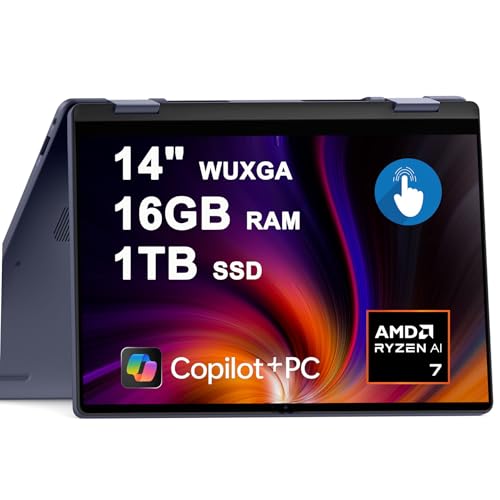
AMD alternatives are represented by the Dell Inspiron 14 Plus 2-in-1 and Lenovo IdeaPad 5 2-in-1. The Dell uses an eight-core Ryzen AI 7 350 with an identified AI engine of up to 50 TOPS, while the Lenovo uses a Ryzen 7 8845HS and integrated Radeon graphics. The Dell Inspiron 14 7440 uses a 10-core Intel Core 7 150U, and the Dell 16 Plus uses an eight-core Core Ultra 7 256V.
The ChromeOS model uses a more modest processor. The Lenovo IdeaPad Flex 3i Chromebook 12.2 uses an Intel N100, while its 4GB memory and 128GB combined storage are directed toward browsing, online classes, and cloud-based work. Choose ChromeOS when your software needs fit browser and Android-style workflows; choose Windows 11 when you require broader desktop application compatibility.
Check memory and storage
Memory determines how many applications and browser tabs a system can handle comfortably. The Dell 16 AI Powered 2-in-1, HP OmniBook 7 Flip 16, and Dell Inspiron 14 7440 each list 32GB. Those configurations are well suited to extensive multitasking based on their published specifications. The HP OmniBook X Flip 16, Dell Inspiron 14 Plus 2-in-1, Dell 16 Plus, Lenovo IdeaPad 5 2-in-1, Lenovo IdeaPad 5i 2-in-1 16, and Dell Latitude 7420 list 16GB.
Storage ranges from 512GB on the Lenovo IdeaPad 5i 2-in-1 16 and Dell Latitude 7420 to 2TB on the HP OmniBook 7 Flip 16. A 1TB SSD appears on many of the selected Windows systems. The Lenovo IdeaPad Flex 3i Chromebook 12.2 lists 128GB combined storage, while the supplied evidence describes 64GB eMMC plus a 64GB SD card. Consider both capacity and the type of files you keep locally.
Decide whether you need a pen
Pen support varies significantly. The Dell 16 AI Powered 2-in-1 includes an Active Pen, the HP OmniBook 7 Flip 16 includes an MPP 2.0 stylus, and the HP OmniBook X Flip 16 includes a stylus. The Lenovo IdeaPad 5 2-in-1 includes a digital pen for notes, sketches, signatures, and handwriting conversion. These are the most clearly documented options for active pen use.
The Lenovo IdeaPad 5i 2-in-1 16 includes a capacitive stylus with a magnetic cap. Its listing says the pen does not connect through Bluetooth and does not need charging, but that design should be viewed differently from an active pressure-sensitive pen. A pen is useful for annotations and signatures, but confirm the included accessory and compatibility details before relying on it for specialized creative work.
Compare size, ports, and security
Sixteen-inch convertibles provide more workspace but can be less comfortable to hold as tablets. The HP OmniBook X Flip 16 lists a 3.06-pound product weight, while the Dell 16 AI Powered 2-in-1 lists 4.3 pounds and the Dell 16 Plus lists 4.52 pounds. Fourteen-inch systems such as the Dell Inspiron 14 Plus 2-in-1, Dell Inspiron 14 7440, and Dell Latitude 7420 offer a more compact middle ground.
Port selection is most detailed on the Dell Inspiron 14 7440, which lists two USB-C ports, two USB-A ports, HDMI, an SD-card slot, and an audio connection. The Dell Mini LED model adds Thunderbolt 4 and HDMI 2.1. The HP OmniBook models also list Thunderbolt 4 and HDMI 2.1, while the Lenovo IdeaPad Flex 3i Chromebook 12.2 includes USB-C, two USB-A ports, HDMI, microSD, and audio.
Security features include fingerprint readers on the Dell Mini LED model, Dell Inspiron 14 Plus 2-in-1, Dell Inspiron 14 7440, and Dell 16 Plus. Privacy-shutter webcams are documented on the Lenovo IdeaPad 5 2-in-1, Dell 16 Plus, and Lenovo IdeaPad Flex 3i Chromebook 12.2. These features are practical considerations for shared spaces and video calls.
Final recommendation
Dell 16 AI Powered 2-in-1 Mini LED ranks first overall in this specification-based comparison under the published weighted criteria.
The final choice among the best led 2-in-1 laptops depends on the documented features that match your intended use.
The Dell 16 AI Powered 2-in-1 is the highest-scoring returned product and the first overall specification-based choice. Its Mini LED WQXGA touchscreen, Ultra 9 processor, 32GB memory, 1TB SSD, Active Pen, and Thunderbolt 4 create the most complete documented configuration in this comparison.
Among the top led 2-in-1 laptops, the HP OmniBook 7 Flip 16 is the better fit for users who prioritize 32GB memory, 2TB storage, Windows 11 Pro, and professional connectivity. The HP OmniBook X Flip 16 is an alternative when display color, 120Hz motion, slim design, and stylus support matter more. For a 14-inch format, consider the Dell Inspiron 14 Plus 2-in-1 or Dell Inspiron 14 7440. The Lenovo IdeaPad Flex 3i Chromebook 12.2 is the focused ChromeOS option for browser-led study and everyday computing.
Frequently Asked Questions
What are the best led 2-in-1 laptops for a large touchscreen?
The Dell 16 AI Powered 2-in-1, HP OmniBook 7 Flip 16, HP OmniBook X Flip 16, Dell 16 Plus, Lenovo IdeaPad 5 2-in-1, and Lenovo IdeaPad 5i 2-in-1 16 all list 16-inch touchscreens. The Dell model has the highest listed resolution and Mini LED technology, while the HP OmniBook X Flip 16 lists 120Hz, 400 nits, and 100% DCI-P3.
Which selected model includes the most storage?
The HP OmniBook 7 Flip 16 lists a 2TB PCIe SSD. Many other selected Windows models list 1TB SSDs, including the Dell 16 AI Powered 2-in-1, HP OmniBook X Flip 16, Dell Inspiron 14 Plus 2-in-1, Dell 16 Plus, Lenovo IdeaPad 5 2-in-1, and Dell Inspiron 14 7440. The Lenovo IdeaPad 5i 2-in-1 16 and Dell Latitude 7420 list 512GB.
Which convertible laptops include a pen?
The Dell 16 AI Powered 2-in-1 includes an Active Pen. The HP OmniBook 7 Flip 16 and HP OmniBook X Flip 16 list included styluses, and the Lenovo IdeaPad 5 2-in-1 includes a digital pen. The Lenovo IdeaPad 5i 2-in-1 16 includes a capacitive stylus, which the listing describes as non-Bluetooth and non-charging.
Should I choose Windows 11 or ChromeOS?
Windows 11 models in this comparison are the Dell, HP, and Lenovo IdeaPad systems, and they are suited to users who need traditional desktop applications. The Lenovo IdeaPad Flex 3i Chromebook 12.2 runs ChromeOS and is documented for online classes, browsing, cloud work, and related everyday tasks. Select the operating system that matches your required applications.
What port features should I compare?
Look for the connections your monitor, storage, and accessories require. Thunderbolt 4 appears on the Dell Mini LED model, HP OmniBook 7 Flip 16, HP OmniBook X Flip 16, and Dell 16 Plus. The Dell Inspiron 14 7440 adds HDMI, USB-A, USB-C, and an SD-card slot, while the Lenovo IdeaPad Flex 3i Chromebook 12.2 lists HDMI, USB-A, USB-C, and microSD.