Buying Guide
Choosing the best printable blank dvd-r discs starts with confirming that the media is actually DVD-R and printable by the method you plan to use. The products in this comparison are write-once discs, so recorded content cannot be erased and reused in the same way as rewritable media. That makes the intended project, labeling method, and storage plan important before selecting a pack.
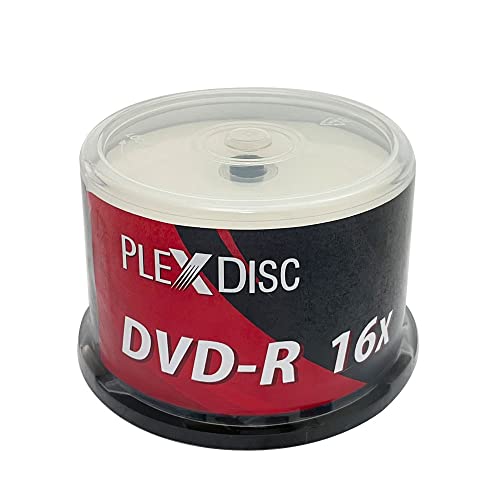
Most selected products list 4.7GB capacity and up to 120 minutes of audio or video. That is the standard capacity for the category represented here, but recording time can depend on the recording mode. The Verbatim 95153, PlexDisc 632-217-BX, Optical Quantum OQDMR16WIPH-BX, and OPTIMUM A20-92-217-BX all state 4.7GB capacity. For projects with many files or repeated duplication, compare the pack quantity as carefully as the per-disc capacity.
DVD-R is a write-once format. This can suit finished videos, photo collections, documents, and distribution copies, but it is less flexible than rewritable media for temporary working files. A write-once disc is best treated as a final or archival copy after confirming that the files and label design are correct.
Match the surface to your printer
Inkjet-printable surfaces are the dominant design in this selection. They are intended for compatible optical-disc inkjet printers rather than ordinary office printers. Several products document full-surface or edge-to-edge printing from 23mm to 118mm, including PlexDisc TY Series, PlexDisc 632-217-BX, OPTIMUM, and Prodisc. That measurement is useful because it indicates how much of the disc face the printer can cover, including the area approaching the hub.
The Verbatim 95153 and Verbatim DataLifePlus 95079 identify white inkjet-printable surfaces and branded or hub-printable areas, but the supplied listings do not provide the same diameter range. HP and Sony identify inkjet printing in their evidence but provide fewer surface details. If a precise full-face label matters, favor products with explicit coverage dimensions and confirm that your printer supports the stated range.
Surface finish can also affect the look and handling of a finished label. PlexDisc’s Liquid Defense Plus 632-C14 describes a glossy white coating with water- and scratch-resistant properties and resistance to fading. OPTIMUM documents a moisture-resistant coating intended to reduce smearing or bleeding in humid conditions. These are different design priorities: glossy finish emphasizes appearance, while the moisture-resistant coating addresses a specific environmental concern. Neither should be treated as a substitute for careful storage.
Compare recording speed carefully
Every leading product here lists 16X recording or a 1X-16X range. A compatible DVD writer is still required, and actual recording behavior can depend on the drive and selected settings. PlexDisc’s listings describe recording 4.7GB in minutes, while Verbatim identifies Super AZO or AZO dye technology. These statements are product specifications, not independent performance tests.
For a mixed hardware environment, it is sensible to check the writer’s supported media speeds before ordering a large pack. A disc labeled 16X does not mean every drive will use that speed. If the project is more concerned with a clean, repeatable workflow than maximum speed, use a supported setting from the writer and authoring software.
Consider playback and drive compatibility
Recorded DVD-R media may be used in computer drives, DVD players, Blu-ray equipment, or gaming systems that support recorded discs. The PlexDisc, Optical Quantum, OPTIMUM, and Prodisc listings explicitly describe broad compatibility across several of these device types. Sony also lists wide compatibility, stable writing, and temperature adaptability. These statements are helpful when the finished discs will move between systems, but they do not establish compatibility with every individual device.
For a distribution project, test the authoring format and playback equipment before preparing the full run. The disc choice is only one part of compatibility; the recorded file structure, finalization process, and receiving device also matter. Keep the product’s stated compatibility as a screening factor rather than a guarantee for an unlisted player.
Choose packaging for the way you store discs
Pack design affects organization and protection. Cake-box or spindle packaging appears across much of the selection. Optical Quantum describes a protective spindle cake box, PlexDisc TY Series specifies a reusable spindle cake box, and Prodisc describes a reusable spindle container for dust-free storage. These options are convenient for keeping a large quantity together.
Shrink-wrap formats, such as the PlexDisc 632-217-BX listing, can work for bulk duplication but may provide less individual separation after opening. The Verbatim and HP spindle packs are similarly oriented toward grouped storage. For long-term filing, consider transferring completed discs to individual sleeves or cases, while keeping the printable surface free from scratches and moisture.
Select the right pack size
A 50-disc pack can be a sensible fit for a smaller event, personal archive, or limited duplication run. The PlexDisc TY Series and Verbatim DataLifePlus options document 50-disc quantities. One-hundred-disc packs are more common in this comparison and suit larger projects, including Verbatim, Optical Quantum, OPTIMUM, Prodisc, Sony, and HP. Pack size should follow the number of finished discs you expect to create, plus a reasonable allowance for authoring or labeling mistakes.
Thermal media can be appropriate only when you own a compatible thermal disc printer; it should not be confused with inkjet media.
Final Recommendation
Prodisc DVD-R 16X 4.7GB Inkjet Printable, 100 Pack ranks first overall in this specification-based comparison under the published weighted criteria.
Verbatim DVD-R 4.7GB 16X White Inkjet Printable with Branded Hub, 100-Disc is the highest-scoring returned product and the first overall specification-based choice among these best printable blank dvd-r discs. It combines the requested DVD-R format with 4.7GB capacity, 16X recording, a white inkjet-printable surface, AZO technology, a 100-disc spindle, and a limited lifetime warranty.
For full-surface labeling, PlexDisc 632-217-BX, PlexDisc TY Series, OPTIMUM A20-92-217-BX, and Prodisc provide the clearest 23mm-118mm coverage evidence. OPTIMUM is the most targeted option for humid conditions because its listing documents a moisture-resistant coating. Optical Quantum is a strong packaging-focused alternative with a protective cake box and broad compatibility details.
The top printable blank dvd-r discs are not interchangeable in every workflow. Choose the 50-disc PlexDisc TY Series or Verbatim DataLifePlus when the project is smaller, select a 100-disc spindle for a larger run, and verify whether your printer uses inkjet disc printing before selecting any surface. For a straightforward specification match with substantial documentation, the Verbatim 95153 remains the most balanced starting point.
Frequently Asked Questions
What are the best printable blank dvd-r discs for full-face labels?
Among the selected products, choose a disc whose listing states a printable range. PlexDisc TY Series, PlexDisc 632-217-BX, OPTIMUM, and Prodisc document coverage from 23mm to 118mm. Confirm that your optical-disc printer supports that diameter before preparing artwork. Products such as Verbatim, HP, and Sony identify inkjet printing but do not provide the same coverage measurement in the supplied evidence.
Are these discs compatible with ordinary inkjet printers?
They are designed for compatible optical-disc inkjet printers, not standard paper printers. The listings mention equipment from Primera, Microboards, DiscProducer, Rimage, and related printer families for several models. Check your printer’s media requirements, printable diameter, and tray design. A printer that cannot load printable optical media should not be assumed to support these discs.
How much content fits on a printable DVD-R?
Most products in this comparison specify 4.7GB per disc or up to 120 minutes of audio or video. The usable recording time can vary with the selected video mode, while data capacity is generally expressed in gigabytes. Because DVD-R is write-once media, confirm the content before final recording and allow additional discs for authoring errors.
Should I choose a spindle or a cake box?
Both formats group multiple discs together, but the listings describe different storage approaches. A cake box or reusable spindle container can provide dust-free organization, as documented for Optical Quantum, PlexDisc TY Series, and Prodisc. Shrink-wrap packaging can suit bulk handling, while individual sleeves or cases may be preferable for finished discs that will be distributed or filed separately.
Do all 16X discs record at 16X?
No specific drive behavior should be assumed from the label alone. The selected listings identify support for up to 16X or a 1X-16X range, but the writer, software, media profile, and recording settings all affect the available speed. Check your drive documentation and use a supported setting. The supplied evidence describes product specifications rather than independent speed testing.