Buying Guide
Choosing among the best usb inkjet printers starts with deciding whether the printer will serve a single computer, a home network, a home office, or a small business. The listings in this comparison span simple print-only machines, compact all-in-ones, photo-capable models, and higher-capacity office devices. Because this is a specification-based guide, the rankings reflect documented features rather than hands-on testing or customer sentiment.
Check the connection details first
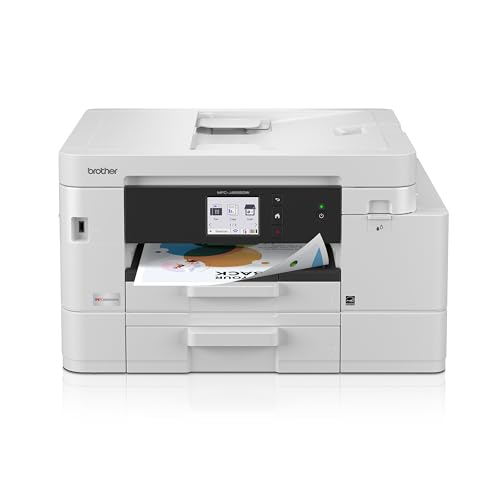
USB is useful when a printer will sit beside one computer or when a direct connection is preferred. The Canon PIXMA 3722 lists USB, Wi-Fi, Wi-Fi Direct, and an included printer cable. The Brother Work Smart 1360 and 1410 list USB alongside wireless networking, while the Brother INKvestment 4555 and 5010 add Ethernet and Wi-Fi Direct. The Epson Stylus C88+ specifically lists USB 2.0 and a parallel port, making it a clearly documented dedicated wired option in the group.
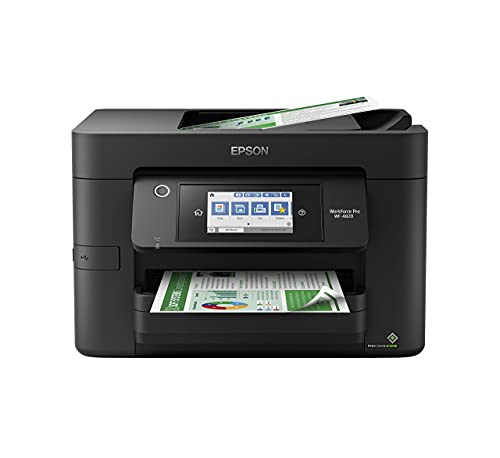
Not every listing supplies the same level of connection detail. The HP OfficeJet Pro 8125e and 9135 and Epson WorkForce Pro WF-4820 document network or app features without explicitly naming USB in the supplied evidence. That does not establish USB compatibility, so shoppers who require a cable connection should verify the interface for those models before buying. Wireless printing can still be useful for households with several computers or mobile devices, but it is not a substitute for confirmed USB support when direct connection is essential.
Match capacity to print volume
Paper capacity is one of the clearest differences between these printers. Entry-level designs such as the Canon PIXMA 3722 list a 60-sheet rear tray, which is suitable for occasional documents but may require more frequent loading. The Brother Work Smart 1360 and 1410 list 150-sheet trays, placing them in a more practical middle range for routine household or home-office work.
The HP OfficeJet Pro 8125e lists a 225-sheet input tray, while the Brother INKvestment 5010 lists 250 sheets. The HP OfficeJet Pro 9135 goes further with two 250-sheet trays, and the Brother INKvestment 4555 lists 400 sheets across two trays. Multiple trays can be useful when switching between ordinary paper and another stock, although the supplied evidence does not describe every supported paper size for those models.
Consider duplex printing and scanning
Automatic two-sided printing can reduce manual page handling for longer documents. It is listed on the Brother 1360, Brother 1410, Brother 4555, Brother 5010, Epson WF-4820, Epson XP-7100, HP 8125e, and HP 9135. The Canon PIXMA 3722 and Epson Stylus C88+ do not have automatic duplex printing listed, so they are less suited to workflows where two-sided output is routine.
An ADF is helpful when copying or scanning multiple pages. The Brother 1360 and 1410 list 20-page ADFs, the Brother 4555 lists a 20-page ADF, and the Brother 5010 lists a 50-page single-pass duplex ADF. The Epson WF-4820 has a 35-page ADF, while the Epson XP-7100 lists a 30-page ADF. The HP OfficeJet Pro models also include ADF features, with the 9135 specifically listing single-pass two-sided scanning. If scanning is occasional, a basic flatbed all-in-one may be enough; for multi-page office work, ADF capacity and duplex scanning matter more.
Decide between print-only and all-in-one
A print-only model can be the right fit when copying and scanning are unnecessary. The Epson Stylus C88+ focuses on color printing, with individual cartridges, borderless printing, and several listed paper types. The Canon TS203 is another simple print-only design in the source pool, but it was not selected because the final comparison prioritizes the stronger documented feature set of the Epson C88+ and the selected multifunction models.
All-in-one models add copying and scanning, and several also include fax. The Brother 5010 and 4555, HP 9135, and HP 8125e are oriented toward broader office workflows. The Canon PIXMA 3722 is simpler, but it still combines print, copy, and scan functions. Consider the extra functions only if they match your routine; an all-in-one occupies more space and can add controls or setup steps that a dedicated printer does not need.
The Epson Expression Premium XP-7100 is a strong fit when media variety is important. Its listing mentions specialty paper, DVDs, multiple media feeds, borderless photos up to 8 by 10 inches, and direct printing from USB or an SD card. The Epson Stylus C88+ also lists card stock, bond paper, semigloss paper, matte paper, and borderless printing. These details make them more relevant for creative projects than office-focused printers whose listings emphasize document throughput.
The Canon PIXMA 3722 lists A4 and 4-by-6-inch photo handling through its rear tray, while the HP and Brother office models focus primarily on documents. Do not assume that every color inkjet has identical photo or specialty-media capabilities; check the documented media list and paper path for the specific model.
Review dimensions and workspace needs
Compact dimensions can be important in a home office. The Brother Work Smart models measure 13.5 inches long by 15.4 inches wide and 7.2 inches high in the supplied specifications. The Canon PIXMA 3722 is listed at 17.2 inches in height and width, with a 5.8-inch length, while the Epson XP-7100 has a listed width of 23.5 inches. The Brother 5010 weighs the current price, and the HP 9135 weighs the current price, so these office-oriented models may need a stable, dedicated surface.
Remember that listed dimensions may not describe every open tray or ADF position. Leave clearance for paper loading and scanning, and check the manufacturer’s current setup guidance before placing a printer in a tight shelf or cabinet.
Final Recommendation
Brother INKvestment 5010 ranks first overall in this specification-based comparison under the published weighted criteria.
Brother INKvestment 5010 is the highest-scoring first overall specification-based choice among the best usb inkjet printers. Its combination of USB, Ethernet, Wi-Fi Direct, high listed print speeds, a 250-sheet tray, automatic duplex printing, and a 50-page duplex ADF gives it a wide documented office workflow.
The HP OfficeJet Pro 9135 is a useful alternative when two 250-sheet trays and duplex scanning matter most. The Brother INKvestment 4555 is especially suitable for its 400-sheet capacity and front USB port. For a smaller home office, the Brother Work Smart 1410 or 1360 provides a more moderate size and capacity while retaining documented USB connectivity. Photo-focused users should look closely at the Epson Expression Premium XP-7100, while the Epson Stylus C88+ remains a simple clearly USB-focused print-only option.
The top usb inkjet printers are not interchangeable: capacity, ADF design, media support, and connection details vary substantially. Confirm the exact interface, operating-system support, ink requirements, and current manufacturer documentation before placing an order.
Frequently Asked Questions
What should I verify before buying one of the best usb inkjet printers?
Confirm that the exact model lists the USB interface you need, especially when the listing emphasizes wireless networking but does not explicitly mention USB. Also check operating-system compatibility, included cable details, paper capacity, and whether the printer is print-only or an all-in-one.
Which selected printer has particularly clear USB evidence?
The Epson Stylus C88+ lists USB 2.0, while the Canon PIXMA 3722 lists USB connection and an included printer cable. The Brother Work Smart 1360 and 1410, Brother INKvestment 4555, and Brother INKvestment 5010 also explicitly identify USB in their supplied features.
Is a printer with an ADF better for home use?
An ADF is useful when you regularly copy or scan multiple pages. It is less important for occasional single-page tasks. The selected models range from 20-page ADFs on the Brother Work Smart 1360 and 1410 to a listed 50-page duplex ADF on the Brother INKvestment 5010.
Which selected model is suited to photos?
The Epson Expression Premium XP-7100 has the most photo- and specialty-media-focused feature set in this comparison. Its listing includes borderless photos up to 8 by 10 inches, specialty paper, DVDs, multiple media feeds, and direct printing from USB or an SD card.
Do all inkjet printers support automatic two-sided printing?
No. Automatic duplex printing is listed for many of the selected Brother, HP, and Epson all-in-one models, but it is not listed for the Canon PIXMA 3722 or Epson Stylus C88+. Check the individual specifications if two-sided output is important.