Buying Guide
Choosing among the best biometric time clocks starts with the way your workplace records, reviews, and exports attendance. This is a specification-based comparison, not a hands-on test or a summary of customer opinions. The products are ranked from supplied listing specifications and feature descriptions. Confirm current software terms, compatibility, and installation requirements before ordering.
Decide between cloud and standalone operation
Cloud systems are designed for managers who need attendance records away from the terminal. The uAttend JR2000 and BN6500N list real-time cloud access, reporting, backups, and payroll-related tools. The ANVIZ CX7 and W1 Pro also document browser-based cloud reporting and offline punch capture. These designs can suit businesses with remote managers, multiple locations, or payroll administrators who do not want to collect records manually.
Standalone clocks take a different approach. The ANVIZ CX3 and HapAttend H3 use local workflows, with USB transfer identified as the way to move records or reports. Standalone operation may be preferable where internet access is restricted, unreliable, or unnecessary. The trade-off is that local systems generally require someone to retrieve or transfer attendance data rather than reviewing it from a remote dashboard.
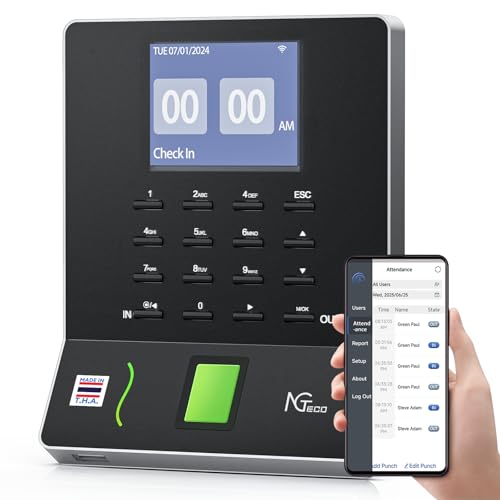
The Tymelix KNT313 documents an intermediate approach. Its hardware operates without Wi-Fi or cloud subscriptions, but it can synchronize with a phone app through wireless pairing. That lets an administrator review records and add missing punches without making the clock itself part of a cloud network. Buyers should distinguish this type of local phone workflow from true browser-based remote access.
Match authentication methods to employee needs
Fingerprint recognition is the defining feature across this category, but backup methods vary. A fingerprint-only design can be simple, while additional methods may help employees whose fingerprints are difficult to read or whose workplace needs badges. The CX7 offers face, fingerprint, RFID, and PIN punching. The CX3, W1 Pro, and JR2000 combine fingerprint recognition with RFID and PIN options. The Tymelix clock lists fingerprint, IC card, and PIN access.
The supplied evidence also documents facial recognition on the CX7, including contact-free operation. The practical point is to choose a documented alternative method rather than assume every fingerprint terminal includes one.
Check connectivity before buying
Network requirements can affect installation more than the biometric sensor itself. The CX7 and W1 Pro list LAN or Wi-Fi connectivity, while the NGTeco W3 and NF-W2-MG specify 2.4GHz Wi-Fi behavior. The BN6500N lists both Wi-Fi and Ethernet. If your workplace uses a different wireless band or has restricted network access, confirm compatibility before purchase.
Offline capture is useful when a connection temporarily fails. The CX7, W1 Pro, JR2000, BN6500N, W3, and NF-W2-MG all document some form of offline storage or fallback. However, offline capture does not mean every product offers local editing, remote reporting, or automatic synchronization in the same way. Review how records are exported, when they sync, and whether the administrative app requires the same local network.
Review payroll and scheduling features
A basic clock records punches; a more capable system also helps turn them into usable timecards. The JR2000 and BN6500N list detailed reporting and payroll-related integration. The NF-W2-MG and W3 support payroll-cycle exports. The CX3 and HapAttend H3 document automatic hour calculations, while the Tymelix KNT313 adds multiple overtime levels and automatic break deductions.
Scheduling needs separate attention. The CX7 and W1 Pro document three-shift support, including overnight schedules. The NF-W2-MG and Tymelix KNT313 also list overnight scheduling. By contrast, the CX3 listing specifically says flexible scheduling is not supported. That does not make it unsuitable for a fixed schedule, but it is an important limitation for rotating or cross-day work.
Compare storage and workforce capacity
Capacity figures are not supplied consistently across the category. The CX7 lists 1,500 users and 100,000 logs. The W1 Pro lists 500 users and 50,000 logs, while the CX3 lists up to 300 employees and 50,000 punch records. The Pyramid TimeTrax Elite identifies up to 1,500 fingerprint scans. HapAttend states suitability for up to 1,000 employees, although its listing does not provide an equivalent punch-log figure.
When records use circular storage, older entries may eventually be overwritten. The W1 Pro and CX3 listings disclose this behavior. Ask how long records remain available under your payroll schedule and whether exports are routine. Capacity should be considered alongside the number of daily punches, not just the number of enrolled workers.
Consider installation, support, and ongoing commitments
The simplest installation depends on the workplace, not only on the device. USB-only clocks avoid network configuration, while cloud systems may reduce manual file handling after setup. The Pyramid TimeTrax Elite requires a Windows-compatible environment, and the NGTeco app products may require a particular local-network arrangement. Warranty terms in the selected group range from one year to three years, and several listings mention U.S.-based technical support.
Also separate hardware ownership from service requirements. The JR2000 and BN6500N describe subscription-based cloud services, while the CX3, H3, and W3 listings state no monthly fee. A no-fee system may require more manual USB administration; a subscription system may provide broader reporting or remote access. Neither approach is universally better, so compare the workflow with your payroll process.
Final Recommendation
ANVIZ FacePass 7 Pro CX7 ranks first overall in this specification-based comparison under the published weighted criteria.
The ANVIZ FacePass 7 Pro CX7 is the highest-scoring returned product and the first overall specification-based choice among the best biometric time clocks. Its face, fingerprint, RFID, and PIN options, cloud reporting, offline capture, door-access interface, capacity figures, and overnight scheduling give it the most specification-aligned documented feature range.
The uAttend JR2000 is a strong alternative for cloud-first administration, while the ANVIZ W1 Pro is a good fit when capacity and three-shift scheduling matter. Choose the NGTeco W3 or ANVIZ CX3 when avoiding recurring fees is more important than remote access. For a local system with phone-based review and detailed overtime rules, the Tymelix KNT313 is one of the top biometric time clocks to consider.
Before purchase, verify the network band, payroll export format, storage behavior, warranty coverage, and whether a service subscription is required. Those details determine whether a clock will fit your actual attendance process better than a feature list alone.
Frequently Asked Questions
What are the best biometric time clocks for a small business?
The best biometric time clocks depend on the required workflow. The ANVIZ CX7 is the most versatile selected option because it documents face, fingerprint, RFID, and PIN punching, cloud access, offline capture, and overnight scheduling. The ANVIZ CX3 and HapAttend H3 are better suited to businesses that prefer local USB transfer and do not need remote dashboards. The uAttend JR2000 fits teams that want cloud reporting and remote attendance access.
Do biometric time clocks need Wi-Fi?
No. The ANVIZ CX3, HapAttend H3, and Pyramid TimeTrax Elite document local or wired workflows rather than requiring Wi-Fi. Other selected products use Wi-Fi, LAN, or cloud services for synchronization and remote reporting. The Tymelix KNT313 is also described as operating without Wi-Fi, while its phone app connects through wireless pairing. Always check whether offline mode is temporary fallback or the primary operating method.
Can employees use a PIN or badge if fingerprint recognition is unavailable?
Several selected products document alternatives. The CX7 supports face, RFID, and PIN methods in addition to fingerprints. The JR2000, W1 Pro, and CX3 list RFID and PIN options, while the Tymelix KNT313 lists IC cards and PINs. The HapAttend H3 lists RFID cards with fingerprint punching. Do not assume a clock supports a particular fallback method unless it appears in the product evidence.
Which selected clocks support overnight shifts?
The ANVIZ CX7 and W1 Pro list three-shift scheduling that includes overnight work. The NGTeco NF-W2-MG and Tymelix KNT313 also document overnight scheduling. The CX3 listing says flexible scheduling is not supported, so it may be less suitable for rotating or cross-day schedules. Confirm how the selected clock calculates a shift that crosses midnight before deployment.
Are biometric time clocks subscription-free?
Some are, and some are not. The ANVIZ CX3, HapAttend H3, and NGTeco W3 listings state no monthly fees or no subscription requirement. The uAttend JR2000 and BN6500N describe subscription-based cloud services, while the ANVIZ cloud models also describe cloud software terms. A subscription may provide remote access, backups, and reporting; a local no-fee design may rely on USB transfer. Compare the total workflow rather than looking only at the hardware.