Buying Guide
The best capacitive stylus pens are passive touchscreen tools: they conduct a touch in much the same basic way a finger does, but their pen-shaped bodies can make tapping, scrolling, writing, and selecting smaller interface targets more controlled. The products in this comparison do not document active Bluetooth features, pressure sensitivity, palm rejection, or device-specific app support. Instead, the meaningful differences are tip construction, number of tips, replacement supplies, body design, and how many pens come in the package.
Choose the tip design first
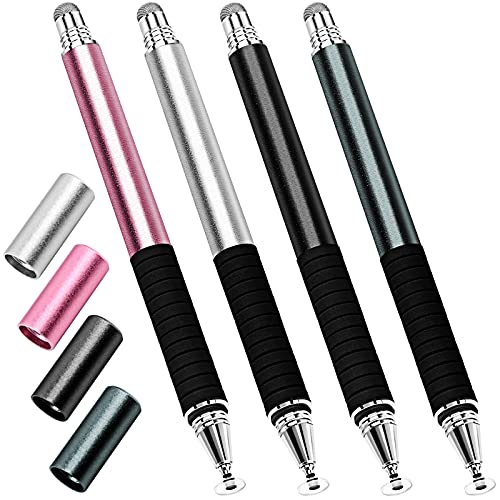
A transparent disc tip is the most useful design when seeing the exact contact point matters. OASO, Mixoo, GUUGEI, and MEKO document disc tips that let the user see more of the screen beneath the contact area. That can help with selecting small controls, annotating, or positioning a mark. Disc tips are typically broader assemblies than narrow rubber ends, so shoppers should think of visibility and placement rather than expecting the behavior of an active fine-point digital pen.
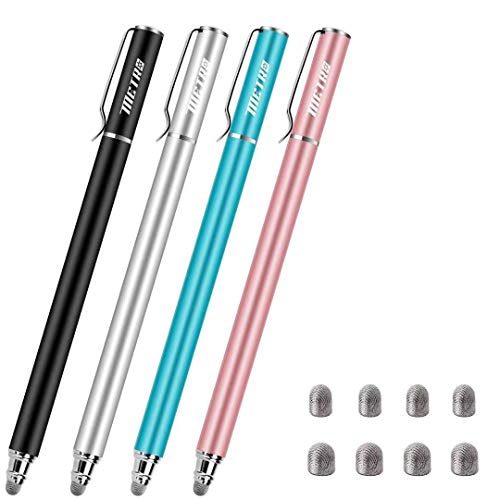
Fiber and mesh tips are softer alternatives. METRO and STYLUSLINK document dual fiber sizes, while the fiber side of Mixoo and GUUGEI adds a softer option beside a disc. These designs are suitable for broad navigation, notes, and casual drawing when a smooth, non-scratching contact surface is preferred. They do not provide the same transparent view of the contact point described for disc tips.
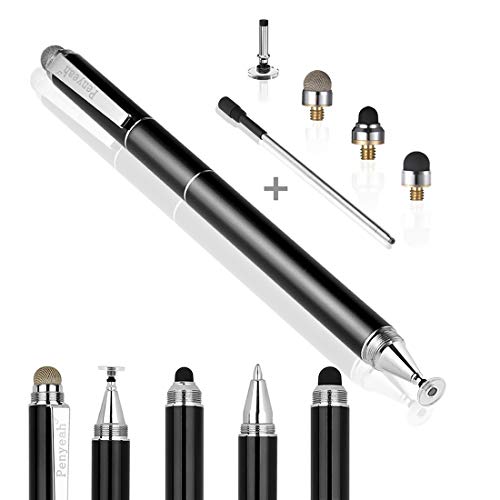
Rubber tips are the simplest general-purpose choice. DIGIROOT, DAXINGXING, and GCHMDE document two rubber sizes, giving a wider end for ordinary tapping and a smaller end for more focused selections. Penyeah includes two rubber sizes alongside other tip types. A smaller rubber tip can be useful for buttons and icons, but the supplied evidence does not establish a universal precision level across devices or applications.
Check whether you need one pen or several
A single pen is appropriate when one person wants a dedicated tool in a bag or beside a tablet. OASO, Mixoo, and Penyeah fit that use case, with each emphasizing multiple tip choices or accessories. Multi-packs make more sense for families, classrooms, offices, or users who want a stylus in several locations. GUUGEI and MEKO supply four pens; STYLUSLINK supplies five; DAXINGXING and GCHMDE supply 10.
Pack size should not be treated as a performance measurement. More pens mainly provide availability and sharing. A large bundle can also be less convenient for a single user who wants one compact item. Review the unit count and the type of included replacements rather than assuming that a larger package has a more advanced touchscreen function.
Look for replaceable tips
Replacement support can extend the practical life of a passive stylus, particularly when a tip is used frequently or several people share the pens. METRO documents eight extra fiber tips, MEKO lists 12 replacement tips, and DAXINGXING lists 20 replacement rubber nibs. STYLUSLINK includes 10 replacement nibs, while DIGIROOT includes replacement rubber tips for both of its sizes.
Mixoo includes two spare disc tips and one spare fiber tip, and OASO includes an additional disc tip. Penyeah documents replaceable screw-type tips and supplies multiple ends, but its design is more about switching functions than simply stocking one replacement style. Before buying, check whether replacement tips match the end you expect to use most. A replacement count is useful only when the supplied tip type fits the intended pen.
Consider setup and portability
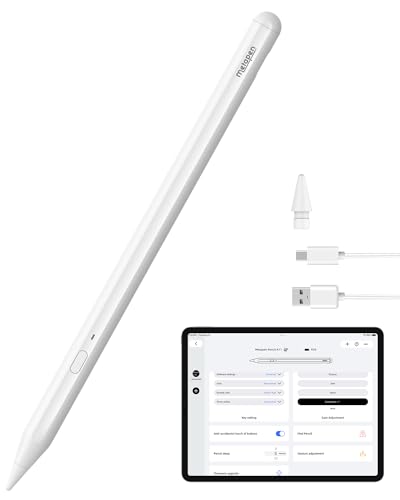
Every selected product is described as ready to use without Bluetooth pairing or charging. That makes these pens appropriate for quick touchscreen navigation and for devices where an active stylus is not required. It also means shoppers should not expect features that were not documented, such as pressure levels, tilt recognition, wireless shortcuts, or palm rejection.
Portability details vary. METRO, DIGIROOT, Penyeah, and GCHMDE document clips or compact pen forms. OASO adds a magnetic cap and leather case, which may be helpful when protecting a disc tip during transport. The selected models generally use lightweight metal, aluminum, alloy, or stainless-steel construction, but the supplied listings do not provide a standardized durability test. Treat material descriptions as construction information, not as proof of long-term performance.
Match the stylus to the device
The listings broadly describe compatibility with capacitive touchscreens, including iPhones, iPads, Android phones and tablets, Samsung devices, Chromebooks, e-readers, and touchscreen computers. Individual compatibility lists differ, so confirm the device type before ordering. Universal capacitive compatibility does not mean compatibility with every active-stylus feature built into a particular tablet.
For a mixed-device household, a model with broad stated compatibility and a passive no-connection design is the simplest match. For a single known touchscreen, focus more on tip style and quantity. Penyeah, MEKO, and OASO are especially differentiated by their documented combinations of disc, fiber, and rubber tips. For shared spaces, the larger sets from DAXINGXING or GCHMDE provide more individual pens, while METRO and STYLUSLINK add useful fiber-tip quantities.
Final Recommendation
Penyeah 4-in-1 Stylus Pen ranks first overall in this specification-based comparison under the published weighted criteria.
The final choice among the best capacitive stylus pens depends on the documented features that match your intended use.
Penyeah 4-in-1 Stylus Pen is the highest-scoring returned product and the first overall specification-based choice. It documents four touchscreen tip formats plus an ink pen, universal capacitive compatibility, interchangeable ends, and a carrying sleeve. Those features make it the most adaptable pick when one stylus needs to cover several tasks.
MEKO is the stronger choice for a household that wants four versatile pens and a substantial replacement supply. OASO is the focused single-pen option for shoppers who prioritize a visible disc and protective cap. METRO and STYLUSLINK suit users who prefer fiber tips, while DAXINGXING and GCHMDE are the practical bulk choices. Among the top capacitive stylus pens, the right selection depends less on brand and more on whether you need visible disc placement, soft fiber contact, dual rubber sizes, or extra pens.
Frequently Asked Questions
How do the best capacitive stylus pens work?
They are passive accessories designed for capacitive screens. Their conductive disc, fiber, mesh, or rubber tip provides a touchscreen contact similar to a finger. The selected listings describe no charging or Bluetooth pairing, so the pens can be used immediately on compatible screens. They should not be confused with active digital pens that provide pressure sensitivity, palm rejection, or wireless controls unless those features are specifically documented.
Are these styluses compatible with both iPad and Android devices?
The selected listings broadly state compatibility with capacitive iPads, iPhones, Android phones, Android tablets, Samsung devices, and other touchscreen hardware. Compatibility is based on the screen accepting a capacitive touch, not on access to active-stylus features. Check the individual listing for your device category, especially when using a touchscreen laptop, e-reader, Chromebook, or gaming device.
Is a disc tip better than a rubber or fiber tip?
Neither is universally better. A disc tip can make the contact point easier to see, which is useful for deliberate selection and positioning. Fiber or mesh tips provide a soft contact style for navigation, writing, and casual drawing. Rubber tips are straightforward for everyday tapping, and dual-size designs offer broader and smaller contact options. Choose based on the task rather than treating one tip material as best for every screen.
Do capacitive stylus pens need charging?
The products selected here are described as ready to use without charging, Bluetooth, or pairing. That simplicity is useful for immediate navigation and shared devices. It also means they do not document active-pen functions such as pressure response, tilt control, programmable buttons, or palm rejection. If those functions are important, a different active-stylus category may be more appropriate.
When should I buy a multipack?
A multipack is useful when several people share touchscreen devices, when you want pens in different bags or rooms, or when replacements need to be available. Four- and five-packs offer a moderate supply, while 10-packs are better suited to offices, classrooms, or widespread distribution. For one user who wants a single carry item, a one-pen option with spare tips may be more convenient.