Buying Guide
The best active stylus pens are not interchangeable. Their useful features depend heavily on the touchscreen protocol, operating system, and device model. A pen built for iPad may not work on a USI Chromebook, while a universal capacitive pen may offer fewer advanced controls. Start by identifying the device, then compare writing control, hand rejection, power, and storage.
1. Confirm the device and protocol
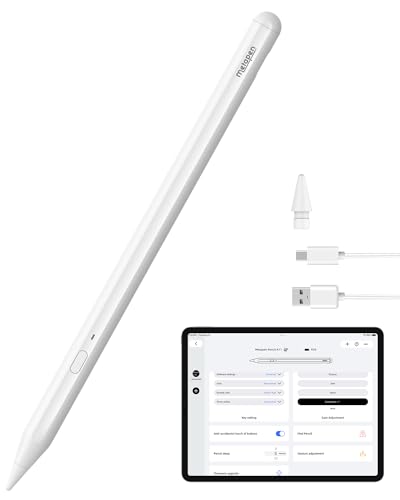
Compatibility is the first filter. The Metapen USI 2.0 Stylus Pen G1 is designed for devices that support USI, with the listing naming Fire Max 11, Google Pixel Tablet, Fire HD 10, and selected Chromebook brands. That is useful clarity, but it also means a buyer must verify USI support before ordering.
The iafer Active Pen for Surface Pro is aimed at Surface and other listed MPP devices. Its evidence names multiple Surface generations and additional compatible computers and e-readers. This is a different compatibility path from iPad and USI, so it should be considered only when the target device appears in the supplied list.
For Apple tablets, the Metapen Pencil Air8 Pro X, Metapen Pencil A11, Metapen iPad Pencil A8, HATOKU iPad Pencil C02, and JEDOUBAL iPad Stylus Pen all provide iPad-focused compatibility information. The listed ranges generally cover selected iPad, iPad Air, iPad Pro, and iPad mini generations. Check the exact model rather than relying only on the tablet family name.
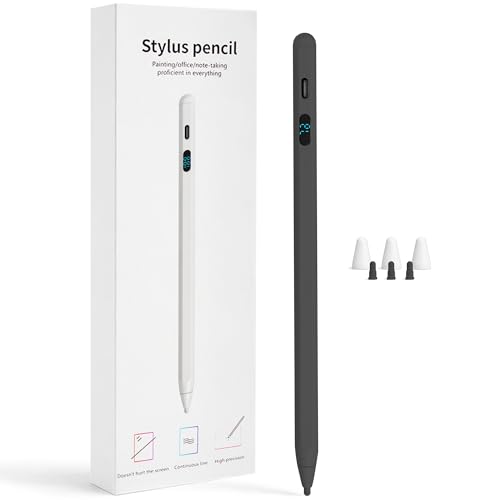
Universal models such as the DONTEN LED Battery Display Stylus, DOGAIN Active Digital Stylus Pen, and Kenkor Dual-Tip Active Stylus Pen list support across combinations of iPad, iPhone, Android, Samsung, phones, tablets, or Switch. “Universal” does not remove the need to check exclusions. Kenkor, for example, specifically excludes Chromebook, Lenovo, and Windows devices and notes poor compatibility on iPhone 12 Pro Max.
2. Match writing controls to the task
A fine tip can help with notes and small marks, but advanced drawing control comes from additional documented features. The USI 2.0 Stylus Pen G1 lists 4,096 pressure levels, making it the clearest pressure-focused choice in this group. The iafer Active Pen for Surface Pro lists 1,024 pressure levels. DOGAIN lists both pressure and tilt sensitivity, although its supplied evidence does not quantify the pressure levels.
Tilt sensitivity is also documented for HATOKU, JEDOUBAL, and DONTEN. These pens are more suitable on paper for buyers who want angle-based line variation, but this comparison does not treat those claims as hands-on performance results. The Metapen A11 and Metapen A8 emphasize 0.1 mm precision instead. The Air8 Pro X takes a different approach with an Air-Flex soft tip described as quiet and paper-like, while its listing does not document pressure or tilt.
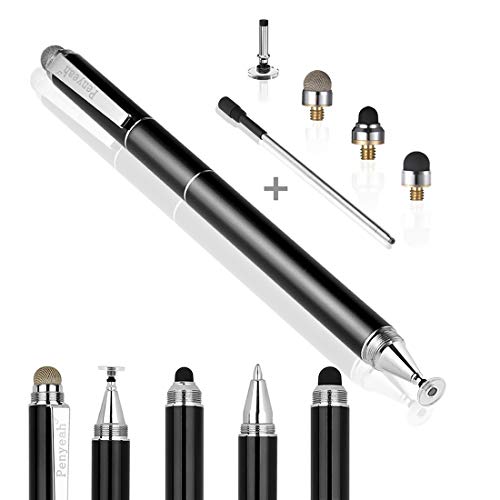
Basic universal pens can still suit tapping, signing, highlighting, and ordinary notes. Kenkor adds a 1.45 mm copper tip and a mesh end, giving it two documented contact styles. The dual-tip format is distinct from the single fine tips used by most of the iPad-focused models.
3. Decide whether palm rejection matters
Palm rejection allows a user to rest a hand on the display while writing, but it is not listed for every pen. It is documented for the USI 2.0 Stylus Pen G1, Air8 Pro X, A11, HATOKU, JEDOUBAL, A8, iafer, and DOGAIN. Those models are the more appropriate starting points for extended handwriting or drawing sessions when the device supports the feature.
The DONTEN LED Battery Display Stylus and Kenkor Dual-Tip Active Stylus Pen do not document palm rejection in the supplied evidence. That does not establish how either pen behaves in every app or device; it simply means this buying guide cannot credit them with that feature. The absence is an important distinction when comparing universal designs with device-specific pencils.
4. Compare charging and battery design
Charging details vary widely. JEDOUBAL lists a 13-minute full charge and more than 10 hours of use. The Air8 Pro X lists a 45-minute charge and up to 26 hours of use, while the A11 lists a 30-minute charge and up to eight hours. HATOKU lists a 15-minute fast charge and up to 11 hours. These are listing specifications, not independently measured results.
The DONTEN pen uses USB-C and provides an LED percentage display, which is useful when battery visibility matters. The USI 2.0 Stylus Pen G1 also uses USB-C and lists a 10-minute initial charge instruction, but the supplied evidence does not provide a full runtime figure. DOGAIN and Kenkor use Micro USB, with DOGAIN listing an eight-hour runtime and Kenkor listing up to 10 hours.
The iafer Active Pen for Surface Pro is the outlier: its AAAA battery is listed for up to 2,500 working hours. That removes routine USB charging but requires keeping the correct battery available. Choose rechargeable USB-C models for easy cable-based replenishment, or choose iafer when replaceable-battery runtime better fits your routine.
5. Consider setup and storage
Several of the best active stylus pens avoid Bluetooth pairing. The USI 2.0 Stylus Pen G1 wakes without buttons, Bluetooth, or apps; Air8 Pro X, HATOKU, JEDOUBAL, DOGAIN, and Kenkor also describe direct operation. The Metapen A11 differs because its programmable side button uses the Wellnote App, although its core iPad use is still described around the pen itself.
Storage is another practical separator. HATOKU, JEDOUBAL, and the Metapen A8 list magnetic attachment, while iafer uses a clip. Kenkor uses a magnetic cap, and the DONTEN package includes tip caps. A magnetic feature should be treated as a storage convenience, not proof that every compatible device supports charging through attachment.
Final recommendation
Metapen Pencil A11 ranks first overall in this specification-based comparison under the published weighted criteria.
The Metapen USI 2.0 Stylus Pen G1 is the first overall specification-based choice among these best active stylus pens because it combines clear USI compatibility, 4,096 pressure levels, palm rejection, and simple no-pairing operation. It is the most specification-aligned fit only when the target device supports USI.
For iPad owners, the Metapen Pencil Air8 Pro X is a compelling alternative when a soft tip and long listed battery life matter, while the Metapen Pencil A11 is better suited to users who want a programmable side button. HATOKU and JEDOUBAL are practical tilt-sensitive iPad options, with JEDOUBAL emphasizing fast charging. The Metapen A8 adds magnetic storage, and the iafer Active Pen for Surface Pro is the clearest long-runtime choice for listed MPP devices.
Among the top active stylus pens for mixed-device use, DONTEN offers the most visible battery information, DOGAIN documents pressure and tilt sensitivity, and Kenkor provides two tip styles. None should be selected without checking the device-specific limitations in the listing.
Frequently Asked Questions
What should I check before buying the best active stylus pens?
Check the exact device model and protocol first. USI, MPP, iPad-focused, and universal capacitive pens are different categories within this comparison. Also verify whether the listing documents palm rejection, tilt or pressure control, charging type, and magnetic or clip storage.
Are all of these pens compatible with iPad?
No. The Metapen Air8 Pro X, Metapen A11, Metapen A8, HATOKU, and JEDOUBAL list iPad compatibility. DONTEN, DOGAIN, and Kenkor also list some iPad devices as part of broader touchscreen compatibility. The USI G1 and iafer pen target different protocols and device groups, so the exact model must be checked.
Which selected pen documents pressure sensitivity?
The USI 2.0 Stylus Pen G1 lists 4,096 pressure levels, the iafer Active Pen for Surface Pro lists 1,024 pressure levels, and DOGAIN lists pressure sensitivity without a level count. These specifications should not be interpreted as independent testing results.
Do these active stylus pens require Bluetooth?
Many selected models state that Bluetooth or an app is not required for basic operation, including the USI 2.0 Stylus Pen G1, Air8 Pro X, HATOKU, JEDOUBAL, DOGAIN, and Kenkor. The Metapen A11 uses the Wellnote App for side-button customization. Compatibility still depends on the device and supported technology.
Which model is best when charging is inconvenient?
The iafer Active Pen for Surface Pro lists up to 2,500 working hours from an AAAA battery. Among rechargeable options, the Air8 Pro X, JEDOUBAL, HATOKU, and DONTEN provide notable listed charging details. Actual runtime can vary by use and device conditions.