Buying Guide
Choosing among the best computerized embroidery machines starts with the type of work you expect to do. The central specification is not the number of decorative patterns alone; it is the maximum embroidery field, the way designs enter the machine, and how much control the interface provides before stitching begins. A compact 4 x 4-inch machine can suit names, small motifs, towels, and other limited-area projects. A 5 x 7-inch or larger field gives more room for apparel panels and broader decorative designs.
Match the embroidery field to your projects
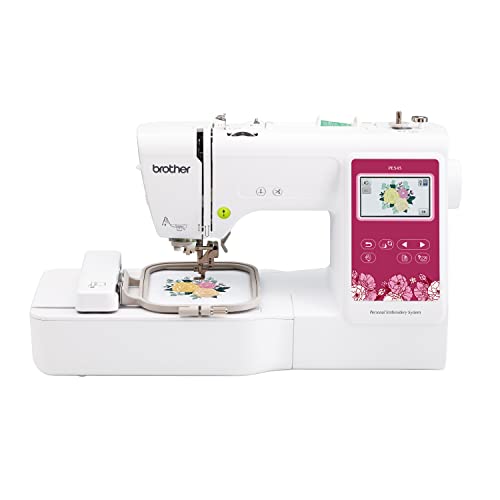
Field size determines how large a single hooping can be. The Brother Skitch PP1, Brother SE700, and Brother PE545 document 4 x 4-inch areas. These machines are focused on smaller motifs and personalization. The Brother SE2000 and Brother SE1900 document 5 x 7-inch fields, a useful middle format for garments, bags, and designs that would exceed a compact hoop.
The Janome Memory Craft 400E documents a 7.9 x 7.9-inch maximum area, while the Brother NQ1700E reaches 6 x 10 inches. The PooLin EOC07 goes further with a documented 7.9 x 15-inch area and additional hoop sizes. Large-field machines can reduce the need to divide a design, but they also require more room for setup. Check the listed dimensions and weight before selecting a permanent workspace.
Decide between embroidery-only and combo machines
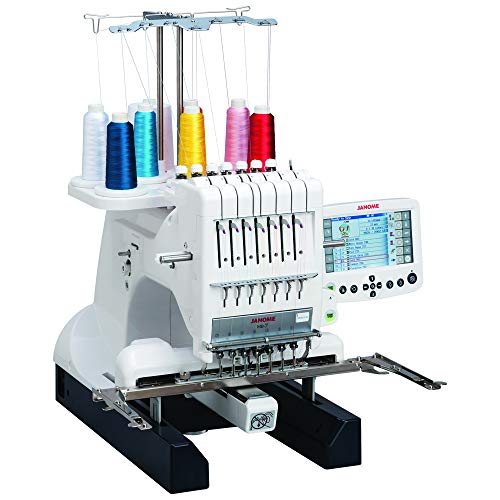
Embroidery-only machines concentrate their controls and accessories on decorative stitching. The PE545, Skitch PP1, PE900, NQ1700E, Janome Memory Craft 400E, Janome MB-7, and commercial-format Smartstitch S-1001 fall into that group based on their supplied descriptions. This format makes sense when embroidery is the main task.
Combination machines add ordinary sewing functions. The SE2000 documents 241 sewing stitches, the SE1900 lists 240, and the SE700 lists 103. These models can support both decorative embroidery and general sewing projects without requiring separate machines. The trade-off is that a combination machine has a broader control system and more accessories to organize.
Compare design libraries and editing
Built-in designs provide an immediate starting point, while fonts support names and monograms. The NQ1700E lists 258 built-in designs, the SE2000 lists more than 190 built-in embroidery designs plus 50 downloadable designs, and the PE545 and SE700 each list 135 designs or patterns. The Memory Craft 400E lists 160 designs and six monogram fonts.
On-screen editing is another important distinction. The SE2000 documents resizing, rotating, repositioning, combining, and enhanced zoom. The PE900 documents similar editing functions on its 3.7-inch display. The NQ1700E adds full-color positioning, rotation, reflection, and tracing controls. When comparing models, prioritize the editing actions you will actually use rather than treating a larger design count as a complete measure of capability.
Check file transfer options
USB is useful for moving custom files from a computer or flash drive. Wireless transfer adds another route. The SE2000, PE900, SE700, and PE545 document wireless LAN, while the Skitch PP1 uses Bluetooth and the Artspira app. The EOC07 documents Wi-Fi and USB transfer, and the Smartstitch S-1001 documents both USB and Wi-Fi.
File compatibility also matters. The Skitch PP1 specifically lists PES, PHC, PHX, and DST support. The MB-7 lists JEF+, DST, and other formats. Before choosing a machine, confirm that the file types produced by your design software are accepted. A connection method is only useful when it works with the files and workflow you plan to use.
Look for workflow automation
Automation can reduce repeated manual steps. The SE2000 and PE900 document color sorting and jump-stitch trimming. The Janome Memory Craft 400E documents automatic thread tension and return after a thread break. The MB-7 adds automatic jump-thread trimming and thread-break return. Commercial-format models such as the Smartstitch S-1001 document automatic color changing, trimming, and thread-break detection.
These features should be read as specification differences, not promises about finished results. They indicate which parts of setup or stitching the machine is designed to manage automatically. If you frequently use several thread colors, multi-needle machines such as the MB-7 and S-1001 may offer a more direct workflow because multiple colors can be loaded at once.
Consider display size and operating style
Touchscreens help with previews, positioning, and design adjustments. The EOC07 and S-1001 document 7-inch touchscreens, while the SE2000, SE700, PE545, and PE900 list 3.7-inch displays. The NQ1700E lists a 4.85-inch full-color touchscreen, and the MB-7 uses a 5.7-inch remote computer screen.
A larger screen may make design placement easier to inspect, but display size is only one part of the control system. Look at the documented editing functions, transfer methods, and included software together. The best computerized embroidery machines for a given user are the ones whose interface matches the amount of editing and file management required.
Review accessories and setup requirements
Included hoops can affect flexibility. The Memory Craft 400E includes four hoops, the EOC07 includes four hoops, and the NQ1700E includes a magnetic sash frame. The SE2000 and SE700 include sewing feet, which matters if you choose a combo machine. The EOC06 includes thread, pre-wound bobbins, and stabilizers, while the SE700 includes eight sewing feet.
Also check whether the product is intended for US 120-volt use when that information is supplied. Larger units may need a dedicated table or stand, particularly the MB-7, S-1001, and EOC07. Treat the listed dimensions and weights as planning information for your workspace.
Final Recommendation
Brother SE2000 ranks first overall in this specification-based comparison under the published weighted criteria.
The final choice among the best computerized embroidery machines depends on the documented features that match your intended use.
The Brother SE2000 is the highest-scoring returned product and the first overall specification-based choice. Its 5 x 7-inch field, 241 sewing stitches, wireless transfer, extensive design support, touchscreen editing, color sorting, and jump-stitch trimming give it the broadest documented combination of embroidery and sewing functions.
Choose the Brother NQ1700E when a 6 x 10-inch field and embroidery-focused controls matter more than sewing capability. The PooLin EOC07 is the field-size specialist for users who need a documented 7.9 x 15-inch area. For multi-color workflows, the Janome MB-7 and Smartstitch S-1001 document seven- and ten-needle configurations respectively. Among the top computerized embroidery machines for smaller projects, the Brother PE545 and Skitch PP1 keep the format focused, while the SE700 adds sewing functions.
Frequently Asked Questions
What are the best computerized embroidery machines for sewing and embroidery together?
The Brother SE2000, Brother SE1900, and Brother SE700 are the selected combo machines. The SE2000 documents 241 sewing stitches and a 5 x 7-inch embroidery field. The SE1900 lists 240 sewing stitches with the same field size. The SE700 combines 103 sewing stitches with a 4 x 4-inch embroidery area.
Is a 4 x 4-inch embroidery field enough for beginners?
A 4 x 4-inch field can be suitable for names, small motifs, and compact personalization. The Brother PE545 and Brother Skitch PP1 document that size, and the Brother SE700 adds sewing capability. If you plan to stitch larger garment panels or broad designs, consider a 5 x 7-inch or larger field instead.
Which selected machine supports multiple thread colors at once?
The Janome MB-7 documents seven needles, and the Smartstitch S-1001 documents ten needles. Both are embroidery-only machines. The MB-7 also documents automatic jump-thread trimming, while the S-1001 documents automatic color changing, trimming, and thread-break detection.
Do these machines import custom embroidery files?
Several do. USB import is documented for models including the Janome Memory Craft 400E, Brother PE535, Brother PE800, and Brother SE1900. Wireless transfer is documented for the Brother SE2000, PE900, SE700, and PE545. The Skitch PP1 specifically lists PES, PHC, PHX, and DST support, while the MB-7 lists JEF+ and DST among its compatible formats.
What should I verify before selecting a computerized embroidery machine?
Verify the embroidery field, included hoops, supported file formats, transfer method, display controls, and whether the unit is embroidery-only or also performs sewing. For larger machines, compare the listed dimensions and weight with your workspace. Also confirm the documented US voltage requirement when applicable.