Buying Guide
Choosing among the best cordless barcode scanners starts with the codes you actually need to read. A 1D scanner can be a sensible fit for conventional retail labels, ISBNs, and inventory tags, but it is not a substitute for a 2D imager when your workflow includes QR, Data Matrix, PDF417, or codes displayed on phones. The Tera HW0009, Eyoyo EY-037, Zebra DS3678-SR, Zebra DS8178, Tera D5300, ScanAvenger SA9000, and Eyoyo EY-034P document 1D and 2D support. The Inateck BCST-21, Zebra LI4278, and NETUM NT-1228BC are 1D-focused selections.
Match the scanner to your barcode types
For mixed retail, ticketing, inventory, and mobile-screen work, look for an imaging scanner with explicit 2D support. The HW0009 lists QR, Data Matrix, PDF417, Aztec, Maxicode, and multiple 1D formats. The EY-037 also documents broad 1D and 2D support, while the DS3678-SR is described as reading printed and screen-based codes, including damaged, dirty, poorly printed, and shrink-wrapped examples.
A 1D model can reduce unnecessary complexity when your labels are conventional linear barcodes. The LI4278 is specifically built around 1D capture, and the BCST-21 and NT-1228BC list support for common 1D formats. The NT-1228BC also mentions worn, damaged, or tightly spaced 1D codes. Check the required symbologies before ordering rather than assuming every cordless reader supports every format.
Compare wireless and wired connections
Cordless operation is useful when the operator moves between shelves, bins, vehicles, or customer areas. Bluetooth is documented on the HW0009, DS3678-SR, DS8178, LI4278, EY-037, D5300, SA9000, EY-034P, BCST-21, and NT-1228BC. Several also support 2.4G wireless through a receiver and direct USB operation, allowing the same scanner to work in a mobile or fixed position.
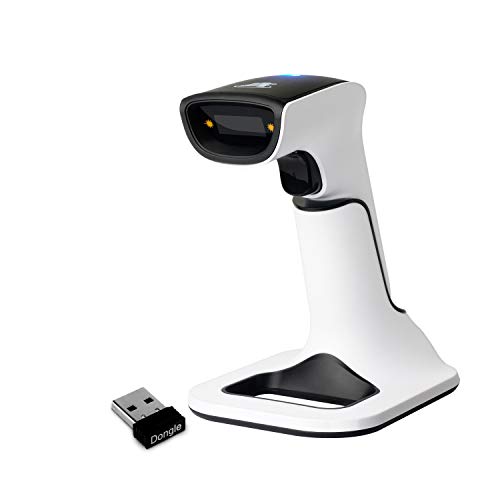
A charging cradle can simplify a counter workflow. The HW0009 has a cradle with an integrated 2.4G receiver, while the EY-037 and SA9000 list charging stands. The Zebra DS3678-SR, DS8178, and LI4278 include cradles, although the supplied evidence does not give identical details for their charging behavior. If you need to move between a computer and a phone, verify the required Bluetooth mode and operating-system compatibility before purchase.
Consider battery and data handling
Battery capacity alone does not establish actual runtime, so prioritize models with clearly stated usage information when long shifts matter. The D5300 lists 12 hours of continuous scanning, a 3.5-hour recharge time, and up to 30 days of standby. The EY-034P lists up to 16 hours of continuous use, while the BCST-21 describes extended use and long standby under stated conditions. The NT-1228BC lists extended scanning from its 2,600mAh battery.
Storage mode is important when scanning away from the receiver or host device. The EY-037, EY-034P, and NT-1228BC document storage workflows. The EY-034P lists capacity for up to 5,000 UPC barcodes, and the NT-1228BC lists storage for up to 200,000 scans. The HW0009 also lets users view stored and total barcodes through its screen. Confirm whether stored data is compatible with your upload process before relying on it for inventory work.
Evaluate protection for the workplace
For warehouses, manufacturing floors, outdoor stock areas, or dusty locations, formal protection details are more useful than general durability language. The EY-037 lists IP65 sealing and a 10-foot drop specification, making it the clearest choice here for harsh environments.
The DS3678-SR is described as ultra-rugged and is specifically positioned for difficult barcode conditions. The EY-034P lists resistance to drops and tumbles, while the Inateck BCST-21 and other selected models provide less formal environmental detail. If dust, water, or repeated drops are central concerns, compare the exact protection rating and warranty rather than relying on the word industrial in a product title.
Look at configuration and operator workflow
Configuration features can matter as much as scan speed in a business system. The HW0009 includes a screen and keypad for settings. The NT-1228BC supports programmable prefixes, suffixes, hidden characters, and keyboard commands. The EY-034P also documents prefix, suffix, character-hiding, and keyboard options. These features may help align scanner output with a POS, spreadsheet, library, or inventory application.
Scan modes affect how the device is used. Manual trigger mode is familiar for item-by-item work. Continuous and auto-sensing modes can be useful at a checkout or packing station when the listing supports them. The EY-037, SA9000, EY-034P, and NT-1228BC document multiple modes. Vibration confirmation, listed on the SA9000 and EY-034P, may be useful where audible feedback is difficult to hear.
Check POS and operating-system compatibility
Compatibility claims are not identical across products. The BCST-21 lists Windows, Mac OS, iOS, Android, iPadOS, and Linux support. The SA9000 lists computers, mobile devices, and POS systems but excludes proprietary integrations. The DS8178 listing specifically advises confirming compatibility with the cash register or POS provider, and the NT-1228BC notes that some POS systems are unsupported.
Before choosing from the top cordless barcode scanners, identify whether the host accepts keyboard input, Bluetooth, a USB receiver, or a proprietary interface. Also check whether your POS requires a particular suffix, prefix, carriage return, tab, or other keyboard command. A scanner can support the right barcode format yet still need configuration for the application receiving the data.
Final Recommendation
Eyoyo EY-037 Industrial 2D Scanner ranks first overall in this specification-based comparison under the published weighted criteria.
The final choice among the best cordless barcode scanners depends on the documented features that match your intended use.
The Tera HW0009 is the highest-scoring returned product and the first overall specification-based choice. Its screen, keypad, cradle, large battery, three connection methods, and broad 1D/2D support make it the most complete general-purpose option in this comparison. The Eyoyo EY-037 is the better fit for a harsh work area because its listing supplies the clearest IP65, drop, and tumble details.
For demanding industrial scanning, consider the Zebra DS3678-SR, especially when difficult or damaged labels are part of the job. The Zebra DS8178 and ScanAvenger SA9000 are practical cradle-based choices for mixed business workflows. The Tera D5300 and Eyoyo EY-034P stand out for documented battery and mode flexibility. Among 1D-only options, the Inateck BCST-21, Zebra LI4278, and NETUM NT-1228BC are more focused choices. These are the top cordless barcode scanners here based on supplied specifications, not hands-on testing or customer sentiment.
Frequently Asked Questions
Are the best cordless barcode scanners always 2D models?
No. The best cordless barcode scanners depend on the codes in your workflow. A 1D scanner such as the Zebra LI4278 can be appropriate for traditional linear labels, while the Tera HW0009 or Eyoyo EY-034P is more suitable when QR, Data Matrix, PDF417, or screen-based codes are required.
Do cordless scanners work with a USB cable?
Several selected models support both cordless and wired use. The Tera HW0009, Tera D5300, ScanAvenger SA9000, Eyoyo EY-034P, Inateck BCST-21, and NETUM NT-1228BC document USB operation in addition to wireless connections. The exact cable, receiver, and host requirements vary by model.
Which scanner is best for a warehouse?
The Eyoyo EY-037 is the clearest warehouse-oriented choice in this comparison because its listing specifies IP65 protection, 10-foot drops, and 7,000 tumbles. The Zebra DS3678-SR is another option when ultra-rugged construction and difficult-code reading are priorities. Confirm the required wireless range and host integration for your site.
What is storage mode on a barcode scanner?
Storage mode lets a scanner retain captured data when it is outside the normal wireless connection range, then upload the records after returning to range. The EY-037, EY-034P, and NETUM NT-1228BC document this function. Check the listed storage capacity and the upload behavior before using it for a large inventory count.
Should I confirm POS compatibility before buying?
Yes. The DS8178 listing advises confirming compatibility with the POS provider, and the NETUM NT-1228BC listing identifies some POS incompatibilities. Verify the connection method, supported barcode types, and required output characters with your POS or software vendor before selecting a scanner.