Buying Guide
Choosing among the best wireless document scanners starts with the kind of paper work you actually do. A person digitizing a few receipts each week has different needs from a small office processing contracts, invoices, and forms every day. The products in this comparison are all documented as wireless document scanners, but their feeders, controls, media support, and software workflows vary substantially.
Start with the connection and destination workflow
Wireless capability is more useful when the scanner can send files where you already work. The ScanSnap iX2500 and iX1300 support Wi-Fi and USB connections, while the Epson models add Smart Panel or ScanSmart workflows. The Brother ADS-3350W also documents wired Ethernet, which can be useful when an office wants a network connection in addition to Wi-Fi.
Computer-free operation is a meaningful dividing line. The Epson ES-580W documents direct scanning to USB, email, and cloud storage, and the ES-C380W supports USB, email, and cloud destinations through its ScanWay workflow. The RapidReceipt RR-620W similarly documents direct scanning to email, cloud storage, or a USB flash drive. These features can reduce the need to keep a computer beside the scanner, although the supplied evidence does not establish how each workflow feels in daily use.
Match feeder size to batch volume
Automatic document feeder capacity is one of the clearest specification differences. The ScanSnap iX2500, Epson ES-580W, and RapidReceipt RR-620W each list a 100-sheet feeder. Those capacities are better suited to larger batches than the 50-sheet Epson ES-500W II or 60-page Brother ADS-3350W.
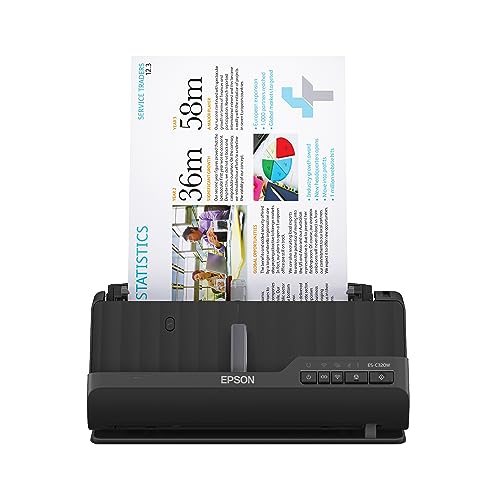
Compact models generally trade feeder capacity for a smaller footprint. The Epson ES-C320W, ES-C380W, and Brother ADS-1350W list 20-page feeders. That can be appropriate for short stacks, receipts, forms, or occasional home-office work, but it means more frequent reloading for a long document queue. The FF-680W lists batch photo scanning for up to 36 photos, giving it a specialized advantage for photo projects rather than ordinary office stacks.
Look for duplex scanning and realistic speed needs
Every selected product documents double-sided scanning, but rated speeds differ. The iX2500 and RR-620W list up to 45 ppm, while the FF-680W also lists up to 45 ppm for document scanning. The Brother ADS-3350W lists up to 40 ppm. The ES-580W and ES-500W II list up to 35 ppm, and the compact Epson and Brother models list up to 30 ppm.
These are published specifications, not measured results. Still, the ratings provide a useful way to separate occasional scanning from larger recurring batches. Duplex capture is especially important when forms, invoices, or contracts commonly contain information on both sides.
Standard paper support is only part of the decision. The iX1300 documents support for thick items and plastic cards. The ES-C320W and ES-C380W list flexible paths for cards and passports. The Brother ADS-1350W includes a card slot and supports single pages up to 197 inches. The FF-680W is the most specialized for photos, with support for multiple photo sizes, panoramas, postcards, and photos up to 8 by 10 inches.
If your work is mainly receipts and invoices, the RR-620W has the most directly relevant documented tools. Its listing describes receipt and invoice data extraction and financial integrations. That does not mean it is the right choice for every user; those features matter most when financial documents are a major part of the workflow.
Consider OCR and file organization
OCR converts scanned pages into searchable or editable content. The Epson ES-580W, ES-500W II, ES-C380W, ES-C320W, and FF-680W all document OCR-related capabilities. The ScanSnap models emphasize organization, automatic naming, and sorting through ScanSnap software. The Brother ADS-1350W lists bundled software for searchable documents, business cards, receipts, and file organization.
Image adjustments can also reduce manual cleanup. Supplied listings mention combinations of automatic cropping, blank-page removal, background removal, skew correction, color optimization, dirt detection, or text enhancement across several selected products. These are documented features rather than guarantees about the final appearance of every scan.
Account for desk space and controls
Compact designs are useful when a scanner must share a small desk. The iX1300, ES-C320W, ES-C380W, and ADS-1350W are positioned as compact or space-saving models. The iX1300 uses a particularly narrow design, while the Epson compact models advertise reduced desk-space use.
Touchscreens can make shared or computer-free workflows more accessible. The iX2500, ES-580W, ES-C380W, RR-620W, and ADS-3350W list touchscreen controls. Models without a documented touchscreen may still be appropriate when scanning is initiated primarily from a computer or mobile app. The right choice depends on whether the scanner will be operated independently or as part of a desk-based software workflow.
Final Recommendation
ScanSnap iX2500 ranks first overall in this specification-based comparison under the published weighted criteria.
The ScanSnap iX2500 is the highest-ranked returned product and the first overall specification-based choice among the best wireless document scanners. Its 45 ppm duplex rating, 100-sheet feeder, Wi-Fi 6, USB-C, touchscreen profiles, and document-protection features provide a particularly complete general-purpose specification set in this comparison.
Among the top wireless document scanners, the Epson RapidReceipt RR-620W is the more specialized selection for receipts, invoices, and financial integrations. The Epson ES-580W is a strong alternative for computer-free destinations and a large feeder, while the Brother ADS-3350W adds wired Ethernet and documented security features for office networks.
For limited desk space, compare the compact Epson ES-C380W, Epson ES-C320W, ScanSnap iX1300, and Brother ADS-1350W. For photo-heavy archiving, the Epson FastFoto FF-680W is the most purpose-built option. These recommendations are based only on the supplied public specifications and listing features, not hands-on testing or customer sentiment.
Frequently Asked Questions
What should I look for in the best wireless document scanners?
Prioritize the connection method, destination options, duplex capability, feeder capacity, and media support. A large feeder and faster duplex rating are useful for recurring batches, while a compact body may matter more in a home office. OCR, searchable PDFs, touchscreen controls, and direct cloud or USB destinations can also shape the workflow.
Are compact wireless scanners suitable for office paperwork?
They can be, especially for light or moderate batches. The Epson ES-C320W, ES-C380W, ScanSnap iX1300, and Brother ADS-1350W document wireless connectivity and duplex scanning, but their listed 20-page feeders are smaller than the 50-, 60-, or 100-sheet feeders on larger desktop models. Choose a compact unit when desk space matters more than unattended batch capacity.
Which selected scanner is best for receipts?
The Epson RapidReceipt RR-620W is the most specifically oriented toward receipts and invoices because its listing documents receipt and document data extraction plus financial-software integrations. Other selected scanners can handle receipts, but they do not present the same set of receipt-focused workflow features in the supplied evidence.
Do all of these scanners scan both sides automatically?
Yes. Each selected product documents duplex or two-sided scanning. Rated speeds and feeder capacities differ, so a model designed for occasional compact use may require more reloads than a desktop scanner with a 100-sheet feeder.
Which wireless scanner is most suitable for photos?
The Epson FastFoto FF-680W is the clearest fit for photo archiving. Its listing documents batch photo scanning, multiple photo sizes, photo enhancement, duplex capture of notes on photo backs, OCR for documents, and wireless backup to Dropbox and Google Drive. The ScanSnap iX1300 also documents photo support, but the FF-680W has the more extensive photo-specific feature set.