Buying Guide
The best dvi/usb-to-vga adapters are not interchangeable. The correct choice depends first on the source port, then on whether the adapter performs active signal conversion, whether the VGA connection is a cable or a female socket, and whether the computer’s operating system needs a driver. The products selected here fall into two main groups: DVI-to-VGA connectors and USB graphics adapters that create VGA output.
Start with the source connector
A DVI-to-VGA product is intended for a computer or graphics source with a DVI connection. Several selected products identify DVI-D 24+1 sources, including the gofanco Active DVI-D to VGA Adapter, BENFEI Active DVI-D to VGA 6-Foot Cable, CableDeconn adapter, Thsucords cable, and AKWOR cable. These listings describe one-way digital DVI output to analog VGA input. They should not be treated as reversible VGA-to-DVI products.
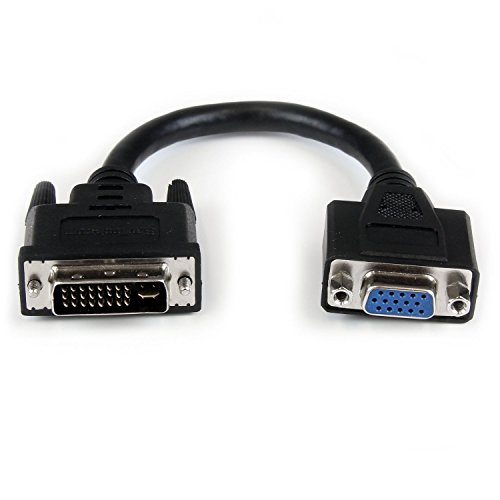
DVI-I products are a separate fit. The StarTech DVI-I Male to VGA Female Adapter and StarTech 8-inch DVI-I to VGA Adapter Cable specifically identify DVI-I sources. The DTECH listing also describes a 24+1-pin connector and says it can fit a 24+5 DVI-I socket, but it identifies its own design as a passive DVI-D connector. Check the socket shape and pin arrangement on the computer before selecting a passive adapter.
For a computer without DVI but with USB, choose a USB graphics adapter instead. Plugable’s USB 2.0 model and StarTech’s USB-A 2.0 model use USB to add VGA output. They are not passive pin adapters: they operate as external display hardware and have operating-system requirements.
Decide between a dongle and an integrated cable
A female VGA output is useful when you already have a VGA cable. CableDeconn and DTECH use this compact adapter style, while the two StarTech DVI-I products provide either a short adapter or an eight-inch cable. These formats can reduce cable clutter, but they do not provide the same reach as an integrated male-to-male cable.
Integrated cables are simpler when the source and display are positioned close together or when you want all of the needed connection in one product. The BENFEI and AKWOR models provide six feet, while Thsucords provides 3.3 feet. The gofanco listing documents an integrated quad-shielded cable, though it does not provide a conventional feet-based length in its supplied specifications. Longer cables can make placement easier, but they also add more cable to route.
Compare active and passive designs
Active conversion is explicitly documented by gofanco, BENFEI, and CableDeconn. Their listings state that digital DVI is converted to analog VGA, with support up to 1080p at 60Hz and PC graphics resolutions up to 1920 x 1200 at 60Hz. This is the clearest fit when the source is DVI-D and the destination is VGA.
Passive designs are documented by DTECH, while the StarTech products are specified for DVI-I-to-VGA connections. A passive adapter relies on the appropriate signal being available from the source. That makes connector identification especially important. If the listing does not state a maximum resolution, as with the two StarTech DVI-I choices, do not infer one from another model.
Check the display resolution
Many selected DVI cables and active adapters document 1080p at 60Hz and 1920 x 1200 at 60Hz. Those include gofanco, BENFEI, CableDeconn, Thsucords, and AKWOR. DTECH documents up to 1080p. StarTech’s USB-A model documents up to 1920 x 1200, while Plugable documents up to 1920 x 1080.
Resolution support is only one part of compatibility. VGA carries video, and the DTECH, Thsucords, and AKWOR listings explicitly say that audio is not transmitted. Plan a separate audio path when sound is required. USB graphics adapters may have different platform and driver behavior, so confirm the operating-system requirements as carefully as the display resolution.
Review operating-system requirements for USB
Plugable documents compatibility with Windows 11, 10, 8.1, 7, XP, macOS 10.14 and later, and ChromeOS. It requires a DisplayLink driver, with installation behavior varying by platform. Its listing also describes mirroring or extending one additional VGA display and using additional adapters for more displays.
StarTech’s USB-A model is explicitly Windows-only and supports Windows X86, X64, and ARM platforms. It requires administrator rights for driver installation and supports up to five adapters on one source. It is USB-powered, so no additional power cord is documented. These requirements make platform checking essential before choosing a USB model.
Look at physical retention and construction
Thumbscrews appear on the StarTech DVI-I adapter, and grip treads and screws are documented on DTECH. These details can help secure a connector during ordinary cable handling. Thsucords documents a nylon braided covering, while AKWOR documents a thicker ABS cable construction.
Warranty information also varies. gofanco lists one year, BENFEI lists 18 months, CableDeconn lists 18 months, Plugable documents a two-year warranty in its feature text, and StarTech’s USB-A model lists two years. These are manufacturer or listing details, not guarantees of performance, so use them as part of product documentation rather than as a substitute for connector and platform matching.
Final Recommendation
gofanco Active DVI-D to VGA Adapter ranks first overall in this specification-based comparison under the published weighted criteria.
The final choice among the best dvi/usb-to-vga adapters depends on the documented features that match your intended use.
The gofanco Active DVI-D to VGA Adapter is the highest-scoring returned product and the first overall specification-based choice. It combines explicit active conversion, detailed resolution support, a shielded integrated cable, and no-driver installation. Among the top dvi/usb-to-vga adapters, Plugable is the more flexible selection for USB display expansion across Windows, macOS, and ChromeOS, provided the DisplayLink driver requirement fits the computer.
Choose BENFEI’s six-foot active cable when you want an integrated DVI-D-to-VGA run with documented 60Hz limits. StarTech’s USB-A model is the more targeted USB option for Windows users who need up to 1920 x 1200, while CableDeconn and DTECH suit installations built around an existing VGA cable. The StarTech DVI-I choices are best matched to sources that specifically provide DVI-I. Thsucords and AKWOR provide integrated DVI-D cable options with clearly stated one-way operation.
Before ordering, identify whether the computer has DVI-D, DVI-I, or USB, verify that the display accepts VGA, and decide whether a separate VGA cable is needed. Also plan for separate audio because the selected DVI cable listings describe video-only operation.
Frequently Asked Questions
What should I check before choosing one of the best dvi/usb-to-vga adapters?
Check the source connector first. DVI-D, DVI-I, and USB products use different connection methods. Then check whether the adapter is active or passive, whether it ends in a VGA socket or an integrated cable, the documented maximum resolution, and the operating-system or driver requirements for USB models.
Are DVI-to-VGA adapters reversible?
The selected DVI-D products are described as one-way, carrying output from DVI to VGA. Thsucords and AKWOR explicitly say that VGA-to-DVI transmission is not supported. DTECH also describes one-way conversion. Do not assume that a VGA source can drive a DVI display unless the product specifically documents that direction.
Do DVI-to-VGA adapters transmit audio?
The DTECH, Thsucords, and AKWOR listings state that audio must be transmitted separately or is not supported. VGA is a video connection in these product descriptions, so plan a separate audio connection when the setup requires sound.
Which selected product supports USB display expansion on macOS?
Plugable documents macOS 10.14 and later compatibility and supports mirroring or extending a VGA display. Its listing requires the DisplayLink driver, with manual installation noted for macOS. StarTech’s selected USB-A model is Windows-only, so it is not the matching choice for a Mac according to the supplied evidence.
When is a female VGA adapter preferable to a male-to-male cable?
A female VGA adapter is useful when the computer-side DVI connector needs to connect to an existing VGA cable. CableDeconn and DTECH use this format. A male-to-male cable such as BENFEI, Thsucords, or AKWOR can be more direct when the display is within the documented cable length and no separate VGA cable is available.