Buying Guide
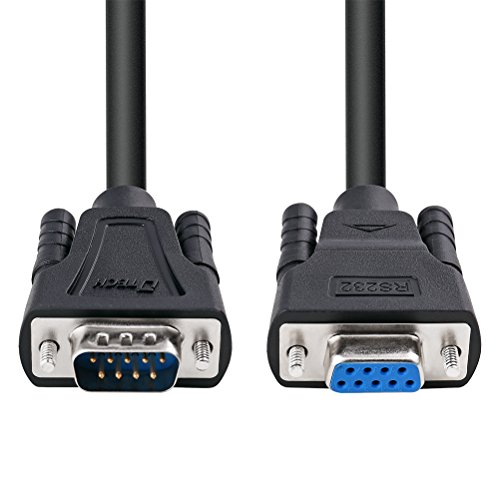
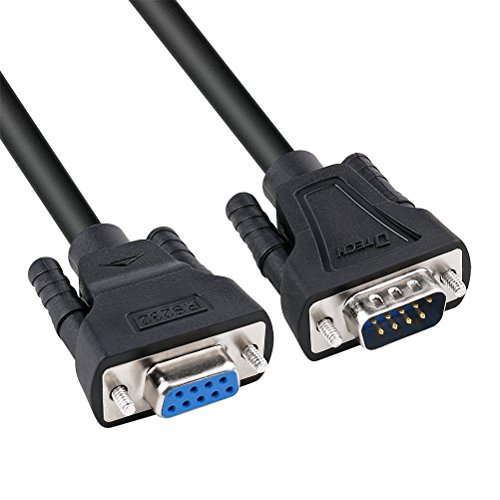
Choosing the best female-to-male serial cables starts with the ports and wiring required by the equipment, not with cable length alone. A male connector has protruding pins, while a female connector has sockets. The selected products use these ends in different combinations, including DB9 male-to-female extensions and DB9-to-DB25 cables. Confirm both connector gender and connector size before selecting a model.
DB9, also called DE9 in some technical documentation, is the most common interface represented here. Cable Matters, StarTech.com MXT1002MBK, XANHAM, DTECH, PhyinLan, and YANBORONSN all document DB9 male-to-female formats. These are appropriate only when the equipment has matching nine-pin serial ports with the required genders.
A DB25 connection is different from a DB9 connection even though both may be used for legacy RS232 equipment. The StarTech SCNM925FM and KENTEK cables each connect DB9 female to DB25 male, but they use different wiring approaches. Do not treat a DB9-to-DB25 cable as a universal gender adapter; the device pinout still determines whether the connection works.
Choose straight-through or null-modem wiring
Wiring mode is one of the most important distinctions in the best female-to-male serial cables. A straight-through cable preserves corresponding pin numbers. The StarTech.com MXT1002MBK, XANHAM, YCS basics, DTECH 15-foot extension, and PhyinLan listings identify conventional extension or straight-through arrangements. These are generally the relevant design when one device needs its serial port extended to another compatible serial connection.
A null-modem cable crosses selected communication lines so that two devices with similar data-terminal roles can communicate directly. The DTECH six-foot simple null-modem model crosses transmit and receive lines and uses a three-wire arrangement without handshaking. The StarTech SCNM925FM is also cross-wired, but it changes from DB9 to DB25 and is explicitly not intended for straight-through connections. The KENTEK DB9-to-DB25 model takes the opposite approach and documents straight-through wiring.
If the equipment manual specifies null modem, crossover, full handshaking, or a particular pinout, follow that instruction. A cable with the correct physical connectors can still be electrically unsuitable when its wiring mode is wrong.
Consider length and routing
Cable length should cover the actual route without creating unnecessary slack. The selected products range from the 1.6-foot YANBORONSN model to the 25-foot YCS basics cable. Short cables can keep compact work areas neater, while longer options help separate a computer from a scanner, modem, printer, controller, or test device.
For a conventional nearby connection, the 6.6-foot StarTech.com and XANHAM cables, the six-foot PhyinLan and KENTEK models, and the 10-foot Cable Matters cable offer several middle-length choices. DTECH supplies both six-foot and 15-foot designs, while the YCS basics model extends to 25 feet. Measure around furniture, racks, panels, or industrial equipment rather than relying only on the direct distance between ports.
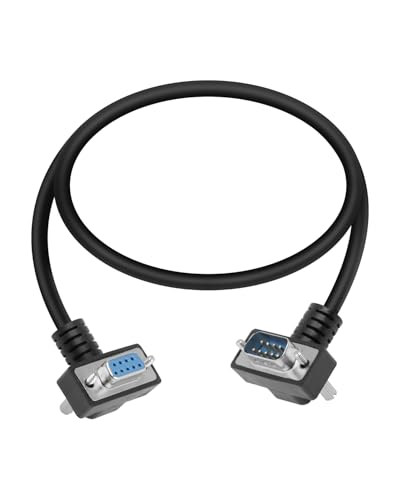
The YANBORONSN cable adds a 90-degree connector design. That shape may help when a port faces a wall, enclosure, or tight corner. A right-angle connector can also change the direction of cable strain, so check the available space around the port before choosing it.
Look at shielding and connector retention
Shielding matters when the cable will run near equipment or wiring that could introduce interference. Cable Matters lists fully shielded connectors, while XANHAM specifies metal braiding and aluminum-foil shielding. DTECH lists aluminum-foil shielding on its straight-through 15-foot cable and on its simple null-modem cable. KENTEK documents a fully shielded design, and StarTech describes shielding on the DB9-to-DB25 null-modem model.
Connector retention is also relevant for equipment that may move or vibrate. DTECH, XANHAM, PhyinLan, and YANBORONSN identify screws on the connector ends. Cable Matters lists molded strain relief, and the StarTech DB9-to-DB25 null-modem model lists molded connectors. These details do not establish a measured durability result, but they help identify the construction features documented in each listing.
Check the application and pinout details
Application descriptions can help narrow the choice, but they do not replace the equipment manual. Cable Matters names CNC machines, modems, GPS units, routers, printers, and barcode scanners. DTECH lists scanners, plotters, cameras, touchscreen devices, microcontrollers, and test equipment. PhyinLan names UPS units, digital cameras, label writers, and console equipment. These examples show the intended category context rather than guaranteeing compatibility with every device.
For industrial or control equipment, verify whether the port is standard RS232, uses a special pinout, or belongs to another serial protocol.
How this comparison was scored
This is a specification-based comparison using the supplied public listing fields. The editorial score weighs connector and interface fit at 30%, wiring-mode clarity at 25%, shielding and construction at 20%, length and installation flexibility at 15%, and application documentation at 10%. The scoring reflects how clearly each listing supports a buying decision; it is not a hands-on performance test and does not summarize customer opinions.
Final Recommendation
XANHAM DB9 Straight-Through Serial Cable, 6.6 ft ranks first overall in this specification-based comparison under the published weighted criteria.
The final choice among the best female-to-male serial cables depends on the documented features that match your intended use.
Cable Matters DB9 Male-to-Female RS232, 10 ft is the first overall specification-based choice among these selections. It combines a clearly documented DB9 male-to-female interface with a useful 10-foot length, shielded connectors, molded strain relief, copper conductors, and multiple listed applications. The XANHAM cable is a strong alternative when a straight-through pinout and more detailed shielding description are priorities. For a 25-foot run, choose YCS basics; for a tight corner, consider YANBORONSN. If the equipment requires crossover wiring, the DTECH simple null-modem or StarTech DB9-to-DB25 null-modem model is more appropriate than a straight-through extension. These are practical distinctions to check when comparing the top female-to-male serial cables.
Frequently Asked Questions
What should I verify before choosing the best female-to-male serial cables?
Verify the connector family, pin gender, wiring mode, and required length. For DB9 equipment, confirm that the device expects a male-to-female connection. Then determine whether it needs straight-through wiring or a null-modem crossover. If one device uses DB25, verify both the connector gender and the exact DB9-to-DB25 pinout.
Is a straight-through cable the same as a null-modem cable?
No. A straight-through cable keeps corresponding pin numbers connected, while a null-modem design crosses communication lines. The selected DTECH six-foot simple null-modem cable crosses TX and RX and omits full handshaking. The StarTech SCNM925FM is also cross-wired. By contrast, XANHAM, YCS basics, and PhyinLan document straight-through configurations.
Which selected cable works in a tight space?
YANBORONSN documents a 90-degree DB9 male-to-female design and a 1.6-foot length. That geometry is intended for corners and wall-mounted equipment where a conventional straight connector may be awkward. Check the direction of the port and the clearance around the enclosure before selecting a right-angle cable.
Do DB9-to-DB25 cables work for every serial connection?
No. DB9-to-DB25 cables address a connector-format difference, but their wiring still matters. KENTEK documents a straight-through configuration, while StarTech SCNM925FM documents a cross-wired null-modem configuration and states that it will not work for straight-through connections. Match the cable to the equipment documentation.
Does a longer cable always provide a better connection?
No. Length should match the physical route and the equipment requirement. The YCS basics cable provides 25 feet, while YANBORONSN provides 1.6 feet for compact installations. Extra length can create routing slack, whereas too little length can strain connectors or prevent proper placement. Choose enough reach for the route and verify the specified serial pinout.