Buying Guide
The best male-to-male serial cables are not interchangeable simply because they have male connectors. Connector shape, electrical wiring, and the computer-side interface all matter. The selected products include conventional DB9-to-DB9 RS232 cords, a full-handshaking null-modem cable, USB-to-DB9 adapters, and one DB9-to-3.5mm control cable. That range is useful because a cable can fit physically while still using the wrong wiring scheme.
Start with the connector type
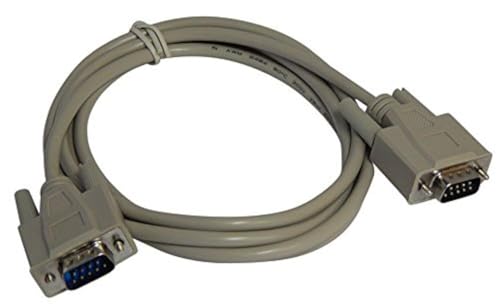
A traditional DB9 serial cable has a nine-pin, two-row connector. The DTECH 1.5ft, XANHAM 6.6ft, DTECH 10ft, Your Cable Store, and DTECH null-modem products document male DB9 connectors at both ends. These are the direct choices when both the computer or adapter and the peripheral expose DB9 ports.
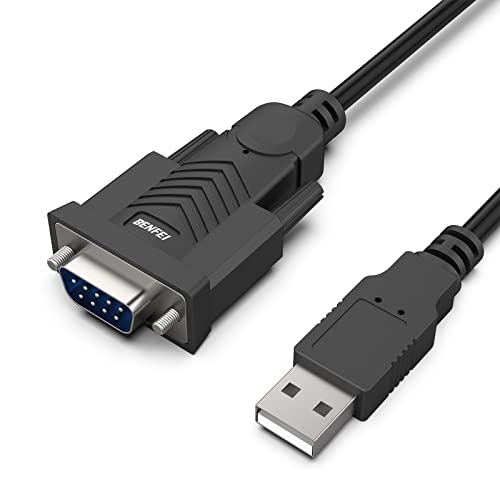
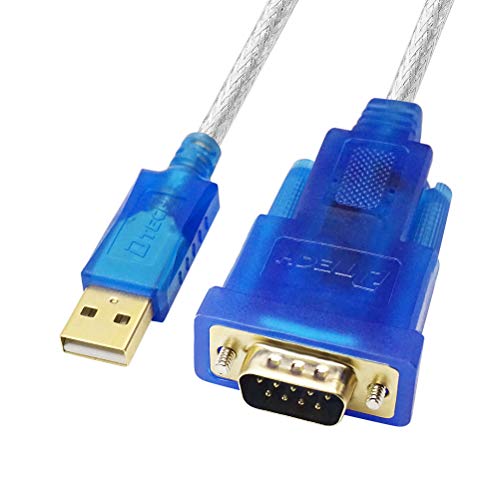
The USB models use a different arrangement: a male USB Type-A plug on one end and a male DB9 connector on the other. They are intended for computers that do not have a native DB9 serial port. OIKWAN specifies an FTDI chipset, SABRENT describes USB 2.0 connectivity and driver considerations, BENFEI identifies a Prolific PL-2303 chipset, and DTECH lists an FT232RL chipset. Confirm that your computer has the matching USB port and that the required driver is available for its operating system.
The LIANSHU cable is more specialized. It connects a male DB9 port to a male 3.5mm connector for equipment using that style of RS232 control input. Do not assume every 3.5mm serial jack follows the same wiring; the listing advises checking the pinout diagram.
Match straight-through and null-modem wiring
Straight-through wiring connects corresponding pins, such as 1-1, 2-2, and 3-3. This configuration is documented by the DTECH 1.5ft, XANHAM, DTECH 10ft, and Your Cable Store cables. It is commonly used for connecting a computer or serial adapter to compatible peripheral equipment, but the equipment manual remains the final authority.
A null-modem cable crosses transmit and receive paths so that two DTE devices can communicate directly. The DTECH 1.5ft null-modem model specifically documents 2-3, 4-6, and 7-8 crossover links and describes full handshaking. That makes it materially different from the straight-through products. Choosing a null-modem cable for a straight-through application, or vice versa, can prevent communication even when the plugs fit.
Choose length for the physical layout
Cable length should follow the distance between ports, not just the distance between devices. The 1.5-foot DTECH straight-through and null-modem options suit close bench arrangements. Your Cable Store’s three-foot cable gives more routing room. XANHAM’s 6.6-foot cable and the DTECH 10-foot version suit separated equipment, though longer cords can introduce more slack to manage.
The USB options range from the 1.5-foot DTECH adapter to BENFEI’s five-foot cable, SABRENT’s listed 2.5-foot size, and OIKWAN’s six-foot design. Short USB cables can keep a laptop or test computer close to the serial device, while longer versions may be easier to route around a desk or equipment rack.
Inspect shielding and physical construction
Shielding is a useful specification when cables will run near other electronics. XANHAM lists both metal braiding and aluminum foil, while BENFEI specifies triple shielding. The DTECH DB9 products describe aluminum-foil shielding. OIKWAN lists gold-plated connectors and PVC cable construction, and LIANSHU describes full shielding plus molded connectors and strain relief.
These details describe construction; they do not establish a tested performance result. Look also for mechanical features that fit your installation. Screw-secured DB9 connectors appear on several selected cables and can help keep the connection fastened without tools. Molded connectors and strain relief may be useful where the cable will be moved or bent regularly.
Consider drivers and software setup
Passive DB9-to-DB9 cables generally focus on physical wiring and connector fit. USB-to-serial models add an active chipset and therefore introduce driver and operating-system considerations. SABRENT explicitly notes that some systems may require manual driver installation. BENFEI also states that driver installation is required, while OIKWAN and DTECH identify their chipsets and supported operating systems in the listings.
Before ordering a USB adapter, identify the software that will use the COM port, the operating system, and any required baud-rate or port settings. SABRENT specifically mentions configurable COM ports and baud rates. A suitable chipset and listed operating-system support can simplify selection, but compatibility with connected hardware and software still needs to be confirmed.
Final recommendation
XANHAM 6.6ft DB9 RS232 Straight-Through Cable ranks first overall in this specification-based comparison under the published weighted criteria.
XANHAM 6.6ft DB9 RS232 Straight-Through Cable is the first overall specification-based choice.
Among the best male-to-male serial cables, XANHAM combines a conventional straight-through DB9 layout with documented metal-braid and aluminum-foil shielding, gold-plated connectors, and molded construction. Its 6.6-foot length provides useful routing room. DTECH’s 1.5ft straight-through model is a better fit for compact setups, while the DTECH 10ft version suits equipment positioned farther apart.
Among the top male-to-male serial cables for computers without DB9 ports, OIKWAN offers an FTDI-based six-foot option, BENFEI adds triple-shielding details, and DTECH provides a compact FTDI-based cable with an LED. SABRENT is useful when cross-platform and driver guidance are priorities. For two DTE devices, choose the DTECH full-handshaking null-modem model rather than a straight-through cord. The LIANSHU cable belongs on a shortlist only when the target equipment specifically uses the documented 3.5mm RS232 control interface.
Quick selection checklist
- Verify whether the equipment needs straight-through or null-modem wiring.
- Confirm every connector gender and interface, including USB, DB9, or 3.5mm.
- Measure the required path and allow enough room for routing.
- Check chipset and driver requirements for USB adapters.
- Review shielding, screws, molded shells, and strain relief when the installation requires them.
Frequently Asked Questions
What should I check before buying the best male-to-male serial cables?
Check the connector on each device, the required wiring pattern, and the cable length. A male DB9-to-male DB9 cable is not automatically suitable for every RS232 connection. Confirm whether the equipment needs straight-through wiring, a null-modem crossover, or a specialized interface such as DB9 to 3.5mm. For USB adapters, verify the operating system, chipset, and driver requirements.
Is a straight-through cable the same as a null-modem cable?
No. Straight-through cables connect corresponding pins, while null-modem cables cross selected transmit, receive, and control lines. The DTECH null-modem model documents 2-3, 4-6, and 7-8 crossover links and full handshaking. Several other selected DB9 cables explicitly identify themselves as straight-through. Use the wiring specified by the equipment documentation.
Do USB-to-DB9 cables count as male-to-male serial cables?
They can fit the male-to-male description because the USB Type-A plug and DB9 plug are both male, but they are active USB-to-serial adapters rather than passive DB9-to-DB9 cords. They require a chipset and may require drivers. OIKWAN, BENFEI, SABRENT, and DTECH each document USB-to-DB9 serial functionality, with different chipset and setup details.
When is a longer serial cable useful?
A longer cable is useful when the computer and serial equipment cannot sit next to each other. The selected options include lengths from 1.5 feet to 10 feet. Measure the actual route, including turns around equipment, and avoid choosing excess length solely for convenience. A shorter cable is generally easier to manage on a test bench, while a longer cable can simplify placement across a desk or rack.
Can a DB9-to-3.5mm cable replace any DB9 serial cable?
No. The connector shape and pinout must match the target device. The LIANSHU listing describes a male DB9-to-male 3.5mm cable for three-conductor RS232 control and advises checking the pinout diagram. It should be treated as a specialized control cable, not a universal replacement for a standard DB9-to-DB9 cord.