Buying Guide
Choosing among the best galaxy tablet keyboard cases starts with model verification, not the keyboard layout. Samsung uses different dimensions and model codes across Tab families, and a case that fits one 11-inch tablet may not fit another. Check the SM-X or SM-P identifier in the tablet settings and compare it with the compatibility list supplied for the case.
Match the case to your Galaxy Tab model
The selected products cover several distinct groups. The Samsung Book Cover Keyboard for Tab S10+ is made for that specific tablet. Samsung’s Slim cover supports the Tab S9, S9 FE, and S10 FE family listed in its evidence, while the Samsung Tab S11 Slim is specifically compatible with the Tab S11. The Nillkin, Dexnor, GreenLaw, and ProCase S10 FE options cover selected S-series and FE models, but their lists are not interchangeable.
A-series buyers have a separate group of choices. The INFILAND, ProCase A-series, and MoKo cases document compatibility with the Tab A11+ and A9+. The JUQITECH case is for the Tab S6 Lite generations listed in its description. Treat the model code as the final check, especially when a title mentions several similarly sized tablets.
Decide whether you need a trackpad
A trackpad is useful when the tablet will handle documents, browsing, presentations, or other pointer-based tasks. The Samsung S10+ cover, Nillkin, Dexnor, GreenLaw, INFILAND, and both ProCase models document touchpad functionality. Their evidence mentions scrolling, clicking, multi-finger gestures, or file navigation.
The Samsung Slim covers and JUQITECH case focus on keyboard input but do not document a trackpad. That simpler arrangement may suit users who mainly type and continue to use the touchscreen for navigation. MoKo includes a separate wireless mouse instead of documenting a built-in touchpad, which gives pointer control but adds another accessory.
Compare keyboard and lighting features
Backlighting is documented on Nillkin, Dexnor, GreenLaw, INFILAND, MoKo, and JUQITECH, with several of these cases specifying seven colors. Backlight details vary: some products list brightness levels, while others only state color choices.
For a more desktop-like layout, the Samsung Tab S10+ cover documents full-size keycaps, function keys, a trackpad, and DeX mode. Nillkin also lists a full row of function keys and Galaxy Tab shortcuts. The Samsung Slim model documents DeX support but does not document a trackpad or full-size keycaps. Avoid assuming that every Bluetooth keyboard case has the same shortcut arrangement.
Look at how the case stands
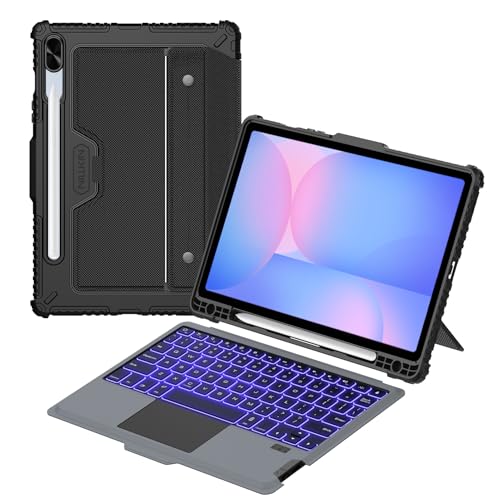
Viewing flexibility differs considerably. Nillkin documents a stand from 0 to 180 degrees with landscape and portrait positioning. Samsung’s S10+ cover adjusts to 150 degrees. The Dexnor case uses a magnetic aluminum-alloy hinge, while GreenLaw, INFILAND, MoKo, and the ProCase folios document fixed positions or ranges.
A continuous or wide hinge is useful when typing, reading, drawing, or viewing content requires different screen positions. Fixed grooves can be simpler and stable on a desk, but they provide fewer intermediate choices. The JUQITECH case documents multiple viewing angles, and its detachable keyboard can be removed when the tablet is being used without a typing surface.
Balance protection with portability
Protection also affects the shape of the setup. Nillkin specifies a thickened TPU frame, PC back, corner protection, and camera cover, making it the most explicitly rugged design among these picks. The ProCase, INFILAND, MoKo, and JUQITECH cases document protective folio or shell materials, while Samsung’s official slim models emphasize a thinner magnetic form.
The listed weights show why portability deserves attention. The Samsung Slim cover is listed at 0.62 pounds, while Dexnor is listed at 1.53 pounds and INFILAND at about 1.5 pounds. These figures describe the listed products and do not establish how a complete tablet setup will feel in use. A protective structure, mouse, card slots, or larger hinge can increase the amount carried.
Check battery and connected-device details
Rechargeable keyboard information is especially useful for wireless designs. Dexnor documents up to 200 hours of work time, MoKo up to 100 hours of normal use without backlighting, and JUQITECH up to 80 hours of continuous typing. INFILAND distinguishes between backlit and standard use. These are supplied specifications, not independent measurements.
The Samsung S10+ cover adds Wireless Keyboard Sharing for compatible Galaxy devices. GreenLaw documents two Bluetooth channels, allowing switching between two connected devices. MoKo includes a wireless mouse with Bluetooth and 2.4G connection options. These features can matter more than lighting if the case will be used with a phone, mouse, or second device.
Final Recommendation
Nillkin Keyboard Case for Galaxy Tab S10 FE/S9 ranks first overall in this specification-based comparison under the published weighted criteria.
The final choice among the best galaxy tablet keyboard cases depends on the documented features that match your intended use.
Nillkin’s Keyboard Case for Galaxy Tab S10 FE/S9 is the highest-scoring returned product and the first overall specification-based choice. It documents the broadest combination of rugged protection, trackpad control, function keys, flexible positioning, S Pen support, camera coverage, and long stated keyboard runtime.
The Samsung Galaxy Tab S10+ Book Cover Keyboard is the more suitable pick for owners of that exact tablet who want an official design with full-size keycaps, a trackpad, DeX, and a 150-degree hinge. Samsung’s Slim cover is the lighter official alternative for compatible S-series and FE tablets, while the Samsung Tab S11 Slim is the model-specific option for Tab S11 owners.
Dexnor is the feature-dense choice for several S-series models, especially where battery information, backlighting, and a rugged shell matter. For A-series tablets, the ProCase A11+/A9+ folio keeps the setup straightforward, INFILAND adds RGB lighting and touchpad gestures, and MoKo is the choice when a separate mouse is wanted. JUQITECH remains the most targeted option for the listed Galaxy Tab S6 Lite generations. Together, these top galaxy tablet keyboard cases show why model fit and design type should come before extra features.
Frequently Asked Questions
What should I check before choosing the best galaxy tablet keyboard cases?
Check the tablet’s exact model number against the case’s compatibility list. For example, the selected products separate Tab A11+/A9+, Tab S10 FE/S10 Lite/S9 FE/S9, Tab S10+, Tab S11, and Tab S6 Lite families. Screen size alone is not enough to establish fit.
Do all Galaxy tablet keyboard cases include a trackpad?
No. The Samsung S10+ cover, Nillkin, Dexnor, GreenLaw, INFILAND, and ProCase models document touchpad features. The Samsung Slim covers and JUQITECH listing do not document a trackpad, while MoKo includes a separate wireless mouse.
Which selected case has the widest documented viewing range?
Nillkin documents adjustment from 0 to 180 degrees and supports landscape or portrait positioning. Samsung’s S10+ cover documents adjustment to 150 degrees. Other selected cases use three angles, anti-slip grooves, or specified ranges such as 110, 120, and 130 degrees.
Are backlit keyboards available for Galaxy Tab cases?
Yes. Nillkin, Dexnor, GreenLaw, INFILAND, MoKo, and JUQITECH document backlighting, with several specifying seven colors. Backlight controls and battery figures vary, so check the individual listing rather than assuming identical operation.
Which case is designed for Galaxy Tab S6 Lite?
JUQITECH’s Backlit Wireless Keyboard Case is the selected model-specific option. Its evidence lists Galaxy Tab S6 Lite versions from 2020, 2022, and 2024, along with detachable magnetic construction, S Pen storage, multi-angle viewing, and USB-C charging.