Buying Guide
Choosing among the best galaxy tablet screen protectors starts with the tablet model, not the brand name on the package. Galaxy Tab products can share similar screen sizes while using different camera, sensor, edge, or button positions. A protector that fits one 11-inch tablet may not fit another 11-inch tablet. Use the tablet’s Settings page or its printed model code to compare against the listing before applying anything.
Confirm the exact Galaxy Tab model
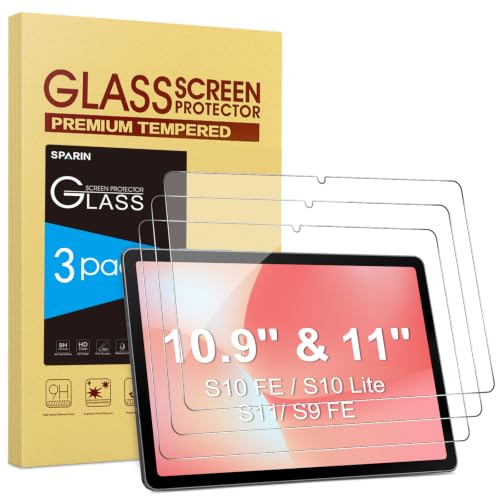
Model compatibility is the most important criterion in this comparison. CoBak and ProCase identify the Galaxy Tab A11 Plus and A9 Plus families, while JETech, SPARIN, and Mothca cover specific S-series generations and screen sizes. The ProCase S-series option lists a particularly broad range, but broad coverage still requires checking the exact model number.
The distinction between standard, FE, Lite, Plus, and FE Plus models matters. Qularlans is limited to the A11 Plus and A9 Plus 11-inch tablets. Mothca covers the listed S10 Lite, S10 FE, S9 FE, and S9 models, while its matte design is not presented as a universal Galaxy Tab accessory. The bersem listing is also useful because it explicitly excludes several 12.4-inch Plus and FE Plus tablets.
Choose tempered glass or film
Tempered glass is the dominant design among the higher-ranked selections. CoBak, Qularlans, JETech, Mothca, SPARIN, and both ProCase options specify glass, with several listings naming 9H hardness. TiKeDa also uses 9H tempered glass for Tab S6 and Tab S5e models. These products are oriented toward a rigid protective layer and generally document rounded edges, thin construction, or scratch resistance.
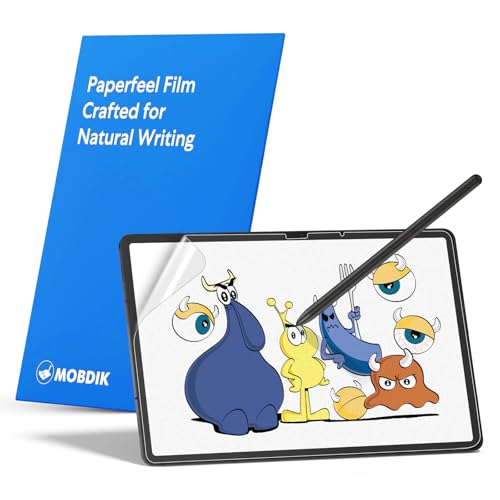
Film offers a different set of priorities. MOBDIK and bersem use paper-feel surfaces intended for writing and drawing. Their listings emphasize a textured, matte interaction rather than tempered-glass construction. A film may be preferable when stylus texture and low glare matter more than a rigid glass layer.
Consider clarity and touch response
If watching video, reading, or viewing photographs is central, look for an explicit clarity specification. CoBak lists original clarity, JETech lists ultra-clear display support, and SPARIN specifies 99.9% transparency. The ProCase products describe HD clarity, while Qularlans lists HD-clear glass and a 0.33mm thickness. Those details indicate the manufacturer’s intended display characteristics, but they are listing specifications rather than independent measurements.
Touch and stylus information is equally useful. Qularlans explicitly states S Pen compatibility, as does TiKeDa. SPARIN lists complete S Pen functionality, while Mothca describes its matte surface as suitable for S Pen use. MOBDIK and bersem emphasize retained touch sensitivity for their thin paper-feel films. If you type, draw, or annotate frequently, prioritize a product whose listing addresses that specific interaction.
Decide whether matte is right for you
Matte surfaces are useful when reflections and fingerprints are a concern. Mothca uses etched matte glass and specifically describes anti-glare and anti-fingerprint properties. MOBDIK and bersem use matte paper-feel films, with glare reduction and writing texture as central features. These designs can make bright environments and stylus work more comfortable according to their supplied specifications.
A matte finish is not the same viewing experience as clear glass. Users who want the most transparent, glossy presentation may prefer Qularlans, CoBak, JETech, SPARIN, or a ProCase clear protector. Surface preference should therefore be considered alongside, rather than after, material choice.
Look for installation assistance
Installation features vary. CoBak, JETech, and Mothca include an installation frame, and bersem lists an alignment tool and step-by-step guidance. These features can help position the protector over the display before adhesive contact. The ProCase listings describe silicone adhesive and bubble-free application but do not list a frame. TiKeDa describes venting and silicone adhesive, while MOBDIK includes an installation kit.
Before installation, verify that the tablet screen is clean and that the protector is the correct size. Follow the supplied instructions, especially for paper-feel products such as MOBDIK and bersem, which may include a removable printed layer or a specific installation sequence. Do not assume that a generic alignment accessory will compensate for an incorrect model match.
Match the protector to your routine
For general protection on an A11 Plus or A9 Plus, CoBak and Qularlans provide documented glass construction, while the ProCase A11 Plus/A9 Plus option offers a straightforward two-pack. For current S-series compatibility, JETech, SPARIN, and the broad-coverage ProCase model offer clear model lists. Mothca is the specialized matte-glass choice. For writing-focused use, MOBDIK and bersem provide paper-feel surfaces. TiKeDa fills the older Tab S6 and S5e requirement with glass and S Pen support.
The top galaxy tablet screen protectors in this comparison differ mainly in fit, material, surface, and installation design. Treat those specifications as a checklist: verify the tablet code, select glass or film, decide between clear and matte, and then review touch, stylus, and alignment details.
Final recommendation
Among the top galaxy tablet screen protectors, the ranked products differ under documented model compatibility clarity, protective construction, display and touch support, installation design, and surface usability.
Qularlans A11+/A9+ Tempered Glass Protector ranks first overall in this specification-based comparison under the published weighted criteria.
CoBak Galaxy Tab A11+/A9+ Glass Protector is the first overall specification-based choice. Its listing combines clear compatibility for two related 11-inch tablet families with 9H glass, an installation frame, thin construction, touch support, and an oleophobic coating. It is a well-balanced selection when the tablet is one of the supported A-series models.
For S Pen use on the A11 Plus or A9 Plus, Qularlans is the more explicitly documented match because it names S Pen compatibility and case-friendly edges. JETech is a strong fit when the tablet is a listed S10 Lite, S10 FE, S9 FE, or S9 model and guided alignment is important. Mothca is the better-defined matte-glass alternative, while SPARIN and ProCase serve users comparing multiple S-series generations.
Among the best galaxy tablet screen protectors for writing, MOBDIK and bersem are the clearest paper-feel choices. TiKeDa remains the focused option for supported Tab S6 and S5e tablets. The correct final choice is the one whose documented model match and surface design fit your tablet and routine.
Frequently Asked Questions
Among the best galaxy tablet screen protectors, how do I identify the right Galaxy Tab screen protector?
Check the tablet’s model number in Settings and compare it with the compatibility details in the listing. Screen size alone is not enough because different Galaxy Tab generations and suffixes can use different dimensions or cutout positions. Pay particular attention to Plus, FE, Lite, and FE Plus designations.
Are tempered-glass protectors better for every Galaxy Tab user?
Not necessarily. Tempered glass is the main construction in products such as CoBak, Qularlans, JETech, Mothca, SPARIN, ProCase, and TiKeDa. MOBDIK and bersem use paper-feel film instead, which may be more appropriate for drawing or handwriting. Choose based on whether rigid glass or a textured film better matches your routine.
Which selected protectors support S Pen use?
Qularlans, Mothca, SPARIN, MOBDIK, and TiKeDa explicitly address S Pen or stylus use in their supplied listing details. The exact tablet model still matters, so confirm that the protector’s compatibility list includes your device before installation.
Does matte glass reduce reflections?
Mothca’s listing specifically describes an anti-glare matte surface. MOBDIK and bersem also describe matte anti-glare film designs. Clear products such as CoBak, JETech, Qularlans, SPARIN, and ProCase focus instead on HD or high-transparency viewing. A matte layer changes the surface finish, so select it when glare control is more important than a glossy appearance.
Why is an installation frame useful?
An installation frame can help align the protector with the tablet display before the adhesive contacts the glass. CoBak, JETech, and Mothca list frames, while bersem lists an alignment tool. These accessories support positioning, but they do not replace checking the model number or preparing a clean screen.