Buying Guide
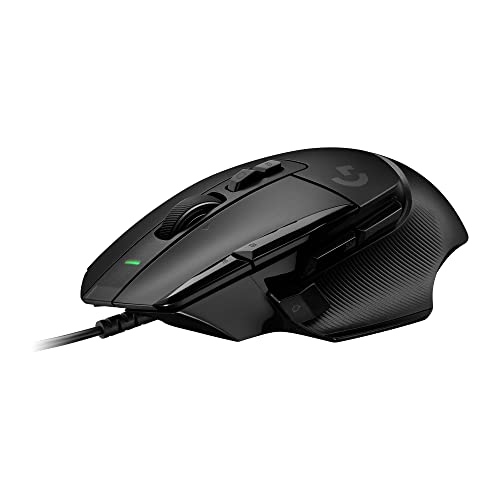
Choosing among the best pc gaming mice with scroll wheels starts with deciding what the wheel must do. A standard notched wheel is enough for weapon selection, zooming, and ordinary navigation. A configurable wheel adds more options for long documents, inventory screens, or repeated commands. In this comparison, the Razer Basilisk V3 Pro, Logitech G502 X, Razer Naga V2 HyperSpeed, Razer Basilisk V3 35K, and Turtle Beach Kone II Air document the most advanced wheel behavior.
Choose the wheel mechanism first
The Razer Basilisk V3 Pro and Razer Basilisk V3 35K list tactile cycling, smooth free-spin, and Smart-Reel behavior, with tilt controls as well. These modes let users choose firm feedback for precise selection or faster scrolling for long menus and documents. The Logitech G502 X similarly switches between ratcheting and hyperfast free-spin modes and adds left and right tilt. These are useful fits for users who want the wheel to serve both gaming and desktop work.
The Razer Naga V2 HyperSpeed documents HyperScroll with free-spin and tactile modes. That makes it particularly relevant to MMO players who want wheel feedback to change with the task. The Turtle Beach Kone II Air lists a 4D free-spin wheel with tilt. By contrast, the Razer Viper V4 Pro emphasizes optical actuation, consistent tracking, and tactile feedback rather than multiple wheel modes. The DeathAdder V3 Pro and Logitech G305 have more conventional documented wheel functions, so they suit buyers who care more about weight, sensor, or wireless simplicity.
Match the sensor to your play style
Sensor numbers are specifications, not guarantees of better play. Still, they show how much adjustment the product offers. The Basilisk V3 Pro and Basilisk V3 35K list Focus Pro 35K sensors, while the Viper V4 Pro lists a Focus Pro 50K sensor. The G502 X lists a HERO 25K sensor, and the Naga V2 HyperSpeed and DeathAdder V3 Pro list Focus Pro 30K sensors. These models provide substantial sensitivity ranges for users who like fine-grained settings.
The Kone II Air lists a 26K DPI and 650 IPS optical sensor. The G305 uses a HERO sensor with up to 12,000 DPI and 400 IPS, while the Redragon M908 lists up to 12,400 DPI and a 1,000 Hz polling rate. Higher listed DPI should not be treated as a direct measure of accuracy. Consider whether you need granular sensitivity controls, a specific polling mode, or simply dependable wired or wireless operation.
Decide how many controls you really need
Button count changes the shape and learning curve of a mouse. The Naga V2 HyperSpeed leads this group with 19 programmable buttons, making it a natural fit for MMOs and other command-heavy games. The Redragon M908 provides 18 programmable buttons, five profiles, and an adjustable weight set. Those layouts can reduce keyboard trips, but they may feel crowded for fast aiming or simple games.
The Basilisk models take a middle path with 13 customizable controls. The Kone II Air lists 21 programmable functions, while the Basilisk V3 X HyperSpeed offers nine customizable controls. The DeathAdder V3 Pro and Viper V4 Pro are more focused on streamlined handling in the supplied evidence. Before choosing a high-button mouse, check whether the games you play actually benefit from macros, profile switching, or extra side inputs.
Compare wired and wireless operation
Wired mice avoid battery charging and are ready whenever the computer is on. The G502 X and Basilisk V3 35K are feature-rich wired selections, while the Redragon M908 provides a wired MMO layout. A wired connection can simplify a desk where the mouse remains in one place, but the cable may affect how freely you move it.
Wireless choices vary considerably. The Basilisk V3 Pro, Basilisk V3 X HyperSpeed, Naga V2 HyperSpeed, and Kone II Air support 2.4 GHz wireless, while several also include Bluetooth. The G305 uses a replaceable AA battery and stores its nano receiver inside the mouse. The Viper V4 Pro and DeathAdder V3 Pro use rechargeable USB-C designs. Battery claims are usage-dependent, especially when high polling rates or lighting are enabled, so treat them as planning figures rather than fixed schedules.
Check shape, size, and weight
Shape should be considered alongside features. The Kone II Air specifically targets medium and larger hands and lists support for all grips. The DeathAdder V3 Pro documents an ergonomic form and a 64-gram weight. The Viper V4 Pro lists 50 grams, making it the lightest clearly documented choice in this selection. The G305 lists 3.4 ounces and a compact design suited to travel.
The Basilisk V3 X HyperSpeed and both Basilisk V3 models use ergonomic forms, while the Redragon M908 uses a larger button-focused layout with weight tuning. These descriptions can narrow the field, but they do not replace checking dimensions and grip preference. Right-handed ergonomic shapes may be less suitable for left-handed users, and a very light mouse may not appeal to someone who prefers a more planted feel.
How this comparison was scored
This is a specification-based comparison using public listing data, not a hands-on test and not a summary of customer opinions. Scores assess wheel functionality, tracking and sensitivity, programmable controls, connectivity and power, and design and handling. The weights total 100, with wheel functionality and tracking receiving the greatest emphasis because they are central to this category. Marketplace signals were not used in the published criteria.
Final Recommendation
Razer Basilisk V3 Pro 35K Wireless ranks first overall in this specification-based comparison under the published weighted criteria.
Razer Basilisk V3 Pro 35K Wireless is the highest-ranked returned product and the first overall specification-based choice among the best pc gaming mice with scroll wheels. Its tactile, free-spin, and Smart-Reel wheel modes, tilt controls, 13 customizable controls, high-resolution sensor, and wireless operation make it a well-rounded documented package.
The Logitech G502 X is a strong alternative for buyers who want similar wheel flexibility without battery management. The Turtle Beach Kone II Air is a sensible ergonomic choice for medium and larger hands, while the Razer Naga V2 HyperSpeed is better suited to MMO command mapping. For lightweight competitive handling, the Razer Viper V4 Pro and Razer DeathAdder V3 Pro have clear low-weight specifications.
Among the top pc gaming mice with scroll wheels, the Razer Basilisk V3 X HyperSpeed offers a less complex wireless control layout, and the Logitech G305 keeps wireless gaming straightforward. Buyers seeking a wired MMO layout can consider the Redragon M908, particularly if its many side buttons and adjustable weights match their games and grip.
Frequently Asked Questions
The key difference is the wheel design and the amount of control it provides. Some models document tactile and free-spin modes, tilt inputs, or automatic switching, while others focus on optical actuation or a ridged surface for controlled scrolling. Extra wheel modes are useful for players who move between precise game inputs and fast navigation.
Is a free-spin wheel useful for PC gaming?
It can be useful for long inventories, menus, documents, and other interfaces where rapid scrolling saves repeated wheel rotations. A tactile mode remains helpful when you need deliberate, measured movement. The Basilisk V3 Pro, Basilisk V3 35K, G502 X, Naga V2 HyperSpeed, and Kone II Air document free-spin-related functionality, but the best choice depends on whether you prefer speed, feedback, or both.
Should I choose a wired or wireless gaming mouse?
Choose wired if you want no battery charging and a consistently connected desk setup. Choose wireless if cable freedom matters more. The selected wireless models use 2.4 GHz connections, Bluetooth, replaceable AA power, or rechargeable batteries depending on the product. Remember that stated battery life can vary with connection mode, polling rate, lighting, and usage.
Not necessarily. MMO players and users who rely on macros may benefit from the Naga V2 HyperSpeed or Redragon M908. For shooters and simpler game controls, a lighter, less crowded design such as the Viper V4 Pro, DeathAdder V3 Pro, or G305 may be easier to manage. Extra buttons are most useful when they map to commands you will actually use.
Does a higher DPI specification mean a better mouse?
No. DPI shows the available sensitivity range, but it does not by itself establish accuracy or comfort. Shape, wheel behavior, controls, connection type, and the ability to configure sensitivity are also important. Use the sensor specification to confirm that the mouse supports your preferred settings rather than treating the largest number as a guarantee of better results.