Buying Guide
Choosing among the best usb label makers starts with how you intend to print and where the machine will live. Some units are pure desktop workhorses that pull power and data through USB, while others pair USB with Wi-Fi, Bluetooth, or Ethernet for shared offices. This guide breaks down the core decision points using the spec evidence above, so you can match form factor, connectivity, and media to your labeling workload.
Connectivity and Setup Style
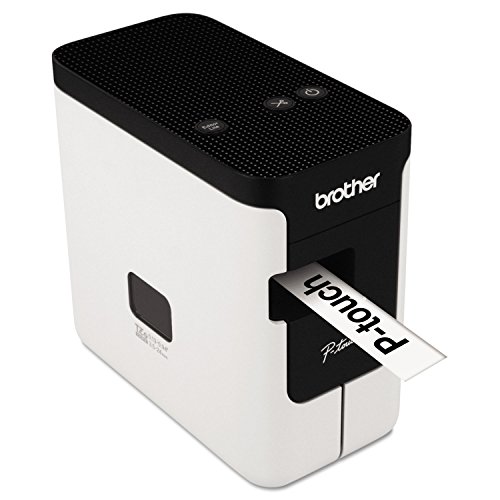
USB remains the most universal cable on this list, but the way each machine uses it varies. The DYMO LabelManager Plug N Play and Brother PT-P700 rely on USB as the sole power and data path, with the PT-P700 explicitly advertising driverless setup on Windows and macOS. Desktop thermal printers like the Brother QL-600, QL-810Wc, and QL-820NWB, plus the DYMO LabelWriter 550 and DYMO LabelWriter 550 Turbo, and Seiko SLP-620, treat USB as the primary PC link while expecting AC power. The QL-820NWB adds a USB host port so you can attach a scanner or keyboard for standalone use, which is useful for warehouse counters and shared mailrooms.
For shared environments, the Brother QL-810Wc and QL-820NWB add Wi-Fi on top of USB, while the QL-820NWB goes further with Ethernet and Bluetooth for fully networked offices. The Brother PT-D610BT rounds out the list with Bluetooth alongside USB, suiting hybrid PC and mobile workflows.
Print Technology, Resolution, and Speed
Two thermal technologies dominate this category. Direct thermal printers such as the Brother QL-600, QL-810Wc, QL-820NWB, DYMO LabelWriter 550, DYMO LabelWriter 550 Turbo, and Seiko SLP-620 use heat-sensitive media and skip ink or toner entirely.
Resolution tops out at 300 dpi on the Brother QL-810Wc and QL-820NWB, with most peers in the 203 dpi class including the DYMO LabelWriter 550, DYMO LabelWriter 550 Turbo, and Seiko SLP-620. Speed scales with category: the Brother QL-810Wc and QL-820NWB push up to 110 standard address labels per minute, the DYMO LabelWriter 550 reaches 62 labels per minute, and the Brother QL-600 prints up to 44 labels per minute. Portable units prioritize compactness over throughput, so expect slower output from handheld models.
Label width determines what you can actually print. The widest desktop thermal printers here handle 2.4 inch media on the Brother QL-600 and similar Brother QL-class machines, with banners up to 3 feet supported by the automatic cutter on the QL-600, QL-810Wc, and QL-820NWB. Mid-range TZe-based P-touch models cover narrower media: the Brother PT-P700 prints on TZe tapes from 3.5 to 24 mm, the PT-D410 supports tapes up to about 18 mm, and the PT-D610BT goes up to roughly 1 inch. Compact DYMO D1-based units such as the LabelManager Plug N Play top out at 12 mm, which is enough for cable and file labels but limiting for signage.
Choose width based on your largest common label, since narrower machines can still print smaller media but not the reverse.
Design Software and Templates
Software depth is where many units diverge. Brother’s P-touch Editor integrates with Word, Excel, and Outlook on the QL-600, while the PT-D610BT adds 175 preloaded business templates, 900 symbols, and 17 fonts on top of USB and Bluetooth connectivity. The PT-D410 pairs a built-in QWERTY keyboard with 30 preloaded templates and a Connect and Create USB mode for PC or Mac design, covering both standalone and computer-driven workflows.
DYMO units lean on the connected computer, with the LabelManager Plug N Play using host fonts and graphics and the LabelWriter 550 series relying on DYMO Label software for layout.
Desktop thermal printers vary in size and weight. The Brother QL-600 is the heaviest at 4.4 pounds, the QL-820NWB sits at 2.5 pounds, and the DYMO LabelWriter 550 Turbo weighs 2.0 pounds in a compact 5.0 by 7.4 inch housing. The Seiko SLP-620 is a light 1.08 pounds with a 4.48 by 6.77 inch footprint, ideal for tight home-office desks. Among P-touch units, the PT-P700 weighs 1.56 pounds and the PT-D410 reaches 1.67 pounds, with the PT-D610BT slightly heavier at about 2.13 pounds and a larger 10.2 inch depth that reflects its color LCD and full keyboard.
Portable label makers are noticeably smaller. These units use built-in lithium-ion batteries recharged over USB, trading raw throughput for grab-and-go convenience at events, classrooms, and remote workstations.
Matching the Machine to Your Workflow
For high-volume shipping desks, direct thermal desktop units such as the Brother QL-600 and DYMO LabelWriter 550 family pair USB with low-maintenance operation, while the Brother QL-810Wc and QL-820NWB add speed and connectivity for shared mailrooms. For asset and signage labeling, TZe-based models like the Brother PT-P700 and PT-D610BT deliver wider tapes and richer design libraries through USB and Bluetooth.
Final recommendation
Brother QL-820NWB Professional Label Printer ranks first overall in this specification-based comparison under the published weighted criteria.
The Brother QL-820NWB Professional Label Printer stands as the first overall specification-based choice among the best usb label makers thanks to its four-way connectivity, 300 dpi resolution at up to 110 labels per minute, and 3-foot banner support on DK rolls. For shoppers focused on the top usb label makers with the widest connectivity envelope, it delivers the most flexible mix of USB host, Ethernet, Wi-Fi, and Bluetooth in a single desktop chassis.
Frequently Asked Questions
What should I look for in the best usb label makers for an office?
Focus on USB connectivity options, label width range, and software integration. Desktop thermal units like the Brother QL-600 and DYMO LabelWriter 550 Turbo pair USB with high-throughput direct thermal printing, while Brother P-touch models add template-rich software and wider TZe tapes for asset and signage labeling.
Can portable label makers really replace a desktop USB model?
For high-volume shipping labels, a desktop thermal printer with USB is still the more efficient choice among the best usb label makers.
Do I need Bluetooth and Wi-Fi if I already have USB?
Not always. If one PC drives the printer, USB-only models like the Brother PT-P700, DYMO LabelWriter 550, and Seiko SLP-620 cover most needs. Bluetooth and Wi-Fi become valuable when multiple users or mobile devices need to print, which is why the Brother QL-820NWB and PT-D610BT add those radios alongside USB.
Which label width is right for my workflow?
Match width to your largest common label. 12 mm D1 tapes suit cable and file labels, 18 to 24 mm TZe tapes handle asset and signage work, and 2 inch or wider DK rolls on the Brother QL class support shipping and name badges. Picking the right ceiling up front avoids bottlenecks when you scale.
How do direct thermal and thermal transfer printers differ among the best usb label makers?
Choose direct thermal for everyday shipping and office labels, and thermal transfer for labs, outdoor storage, and long-life identification.