Buying Guide
Choosing among the best wi-fi voip phones starts with the way calls move through your organization. A fixed desk used by one employee has different needs from a receptionist station, warehouse area, lobby, or executive office. The products here are selected from supplied listing evidence and ranked by documented specifications, not by hands-on testing or customer sentiment.
Decide between a desk phone and a cordless phone
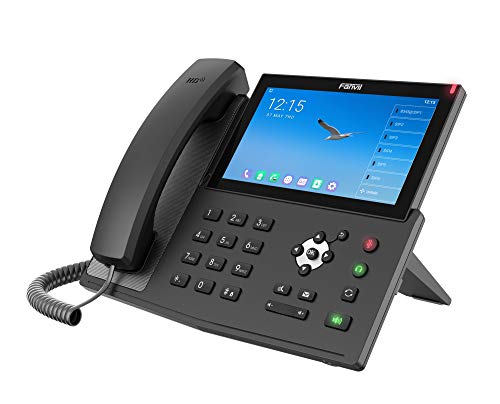
Desk models are generally the better fit when the user needs visible line keys, a stable handset position, Ethernet fallback, or a broad set of programmable controls. The Yealink T57W, Grandstream GRP2616, and Fanvil X7A are especially oriented toward high-control desks. Their larger displays or greater account and key capacity can help users handle multiple calls and contacts from one station.
Cordless models serve a different purpose. The Grandstream WP826 and WP816 are genuine wireless handsets rather than desk-phone adapters. The WP826 has a 4-inch color LCD, while the WP816 emphasizes a compact body, two lines, Bluetooth, and a rechargeable battery. These designs make sense when the user must move within a wireless coverage area. They may be less convenient for a receptionist who needs many visible line keys.
Match SIP capacity to call volume
SIP-account and line counts are useful indicators, but they do not alone determine the right phone. A two-line model can be sufficient for a small office or a secondary location. The GRP2612W and SIP-T34W each document four-account operation, giving them more room than basic two-line configurations without moving into executive-phone complexity.
For heavier call handling, the T54W and T57W each list 16 VoIP accounts. The X7A lists 20 SIP lines and 112 one-touch DSS keys, while the Edge E350 supports up to 32 lines through eight line keys. These figures suggest a better fit for reception, dispatch, or power-user desks, but configuration still depends on the phone system and administrator setup.
Evaluate the display and controls
Screen size changes how quickly users can see contacts, line status, menus, and conferencing controls. The T57W and X7A use 7-inch color touchscreens. The CCX 505 uses a 5-inch multitouch LCD, and the GRP2616 and T54W use 4.3-inch color displays. Larger screens can make complex interfaces easier to navigate, but they also take up more desk space.
Physical keys remain valuable for fast call handling. The GRP2612W has four multipurpose line keys, the GRP2616 has six line keys, and the Edge E350 has eight line keys supporting up to 32 lines. The T57W adds 29 touch keys, and the X7A lists 112 one-touch DSS keys. Consider whether the user prefers dedicated controls or a touchscreen-driven layout.
Accessibility can also matter. The Edge E350 documents text-to-speech, larger font settings, and screen color adjustments for color blindness. Those are concrete display features to compare when multiple people with different visual preferences share a workspace.
Check audio and headset connections
For frequent calls, look for more than a generic HD-audio claim. The WP816 lists HD voice, dual microphones, acoustic echo cancellation, and noise-shield technology. The GRP2612W and GRP2616 list HD audio and support for wideband codecs, while the CCX 505 lists Poly HD Voice and Acoustic Clarity. The Edge E350 documents Acoustic Fence and NoiseBlockAI features for different handset and speakerphone situations.
Headset connectivity also varies. Bluetooth appears on the T57W, T54W, CCX 505, X7A, Edge E350, WP816, and GRP2616. USB support is documented on the T57W, T54W, CCX 505, and SIP-T34W. Electronic hook switch support is listed for the T34W and X7A, while the GRP2616 supports EHS with selected headset brands. Confirm compatibility with the headset you already use before ordering.
Understand Wi-Fi, Ethernet, and power
Wi-Fi is not the only networking question. Ethernet ports and PoE can provide an alternative connection or simplify power delivery in an office with compatible switches. The GRP2616, T54W, T57W, and CCX 505 document Gigabit Ethernet and PoE. The SIP-T34W also lists dual Gigabit Ethernet and 802.3af PoE. The GRP2612W uses dual 10/100 Ethernet with integrated PoE.
Some listing details deserve close attention. The GRP2612W states that its Ethernet cord must be disconnected to enable Wi-Fi. Several Yealink models list the power adapter as not included, so check the intended power method before installation. Cordless models use rechargeable batteries, while desk phones generally require external power or PoE.
Consider specialty environments
The WP826 and WP816 are the selected mobility-focused designs. For demanding call desks, the T57W, GRP2616, and X7A document the highest capacity combinations. The Edge E350 is notable where accessibility and noise-control features matter. This range lets you compare design types without treating one specification set as universally best.
Final Recommendation
Yealink T57W ranks first overall in this specification-based comparison under the published weighted criteria.
The Yealink T57W is the highest-scoring returned product and the first overall specification-based choice among these best wi-fi voip phones. Its 16 SIP accounts, 7-inch adjustable touchscreen, 29 touch keys, Bluetooth, and USB support give it the broadest documented control set for a busy professional desk.
The Grandstream GRP2616 is a strong alternative when six line keys, six SIP accounts, Gigabit Ethernet, and integrated PoE are more useful than a touchscreen. Choose the Poly CCX 505 for a touch-focused interface with documented HD Voice, Acoustic Clarity, Bluetooth, Wi-Fi, and PoE. The Fanvil X7A is the specialist pick for users who need many programmable keys and 20 SIP lines.
For smaller offices, the Grandstream GRP2612W and Yealink SIP-T34W offer four-account configurations with practical wireless and headset features. The Grandstream WP826 and WP816 are the better design choices when movement matters. Overall, the top wi-fi voip phones are not interchangeable: select by line capacity, control style, mobility, headset needs, and available power infrastructure.
Frequently Asked Questions
What should I check before buying the best wi-fi voip phones?
Confirm that the phone works with your SIP provider or business phone system, then check SIP-account capacity, Wi-Fi standards, Ethernet options, PoE requirements, and headset compatibility. Also verify whether a power adapter is included. The T57W, T54W, and SIP-T34W listings, for example, state that a power adapter is not included, while PoE is documented for those models.
Are cordless Wi-Fi VoIP phones suitable for an office?
They can be, especially when the user needs to move around while remaining within wireless coverage. The WP826 is cordless and uses Wi-Fi 6, while the WP816 adds two-line operation, Bluetooth, a rechargeable battery, and specified talk and standby figures. A fixed desk with many simultaneous calls may be better served by the GRP2616, Edge E350, or T57W.
Is PoE necessary for a Wi-Fi VoIP phone?
No. Wi-Fi handles the network connection, but the phone still needs power. A model may use an included or separately purchased adapter, a rechargeable battery, or Power over Ethernet when connected through compatible Ethernet equipment. The GRP2616, CCX 505, T54W, T57W, GRP2612W, and SIP-T34W list PoE, but check the specific installation requirements.
Which selected phone has the most programmable controls?
The Fanvil X7A lists 112 one-touch DSS keys and 20 SIP lines, making it the most control-oriented option in this comparison. The Yealink T57W lists 29 touch keys and 16 SIP accounts, while the Poly Edge E350 provides eight line keys supporting up to 32 lines. Choose according to whether you prefer touchscreen controls, DSS keys, or physical line keys.
Do all Wi-Fi VoIP phones support the same headset types?
No. Bluetooth, USB, and electronic hook switch support differ by model. Bluetooth is documented for several selected phones, including the T57W, T54W, CCX 505, X7A, Edge E350, and WP816. USB support is listed for the T57W, T54W, CCX 505, and SIP-T34W. Check the manufacturer and headset compatibility requirements before purchase.