Buying Guide
The best z-wave home automation modules are not interchangeable. A relay changes the state of a circuit, an input controller turns button presses into scenes, a plug handles an appliance at the outlet, and a connectivity adapter gives a host system access to Z-Wave devices. Start by identifying the job before comparing chipset generation or enclosure style.
Match the module to the load or control point
For ordinary on/off switching, choose a relay or smart plug. The Shelly Wave 1 US LR UL uses a one-channel dry-contact design and is documented for lights, locks, gates, garage doors, and irrigation. The Zooz ZEN51 is a smaller retrofit-oriented relay that can sit behind a wall switch or at a light fixture. Its three-way support and smart-bulb mode make it relevant when an existing switch arrangement matters.
For outlet-based appliances, the Ezlo Z-Wave Smart Plug is the simplest physical format in this comparison. It provides on/off control, monitoring, overcurrent protection, and status indicators without requiring in-wall wiring. The Ezlo Z-Wave In-Line Smart Switch is another plug-in retrofit route, but its corded design is better suited to equipment where an in-line module is acceptable.
Some projects need a specialized module. The Shelly Wave Shutter US UL is designed for bi-directional motorized devices such as blinds, shutters, awnings, windows, and pool covers. It should not be treated as a generic replacement for every relay because its documented purpose is motor direction and position control. For manual scene triggers, the Shelly Wave i4 DC US LR is the relevant design: it reads four digital inputs and does not contain relays.
Check hub and software requirements
Every selected device depends on a compatible Z-Wave controller or gateway in some form. Confirm the controller’s support for the device type, firmware updates, scenes, energy data, or Long Range before installation.
The Home Assistant Connect ZWA-2 is intended specifically to connect Z-Wave devices to Home Assistant. It is a good fit for a Home Assistant system, but it is not a standalone automation hub. Likewise, the Zooz ZAC93 LR GPIO Module needs supported Raspberry Pi or Home Assistant Yellow hardware and an appropriate software setup. These adapter-style products are best considered controller components rather than load-switching modules.
Consider network range and generation
Several products document 700-series or 800-series chips and Z-Wave Long Range. Long Range can be useful in large properties or for devices separated from the main controller, but the listing evidence repeatedly makes the qualification clear: the hub or gateway must also support the relevant Long Range implementation. Do not assume that a Long Range-capable module automatically creates a long-range link with every controller.
A module can also contribute to the network in another way. The Shelly Wave Pro 2 US is described as a Z-Wave repeater, while the Zooz ZEN51 listing documents Long Range and SmartStart-related capabilities. Network behavior still depends on placement, controller support, and the wider Z-Wave installation, so specification claims should guide planning rather than replace compatibility checks.
Review electrical and physical installation details
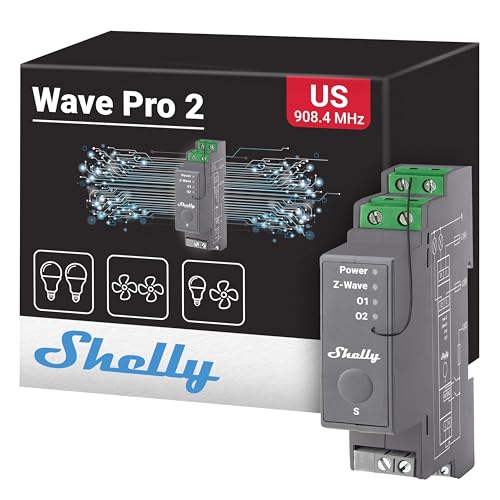
In-wall and DIN-rail modules require more planning than plug-in devices. Check whether a neutral wire is present, whether the load is compatible, and whether the box or panel has enough space. The Zooz ZEN51 specifically requires a neutral wire and supports mechanical or momentary switches, not dimmers or electronic switches. The Shelly Wave Pro 1PM US LR and Shelly Wave Pro 2 US use DIN-rail mounting, which suits breaker boxes or organized control panels but may not fit a casual retrofit.
For motorized coverings, verify that the existing motor and switch arrangement match the shutter controller’s bi-directional AC design. For a plug or in-line module, check the connected equipment’s electrical requirements and the module’s documented load limits. The Ezlo in-line model is listed for devices up to 1,800 watts, while the Shelly Wave 1 US LR UL is described as a 15-amp relay.
Decide whether monitoring is important
Energy monitoring is useful when automation decisions depend on consumption or when you want visibility into an appliance or circuit. The Shelly Wave Pro 1PM US LR, Shelly Wave Shutter US UL, Ezlo Z-Wave Smart Plug, and Ezlo Z-Wave In-Line Smart Switch all document monitoring-related functions. Monitoring support can vary by hub, so confirm that your software exposes the desired readings.
If you only need scheduled on/off control, monitoring may add complexity without helping the project. A basic relay or input controller may be more appropriate. Conversely, a monitored plug is a practical choice for a portable load where installation should remain reversible.
Choose the right level of DIY involvement
The compact relays and plugs are aimed at different installation styles, but neither listing should be read as a substitute for electrical safety procedures. DIN-rail, in-wall, and circuit-level installations may require qualified assistance. The ZAC93 listing explicitly targets advanced users with programming and Z-Wave knowledge, while the ZWA-2 emphasizes a setup wizard and migration workflow for Home Assistant users.
Final Recommendation
Shelly Wave Pro 2 US ranks first overall in this specification-based comparison under the published weighted criteria.
The final choice among the best z-wave home automation modules depends on the documented features that match your intended use.
Shelly Wave Pro 2 US is the highest-scoring returned product and the first overall specification-based choice. Its two channels, dry contacts, DIN-rail format, repeater function, and documented lighting and valve applications give it the broadest feature set for a structured installation. It is not the right pick for every project: a plug-in appliance may call for the Ezlo Z-Wave Smart Plug, while a Home Assistant user needing only a Z-Wave adapter may prefer the Home Assistant Connect ZWA-2.
Among the top z-wave home automation modules, the most specification-aligned choice depends on the installation point. Select the Shelly Wave Shutter US UL for bi-directional coverings, the Shelly Wave i4 DC US LR for multi-action input control, and the Zooz ZEN51 for a compact switch retrofit. The Shelly Wave Pro 1PM US LR adds power metering to a panel relay, while the Shelly Wave 1 US LR UL emphasizes long-range single-channel dry-contact control.
Before ordering, confirm the hub, Z-Wave frequency, wiring, load type, enclosure space, and whether your controller supports the advertised Long Range or energy-monitoring features. These checks matter more than choosing a module solely by chipset generation.
Frequently Asked Questions
What are the best z-wave home automation modules for a first project?
A plug-in model is generally the simplest physical starting point because it avoids changing wall-box or panel wiring. The Ezlo Z-Wave Smart Plug provides documented on/off control, energy monitoring, overcurrent protection, and compatibility with several Z-Wave platforms. You still need a Z-Wave hub, and you should verify the appliance requirements before connecting it.
Do Z-Wave Long Range modules work with every Z-Wave hub?
No. The supplied listings state that Long Range operation requires support from the hub or gateway as well as the end device. Standard Z-Wave compatibility may still be available, but the extended-range mode should be confirmed for the specific controller and software combination.
Which module should I use for blinds or roller shutters?
The Shelly Wave Shutter US UL is the selected product specifically documented for roller shutters, blinds, awnings, windows, pool covers, and other bi-directional AC motor devices. Check the motor and switch wiring before installation and confirm that your hub exposes the controller’s position and power features.
Is the Shelly Wave i4 DC US LR a relay?
No. The listing describes it as a four-input controller that reads digital inputs and triggers scenes or Z-Wave actions. It does not contain relays, so it cannot directly switch a load. Pair it with compatible Z-Wave devices when physical button presses need to start lighting, blind, or other automations.
What is the difference between a Z-Wave adapter and a switching module?
An adapter such as the Home Assistant Connect ZWA-2 or Zooz ZAC93 LR GPIO Module gives a host system access to Z-Wave. A switching module such as the Zooz ZEN51 or Shelly Wave 1 US LR UL controls an electrical load. The adapter still needs a compatible host and software, while the switch module still needs a Z-Wave hub to provide automation logic.