Buying Guide
This guide compares the best angle plug surge protectors using documented angled plug and clearance design, surge protection specification, outlet capacity and spacing, usb and charging connectivity, cord length and mounting flexibility, and safety and protection features.
The comparison is specification-based, so the practical advice below explains how to match stated features to a room or equipment layout rather than claiming hands-on performance. The products differ considerably in body shape, number of AC outlets, USB configuration, cord length, and mounting provisions. Those differences make the intended location the right starting point.
Begin by identifying where the wall receptacle sits in relation to furniture and equipment. A receptacle behind a sofa may require a very thin plug head. Measure the available depth and note the direction in which the cord must travel before selecting a unit.
Count outlets by shape, not just number
Outlet count matters only when the layout leaves room for the plugs you use. The TROND Prime VIII 4000J Rotating Plug Power Strip has 10 widely spaced AC outlets split between horizontal and vertical orientations.
The TROND 9-Outlet Rotating Plug Power Strip with USB PD distributes its AC positions across four sides. These formats are aimed at users who want several devices connected without placing every adapter directly beside the next one.
For transformer-heavy equipment, Tripp Lite TLP74RB Right-Angle 7-Outlet Protector includes six right-angle outlets and a dedicated end outlet for a bulky transformer.
Before choosing a high-count model, sketch the plugs that will remain connected. A higher outlet count is not automatically more useful if the body is crowded or the connected adapters extend into nearby space. Multi-sided bodies may distribute plugs more effectively, but they also require room around the sides. Outlet orientation and spacing are therefore as important as the total number.
Compare rotating, angled, and flat plug clearance
Rotating plugs provide adjustable cord direction. Their stated rotating designs can be useful when the cord needs to run sideways instead of straight down from the receptacle.
Fixed angled designs address clearance differently. TESSAN identifies a 45-degree right-angle plug with a 0.31-inch thin head. These thin heads are described as fitting behind furniture and leaving additional room near the lower receptacle.
Tripp Lite TLP74RB Right-Angle 7-Outlet Protector focuses on right-angle outlet orientation rather than a rotating plug. Use that distinction when the exact direction of the cord matters.
A thin plug head may leave more room for the lower receptacle on a duplex wall outlet, while a rotating design may give more freedom to route the cord left, right, upward, or downward. Check plug thickness, cord direction, and the clearance behind the furniture. Also consider whether the power-strip body will sit vertically, horizontally, or on a surface. A plug that fits behind a cabinet can still be unsuitable if the strip body presses against the cabinet or the connected adapters need more room.
Decide whether USB output is necessary
USB ports can reduce the need for separate charging adapters, but compare their output carefully. The TROND 9-Outlet Rotating Plug Power Strip with USB PD specifies a 20W USB-C PD port when used alone and notes that shared use can reduce that output to 15W. TESSAN also lists a USB-C port at up to 20W.
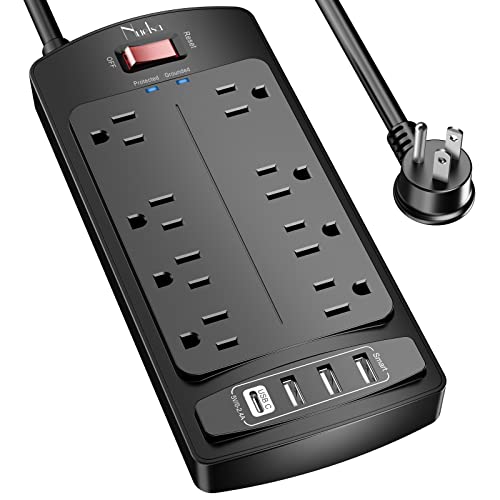
The TROND Prime VIII 4000J Rotating Plug Power Strip lists two USB-C ports and two USB-A ports, with combined USB output of 17W. Nuetsa identifies one USB-C and three USB-A ports, with the USB-C port listed at up to 3A. HOPOW lists two USB-C and one USB-A port with a shared 17W output. SUPERDANNY lists two USB-C and two USB-A ports with a total USB output of 15W.
If phones, tablets, and small USB devices are part of the same station, these integrated ports may simplify the setup.
Pay attention to whether a USB figure applies to one port or the whole USB section. The TROND 9-Outlet Rotating Plug Power Strip with USB PD distinguishes its single-port PD condition from shared operation. HOPOW and SUPERDANNY specify shared totals. Those details help set realistic expectations for simultaneous charging.
Check cord length and mounting options
Measure from the wall receptacle to the intended strip location before choosing a cord. TESSAN and the TROND 9-Outlet Rotating Plug Power Strip with USB PD list 5-foot cords. Belkin and Nuetsa list 6 feet. Eaton Tripp Lite SUPER7 lists 7 feet, while SUPERDANNY and HOPOW list 6-foot cords.
Mounting can keep a strip off the floor or secure it beneath a desk. Consider the location of the switch, protection indicator, and connected plugs before fixing the unit in place.
A mounted installation should leave the switch, indicator, and all needed outlets accessible. Do not place the body where heat cannot dissipate or where furniture presses against the cord. A shorter cord may be preferable when the strip will sit directly beside the wall receptacle, while a 7-foot or 6-foot cord may be more practical when the strip must reach a work surface.
Final recommendation
Among the top angle plug surge protectors, the ranked products differ under documented angled plug and clearance design, surge protection specification, outlet capacity and spacing, usb and charging connectivity, cord length and mounting flexibility, and safety and protection features.
TROND Prime VIII 4000J Rotating Plug Power Strip ranks first overall in this specification-based comparison under the published weighted criteria.
The final choice among the best angle plug surge protectors depends on the documented features that match your intended use.
The TROND 9-Outlet Rotating Plug Power Strip with USB PD is a strong alternative when direct USB-C PD charging is central to the setup.
Confirm those details against the product specifications before installation.
Frequently Asked Questions
Among the best angle plug surge protectors, is a rotating plug better than a fixed right-angle plug?
They solve clearance in different ways. A rotating plug can redirect the cord around an obstruction or toward the side of a desk. A fixed right-angle plug has a predetermined direction and may be preferable when that direction matches the wall and furniture layout.
Can these power strips be mounted behind a desk or on a wall?
Confirm the mounting surface, screw placement, cord direction, and access to the switch or indicator before installation.
What should I check before placing one behind furniture?
Check the plug thickness, direction of the cord, and clearance required by the power-strip body. Confirm that the furniture will not pinch the cord, cover the indicator, or prevent access to connected plugs. Also verify the number and shape of adapters you plan to use, because outlet spacing can matter as much as the total count. A 0.3-inch or 0.31-inch thin plug may suit a narrow gap, while a rotating design may offer more freedom to route the cord.
Do USB ports replace the AC outlets on these products?
No. USB ports are separate charging connections, while AC outlets accept standard grounded plugs. Compare both sections when planning a charging station.