Buying Guide
Choosing among the best right angle power strips starts with the plug, but the plug is only one part of the installation. A low-profile or rotating design can help a strip sit behind a nightstand, sofa, desk, or cabinet without forcing furniture farther from the wall. After that, compare how many AC outlets are available, whether larger adapters receive extra room, and whether the cord reaches the intended work area.
This is a specification-based comparison using supplied product information. It is not a hands-on test, so the scores reflect documented features rather than unverified performance.
Check the plug geometry first
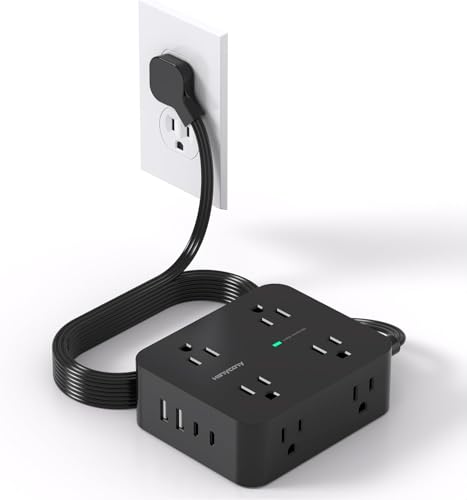
A fixed 45-degree plug is useful when the goal is to preserve the lower receptacle on a duplex wall outlet. Nuetsa, SUPERDANNY, Belkin, CHCORE, HANYCONY, HOPOW, Yintar, TESSAN, and GE document angled or flat-plug designs. The TROND design takes a different approach with a 360-degree rotating plug. That feature may be more adaptable when the wall socket is not aligned with the direction in which the cord needs to travel.
Plug thickness and cord direction still matter. A thin plug can reduce the space needed behind furniture, but the exact wall socket, cord path, and furniture clearance should be checked before installation. The rotating mechanism on TROND may help with alignment, but it does not remove the need to confirm clearance around the receptacle.
Match AC outlet capacity to the equipment
Count the devices that will use standard plugs, not just the total number of charging connections. Belkin is the capacity leader in this comparison with 12 AC outlets. SUPERDANNY, CHCORE, HANYCONY, and TESSAN provide eight AC outlets, while Nuetsa supplies eight AC outlets alongside four USB ports.
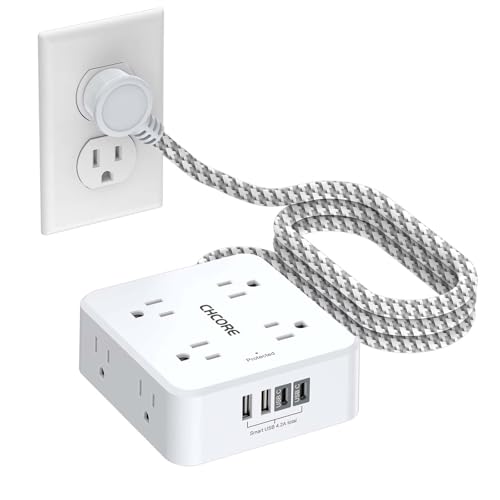
Spacing matters when adapters are bulky. Belkin documents widely spaced outlets, and CHCORE and HANYCONY describe spacing intended to reduce adapter interference. Yintar includes one widely spaced outlet. A larger outlet count does not automatically mean every position can accept a large adapter at once, so look for explicit spacing information when that is important.
HOPOW and GE provide five and six AC outlets respectively, while TROND has five AC outlets. These layouts may be easier to place on a smaller desk, particularly when some devices connect through USB rather than standard AC plugs.
Decide whether USB ports are useful
USB ports can reduce the need for separate wall chargers, but they should be treated as a supplement to the AC outlets. The selected models with both USB-A and USB-C include Nuetsa, SUPERDANNY, CHCORE, TROND, HANYCONY, HOPOW, Yintar, and TESSAN. Compare the number and type of ports with the devices you intend to connect.
Output details are clearest for several models. TROND lists two USB-C and two USB-A ports, with combined USB output of 3.4A/17W maximum. SUPERDANNY lists two USB-A ports at 2.4A each and two USB-C ports at 3A each, with total USB output up to 15W. CHCORE describes two USB-C ports and two USB-A ports with similar per-port figures. HANYCONY documents two USB-C and two USB-A ports, while HOPOW lists two USB-C ports and one USB-A port with shared output up to 17W.
TESSAN provides two USB-A ports and one USB-C port. Yintar uses two USB-A ports and one USB-C port. Belkin and GE do not list USB charging ports, so they are better matched to setups that already have dedicated chargers or that prioritize AC capacity.
Compare documented protection features
Surge protection is expressed in joules, but the figures should be compared alongside the other stated safeguards. Belkin lists 3,780 joules, Nuetsa lists 2,700 joules, HOPOW and Yintar list 1,700 and 1,680 joules, and TROND lists 1,440 joules. SUPERDANNY lists 1,050 joules, HANYCONY lists 1,080 joules, and CHCORE and TESSAN list 900 joules. GE lists 800 joules.
The specifications also identify circuit-level features. Overload protection appears across many selected models, while short-circuit and over-current protection are documented for several. Belkin documents a safety indicator and UL certification. GE identifies a circuit breaker and automatic shutdown. Nuetsa, CHCORE, HANYCONY, Yintar, TESSAN, and GE identify ETL-related certification or listing details.
A joule figure is not a substitute for following the strip’s electrical limits. The supplied specifications identify limits such as 1250W, 1875W, or 1250W/10A for particular models. Check the exact model’s electrical specification before connecting equipment with substantial power demand.
Plan the cord and mounting position
Cord length affects whether the strip can sit on a desk, under a counter, or beside a bed without a loose span across the floor. SUPERDANNY has the longest documented cord at 10 feet. Belkin provides an eight-foot cord, while Nuetsa, HOPOW, Yintar, and TROND list six-foot options. CHCORE, HANYCONY, and TESSAN list five-foot options. GE’s selected model has four feet.
Mounting holes or slots can keep a strip from sliding behind furniture. SUPERDANNY, Belkin, CHCORE, TROND, HOPOW, Yintar, TESSAN, and GE document mounting features. TESSAN also lists four rubber feet for desktop stability. Consider whether you want a fixed wall or underside installation, or whether the strip needs to remain portable.
Final recommendation
Nuetsa 8-Outlet Flat Plug Surge Protector ranks first overall in this specification-based comparison under the published weighted criteria.
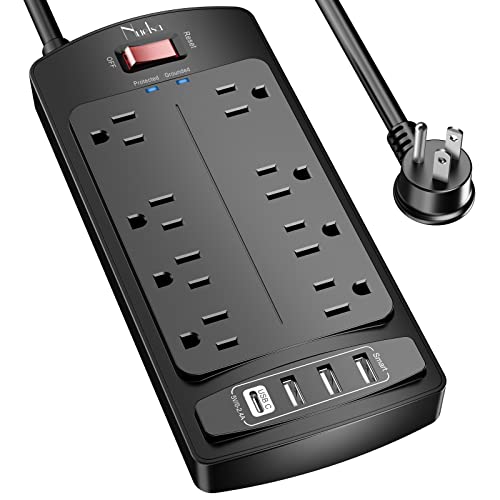
Nuetsa 8-Outlet Flat Plug Surge Protector is the first overall specification-based choice in this comparison. It combines eight AC outlets, four USB ports, a six-foot cord, a flat plug, and 2,700-joule protection. Its documented ETL-certified components and protected indicator add useful specification detail for a workstation.
SUPERDANNY is the practical reach choice because of its 10-foot cord and four-side layout. Belkin is better suited to a stationary setup requiring 12 AC outlets, widely spaced positions, and 3,780-joule protection without USB charging. CHCORE and HANYCONY suit mixed AC and USB-C charging stations, while HOPOW combines a slim cord, USB-C ports, and mounting holes. TROND is the adaptable choice for difficult socket alignment because of its rotating plug.
Yintar and TESSAN offer compact combinations of outlets, USB ports, and mounting features. GE is the simpler choice for six AC outlets, covered unused receptacles, and no USB requirement. Together, these top right angle power strips cover high-capacity rooms, compact desks, mounted work areas, and behind-furniture installations. The best right angle power strips for your setup will depend on outlet spacing, cord path, USB needs, and the electrical limits stated for the exact model.
Frequently Asked Questions
Among the best right angle power strips, what makes a power strip right angle?
A right-angle power strip uses an angled plug, commonly described as 45 degrees, so the cord exits along the wall instead of projecting directly outward. TROND provides an adjustable alternative with its rotating plug. The best right angle power strips for behind furniture should also have a low-profile plug and a cord route that matches the available clearance.
Should I choose more AC outlets or more USB ports?
Choose more AC outlets when your equipment uses standard plugs or bulky power adapters. Choose a USB-equipped model when phones, tablets, headphones, or similar devices will be charged directly from the strip. CHCORE, HANYCONY, and SUPERDANNY combine eight AC outlets with four USB ports, while Belkin focuses on AC capacity without USB ports.
Are all flat plugs suitable behind furniture?
No. Flat plugs reduce projection, but plug thickness, cord direction, wall receptacle position, and furniture clearance still matter. Check the supplied dimensions and look for a stated angled design. TROND’s rotating plug may help with alignment, but it does not remove the need to confirm clearance.
What should I check besides the joule specification?
Review the listed electrical limit, overload and short-circuit protection, indicator features, certification information, and whether the strip includes a circuit breaker or automatic shutdown. Also confirm the number of outlets, spacing, cord length, and mounting method. These details help distinguish a compact charging strip from one intended for a larger stationary setup.
Can a right angle power strip be mounted?
Several selected products document mounting holes or slots, including SUPERDANNY, Belkin, CHCORE, TROND, HOPOW, Yintar, TESSAN, and GE. Confirm that the mounting surface and screw arrangement suit the installation. A portable strip without documented mounting hardware should not be treated as a fixed-installation model.