Buying Guide
The best chrome os 2-in-1 laptops differ less by their hinge concept than by the hardware surrounding it. Every selected model supports touch interaction and a convertible form, but the display, processor, memory, storage, ports, and camera determine how practical that flexibility will be. Start by deciding whether you need a full-size 14-inch workspace, a compact tablet-like device, or a middle ground with an integrated pen.
Choose the right screen size and panel
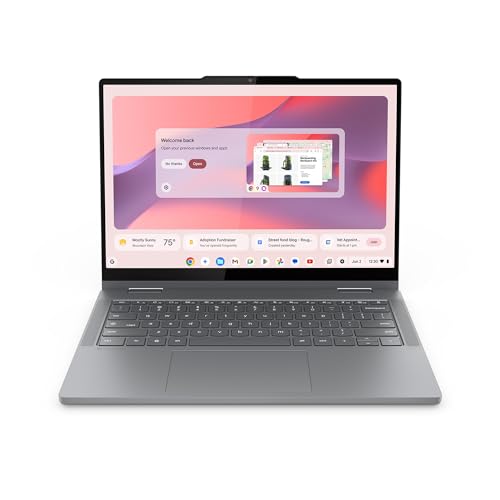
A 14-inch display gives documents, browser tabs, and video calls more room. The Lenovo IdeaPad Flex 5i Chromebook Plus 14 uses a 14-inch WUXGA IPS touchscreen with a 1920x1200 resolution and 300-nit brightness. The HP Chromebook 14 x360 Plus N150 also lists WUXGA resolution and 300 nits, adding an anti-glare coating. These are the clearest choices in this group when screen detail and workspace are priorities.
The HP Chromebook Plus x360 14 lists a 14-inch FHD IPS touchscreen at 1920x1080 and 250 nits. The resolution is still suitable for general Chrome OS work, but it shows less vertical content than the WUXGA models. The HP 2-in-1 14-inch N100 Chromebook lists an HD touchscreen, so it is better matched to basic browsing, documents, streaming, and touch navigation than to users who want the most detailed panel.
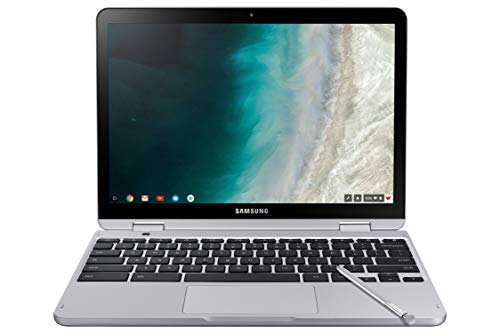
Compact displays can make tablet handling easier. The Samsung Chromebook Plus V2 and Samsung 12.2-inch FHD 2-in-1 Chromebook Plus both document 12.2-inch screens, while the Lenovo IdeaPad Flex 5i Chromebook 13 lists a 13.3-inch FHD touch display. The Samsung Chromebook Plus V2 adds a 16:10 aspect ratio and a built-in pen. The Samsung 12.2-inch model also includes a stylus, making both Samsung designs more distinctive for handwritten interaction.
Match the processor and memory to your workload
Processor and RAM should be considered together. The Lenovo IdeaPad Flex 5i Chromebook Plus 14 lists an Intel Core i3-1315U with six cores and 8GB of LPDDR4X memory. The HP Chromebook Plus x360 14 lists an eight-core Intel Core i3-N305 and 8GB LPDDR5. These configurations are the most compelling selections for users who expect several browser tabs, documents, video calls, and web applications to remain open together.
The Lenovo Flex 5i Chromebook Plus 14 i5 steps up to an Intel Core i5-1334U while retaining 8GB LPDDR4X. Its processor specification gives it the highest documented processing tier in this comparison. The Lenovo IdeaPad Flex 5i Chromebook 13 uses an older Intel Core i3-1115G4 with 8GB memory, so it remains relevant for ordinary Chrome OS productivity but lacks the newer platform details of the leading 14-inch models.
The Intel N150 and N100 systems are oriented toward everyday computing. The Lenovo Chromebook 2-in-1 N150 14 and HP Chromebook 14 x360 Plus N150 each list 4GB memory. The HP 2-in-1 14-inch N100 Chromebook also lists 4GB, along with a four-core N100 processor. Those specifications can suit web browsing, document editing, streaming, and online learning, but 8GB configurations provide more room for simultaneous browser work.
The Samsung Chromebook Plus V2, Samsung 12.2-inch FHD 2-in-1 Chromebook Plus, and Dell Chromebook 3100 2-in-1 use older or entry-level processor platforms with 4GB memory. Their main advantages are their convertible formats, compact sizes, or input accessories rather than processor headroom.
Check the storage type and capacity
Storage affects how many files, applications, and offline documents can remain on the computer. The Lenovo IdeaPad Flex 5i Chromebook Plus 14 lists 256GB internal storage plus an SD-card component, while the HP Chromebook Plus x360 14 lists 256GB UFS. The Lenovo IdeaPad Flex 5i Chromebook 13 also lists 256GB. These are the most generous straightforward capacities among the selected products.
The Lenovo Chromebook 2-in-1 N150 14 lists 128GB UFS, and the HP Chromebook 14 x360 Plus N150 lists 128GB UFS. These capacities offer more local room than the 64GB and 32GB configurations, while still fitting the lighter everyday role of their processors and 4GB memory.
The HP 2-in-1 14-inch N100 Chromebook and both Samsung models list 64GB-class internal storage, although the Samsung 12.2-inch model also describes accessory storage in its package. The Dell Chromebook 3100 2-in-1 lists 32GB eMMC. Treat accessory storage and removable cards separately from built-in capacity when comparing configurations, because they do not represent the same storage arrangement.
Consider the hinge and touch experience
A 360-degree hinge is useful when you regularly switch between typing, viewing, and touch interaction. The Lenovo IdeaPad Flex 5i Chromebook Plus 14 documents laptop, yoga, flip, and tablet modes. The HP Chromebook Plus x360 14 likewise names laptop, yoga, flip, and tablet positions. The HP Chromebook 14 x360 Plus N150 documents laptop, tent, stand, and tablet modes. These explicit mode descriptions make the intended flexibility clear.
The Lenovo Chromebook 2-in-1 N150 14 documents laptop, tent, and tablet modes. The Lenovo IdeaPad Flex 5i Chromebook 13 describes laptop, tent, stand, and tablet use, while both Samsung selections document conversion to tablet mode through a 360-degree hinge. The Dell Chromebook 3100 2-in-1 is also a documented touchscreen convertible, though its listing provides fewer hinge-mode details.
A pen can matter more than the number of modes for note-taking. The Samsung Chromebook Plus V2 has a built-in pen that does not need charging. The Samsung 12.2-inch FHD 2-in-1 Chromebook Plus includes a stylus pen. None of the other selected products documents an included active pen, so do not assume pen support from the touchscreen alone.
Review ports, wireless features, and cameras
Port selection varies substantially. The Lenovo IdeaPad Flex 5i Chromebook Plus 14 lists two USB-A ports, USB-C, HDMI, a microSD reader, an audio jack, Wi-Fi 6E, and Bluetooth 5.3. The Lenovo Chromebook 2-in-1 N150 14 lists two USB-C, two USB-A, and HDMI. These are the most expansive wired connection layouts in the shortlist.
The Lenovo IdeaPad Flex 5i Chromebook Plus 14 includes USB-C with DisplayPort 1.4 and USB Power Delivery, HDMI, a USB-A port, a headphone/microphone jack, and a microSD reader. The HP 2-in-1 14-inch N100 Chromebook also documents USB-C Power Delivery and DisplayPort 1.4a, along with USB-A. If you connect an external display or charge through USB-C, inspect these specific port capabilities rather than counting ports alone.
Camera specifications also vary. The Lenovo IdeaPad Flex 5i Chromebook Plus 14 lists a 1080p webcam with a privacy shutter. The Lenovo Chromebook 2-in-1 N150 14 lists an FHD webcam with a physical shutter, and the Lenovo IdeaPad Flex 5i Chromebook Plus 14 i5 lists a 1080p webcam. The HP Chromebook 14 x360 Plus N150 documents an FHD camera with temporal noise reduction. The Samsung Chromebook Plus V2 is unusual for its 13MP world-facing autofocus camera, while the Samsung 12.2-inch model lists a 720p camera.
Weigh portability and documented durability
The smaller Samsung Chromebook Plus V2, Samsung 12.2-inch FHD 2-in-1 Chromebook Plus, and Dell Chromebook 3100 2-in-1 are suited to users who prefer compact convertible dimensions. The Samsung models list a 2.98-pound weight. The Lenovo Chromebook 2-in-1 N150 14 lists a 3.3-pound weight and 0.69-inch thickness, giving it a relatively portable 14-inch profile.
The HP Chromebook 14 x360 Plus N150 lists a 3.04-pound weight, while the Lenovo 14-inch Flex 5i models list 3.48 pounds. The HP Chromebook Plus x360 14 lists 5 pounds in its supplied specifications. Weight figures can vary by configuration, so use them as listing-specific comparisons rather than universal model-family measurements.
Durability claims should also remain specific. The Lenovo Chromebook 2-in-1 N150 14 describes military-grade durability, and the HP Chromebook 14 x360 Plus N150 states that it passed MIL-STD 810H testing. Those claims are part of the supplied listings; they are not independent test results. The Dell and other compact models should not be assigned the same durability description unless their listing supplies it.
Final recommendation
Lenovo Flex 5i Chromebook Plus 14 i5 ranks first overall in this specification-based comparison under the published weighted criteria.
The final choice among the best chrome os 2-in-1 laptops depends on the documented features that match your intended use.
The Lenovo IdeaPad Flex 5i Chromebook Plus 14 is the highest-scoring returned product and the first overall specification-based choice. Its WUXGA touchscreen, Core i3-1315U, 8GB memory, 1080p privacy-shutter webcam, backlit keyboard, Wi-Fi 6E, HDMI, and broad port selection create the most balanced package in this comparison.
The HP Chromebook Plus x360 14 is a close alternative for users who prefer four clearly documented modes and an eight-core Core i3-N305. Choose the Lenovo Flex 5i Chromebook Plus 14 i5 when processor tier is the main requirement. For a thinner 14-inch design, the Lenovo Chromebook 2-in-1 N150 14 combines a WUXGA display with a useful collection of ports, while the HP Chromebook 14 x360 Plus N150 adds an anti-glare panel and stated MIL-STD 810H testing.
Among the top chrome os 2-in-1 laptops, the Samsung Chromebook Plus V2 and Samsung 12.2-inch FHD 2-in-1 Chromebook Plus are the most specialized selections because they document pen-based interaction. The compact Lenovo IdeaPad Flex 5i Chromebook 13 and Dell Chromebook 3100 2-in-1 suit users who prefer smaller convertibles. Confirm the exact storage arrangement, memory, port layout, and condition of any listing before choosing a configuration.
Frequently Asked Questions
What makes the best chrome os 2-in-1 laptops different from standard Chromebooks?
A 2-in-1 Chromebook combines Chrome OS with a touchscreen and a convertible hinge. Selected examples such as the Lenovo IdeaPad Flex 5i Chromebook Plus 14, HP Chromebook Plus x360 14, and Samsung Chromebook Plus V2 document tablet conversion or multiple hinge modes. A standard clamshell Chromebook may have Chrome OS but does not necessarily provide that convertible hardware.
Is 8GB memory useful in a Chrome OS convertible?
The selected Lenovo and HP Core i3 configurations show why 8GB can be useful: it provides a stronger documented memory specification for users who keep many browser tabs, documents, and web applications open. Several N150, N100, and compact Samsung models list 4GB, which is better aligned with lighter browsing, document work, streaming, and online learning.
Which selected model documents an included pen?
The Samsung Chromebook Plus V2 lists a built-in pen that does not need charging. The Samsung 12.2-inch FHD 2-in-1 Chromebook Plus lists a stylus pen. The other selected models document touchscreens but do not state that an active pen is included, so a touchscreen alone should not be treated as evidence of an included stylus.
Are all 14-inch Chrome OS 2-in-1 displays the same?
No. The Lenovo IdeaPad Flex 5i Chromebook Plus 14 and Lenovo Chromebook 2-in-1 N150 14 list WUXGA displays, while the HP Chromebook Plus x360 14 lists FHD resolution and the HP 2-in-1 14-inch N100 Chromebook lists HD resolution. The HP Chromebook 14 x360 Plus N150 adds a 300-nit anti-glare WUXGA panel. Compare resolution, brightness, panel type, and coating rather than screen size alone.
Which ports should I check before selecting a convertible Chromebook?
Check whether the listing includes USB-C charging, DisplayPort support, HDMI, USB-A, microSD, and an audio jack. The Lenovo IdeaPad Flex 5i Chromebook Plus 14 and Lenovo Chromebook 2-in-1 N150 14 document especially broad port layouts. The HP 2-in-1 14-inch N100 Chromebook specifically lists USB-C Power Delivery and DisplayPort 1.4a, which may matter for external-display setups.