Buying Guide
The best intel pentium 2-in-1 laptops in this comparison cover several distinct designs rather than one uniform format. Most are compact hinged notebooks with 360-degree screens, while the BNCF NewBook 10 uses a detachable keyboard and stand. The selected evidence also divides the field between Windows systems and Chromebooks. That distinction matters because the processor name alone does not describe the complete experience: operating system, memory, storage, ports, display format, and chassis features all affect how a system fits a particular routine.
This guide uses public listing information only. It is not a hands-on test, and it does not summarize customer opinions. Where a listing is incomplete or internally inconsistent, the ranking gives less credit rather than filling in missing specifications.
Start with the operating system
Windows models in the selection include Windows 11 Pro, Windows 11 Home, and Windows 10 Pro. Windows is the familiar choice for users who need a traditional desktop interface, Windows-specific applications, or standard file-management behavior.
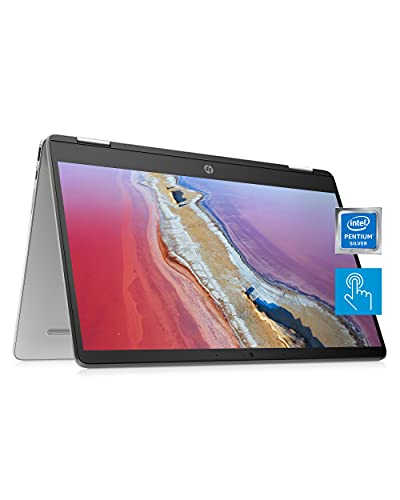
ChromeOS appears on the HP Chromebook x360 14a models and the HP 2023 Convertible Chromebook. ChromeOS is centered on the Chrome browser and supported applications. The HP Chromebook x360 14a listing also identifies Android app support, a webcam, dual microphones, and dual speakers. Those details make it a practical touch-oriented format for browser work, video calls, media, and school assignments, but its 4GB RAM and 64GB eMMC are modest beside the SSD-equipped Windows models.
Compare the Pentium designation carefully
The category includes several Intel Pentium families. The Pentium Silver N5030 appears in the Lenovo ThinkPad Yoga 11e, HP Chromebook x360 14a, and Dell Latitude 3190. The Pentium N6000 appears in several Dell Latitude 3120 configurations and the Lenovo 500w listing. The Dell Latitude 3189 lists a Pentium N4200, while the BNCF device specifies Pentium Gold 6500Y.
These names should not be treated as interchangeable specifications. A named processor model provides clearer evidence than a listing that says only Intel Pentium or gives a maximum clock speed without the family number. The HP 2023 Chromebook is included because its title and features identify an Intel Pentium processor, but the supplied data does not provide the exact model. Its processor score reflects that uncertainty.
Choose memory and storage for the workload
Memory affects how many browser tabs and applications a system can keep active, while storage determines how much room is available for local files and how the listing describes startup and file access. The most specification-aligned combinations here are 8GB RAM with 256GB or 512GB SSD storage. The Lenovo ThinkPad Yoga 11e and Lenovo 500w each list 8GB RAM and 512GB SSD storage. The Dell Latitude 3120 configurations with 256GB SSDs also provide a balanced specification set.
The 8GB/128GB systems remain useful when local file storage needs are limited. Chromebook storage should be read differently: the HP Chromebook x360 14a uses 64GB eMMC, while the HP 2023 Chromebook lists a 128GB SSD. Cloud-focused workflows may make that distinction less important, but the storage technologies and capacities are not identical.
Match the screen to the way you use the device
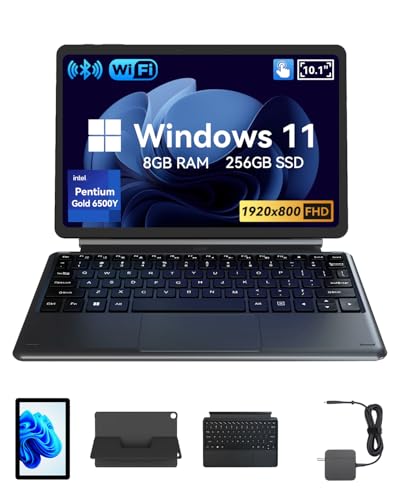
Every selected product documents touch input, but screen sizes range from 10.1 to 14 inches. The 10.1-inch BNCF NewBook 10 is the most tablet-like option, with a detachable keyboard and stand. The 11.6-inch systems emphasize compact portability. They include the Dell Latitude models, both Lenovo education designs, and the HP ProBook. The 14-inch HP Chromebooks provide more physical screen area for split windows, reading, and media viewing.
Resolution also varies. Several compact systems list 1366x768 HD panels. The BNCF model documents a 1920x800 display, while the HP 2023 Chromebook specifies an HD IPS touchscreen. These are listing specifications, not independent measurements, so they should be used to compare stated formats rather than assumed viewing quality.
Look at hinge and chassis features
A 360-degree hinge is central to the Lenovo ThinkPad Yoga 11e, Lenovo 500w, HP Chromebook x360 models, and the Dell and HP convertible notebooks. These designs can move between laptop, tent, stand, and tablet positions, although the supplied evidence does not establish that every model supports every position in exactly the same way.
Durability is most clearly documented on the two Lenovo education systems. The ThinkPad Yoga 11e lists a spill-resistant keyboard, Gorilla Glass, reinforced hinges and ports, rubber bumpers, and MIL-STD-810G testing. The Lenovo 500w listing describes shock-absorbent bumpers, a water-resistant keyboard, and resistance to typical school-day scrapes, slips, and spills. These claims come from the supplied listings and should not be interpreted as a guarantee against damage.
The BNCF NewBook 10 takes a different approach. Its magnetic keyboard and stand detach from the tablet body, and the listing also specifies active cooling, front and rear cameras, micro HDMI, USB-C, USB 3.0, and a headphone jack. That can be appealing when tablet handling matters more than a permanently attached keyboard, but its small display is a design trade-off.
Check the ports and wireless details
Port selection varies considerably. The Dell Latitude 3120 listings identify USB-C and USB 3.2 ports, while one configuration also lists a webcam and Wi-Fi and Bluetooth. The Lenovo ThinkPad Yoga 11e includes HDMI, USB-C, two USB-A ports, a headphone/microphone combination jack, Wi-Fi 5, and Bluetooth 5.1. The Lenovo 500w listing identifies HDMI and Wi-Fi 6. These details make the two Lenovo education models particularly easy to distinguish by connectivity evidence.
The HP Chromebook x360 14a lists Wi-Fi 5, Bluetooth 5.0, a 720p webcam, integrated dual microphones, and dual speakers. The HP 2023 Chromebook lists USB-C, USB-A, Bluetooth 5, Wi-Fi, and an integrated webcam. If external displays, wired accessories, or classroom peripherals are part of the plan, compare the documented port list instead of assuming that similarly sized convertibles have identical connections.
Final Recommendation
Lenovo ThinkPad Yoga 11e Gen 5 ranks first overall in this specification-based comparison under the published weighted criteria.
The Lenovo ThinkPad Yoga 11e Gen 5 is the first overall specification-based choice among the best intel pentium 2-in-1 laptops. It combines the clearest durability documentation with a named Pentium Silver N5030, 8GB RAM, 512GB SSD, stylus support, multiple convertible modes, and a broad port list. The Lenovo 500w Gen 3 is the next fit for school-focused use, while the Dell Latitude 3120 with 8GB RAM and 256GB SSD is a documented Windows alternative.
For ChromeOS, the HP 2023 Convertible Chromebook offers the more substantial listed memory and storage combination, whereas the HP Chromebook x360 14a provides more detailed webcam, audio, wireless, and claimed battery information. For tablet-style handling, the BNCF NewBook 10 is the distinct choice because its keyboard and stand detach. The top intel pentium 2-in-1 laptops therefore separate into practical niches: rugged education designs, compact Windows workstations, ChromeOS touch notebooks, and a detachable tablet computer.
Before selecting one, confirm the exact processor model, operating system, memory, storage, included accessories, and condition shown on the current listing. This is especially important for the Lenovo 500w, whose supplied title and features use different model references, and for the HP 2023 Chromebook, whose Pentium model is not specified.
Frequently Asked Questions
What are the best intel pentium 2-in-1 laptops for students?
The Lenovo ThinkPad Yoga 11e Gen 5 and Lenovo 500w Gen 3 are the clearest student-oriented selections because their listings document education-focused designs. The ThinkPad Yoga 11e adds a stylus, spill-resistant keyboard, Gorilla Glass, reinforced components, rubber bumpers, and MIL-STD-810G testing. The 500w lists shock-absorbent bumpers, a water-resistant keyboard, Wi-Fi 6, HDMI, and a 720p camera. These are stated design features, not independent durability test results.
Is Windows or ChromeOS better for a Pentium convertible?
The answer depends on software needs. Windows 11 Pro or Windows 11 Home is the more direct fit for users who need the familiar Windows desktop and Windows applications. ChromeOS is browser-centered and appears on the HP Chromebook x360 14a and HP 2023 Convertible Chromebook. Compare application compatibility, local storage needs, and preferred file workflow before choosing between the platforms.
Which selected model has the most storage?
The Lenovo ThinkPad Yoga 11e Gen 5 and Lenovo 500w Gen 3 each list a 512GB SSD. That is the largest documented storage capacity among the selected products. The Dell Latitude 3120 and Latitude 3190 configurations with 256GB SSDs follow, while several other models list 128GB SSDs. The HP Chromebook x360 14a lists 64GB eMMC storage, so its storage type and capacity differ from the SSD-equipped systems.
Are all of these laptops true 2-in-1 designs?
Yes, the selected products document a convertible or detachable design and touch input. Most use a 360-degree hinge that supports laptop and tablet-oriented positions. The BNCF NewBook 10 is different: its magnetic keyboard and stand detach from the tablet body. The exact hinge positions and included accessories should still be checked against the current product listing.
What should I verify before ordering?
Verify the exact Pentium model, RAM, storage type and capacity, screen resolution, operating system, ports, warranty terms, and whether the device is renewed or certified refurbished. Also check the configuration associated with the specific ASIN. The supplied data includes multiple similar Dell Latitude 3120 and 3190 configurations, and the Lenovo 500w listing contains inconsistent model wording. Confirming those fields helps prevent selecting a variant that does not match the intended setup.