Buying Guide
The best serial converter adapters are not interchangeable: the correct model depends first on the serial standard and connector arrangement. The products in this comparison include conventional USB-to-RS-232 cables, a four-port RS-232 adapter, an RS-485/RS-422 converter, and a Bluetooth RS-232 design. Treat the listing specifications as the basis for selection; this guide does not add hands-on test results.
Match the serial protocol
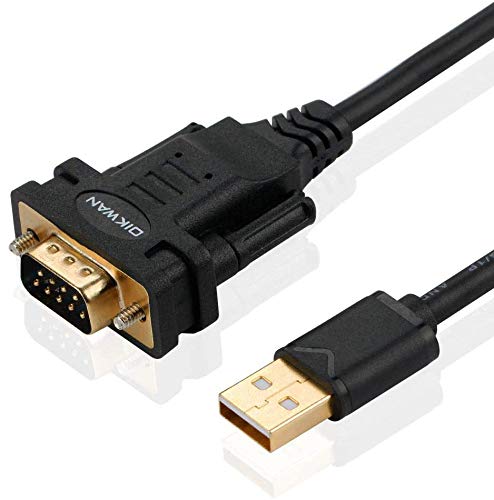
RS-232 is the dominant design in the single-port cables here. StarTech ICUSB232V2, ATEN UC232A, SABRENT CB-DB9P, SABRENT CB-FTDI, OIKWAN AQ-17, TRENDnet TU-S9, and CableCreation CD0489 all document USB-to-RS-232 connectivity. These are appropriate starting points for equipment such as modems, printers, scanners, PLCs, POS devices, and networking hardware when the connected device uses RS-232.
RS-485 and RS-422 use differential signaling and are represented by the OIKWAN AQ-RS485. Its listing documents two-wire and four-wire, half-duplex and full-duplex modes, along with point-to-point and point-to-multipoint operation. That makes it a more suitable design for equipment specifically marked RS-485 or RS-422. Do not substitute an RS-232 cable simply because both connectors may appear similar.
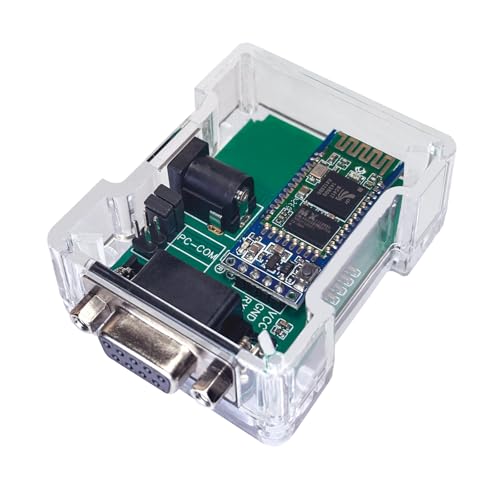
The DSD TECH SH-B23A is also an RS-232 converter, but the host side is Bluetooth rather than USB. It is intended for Android phones or Bluetooth-enabled computers. The listing states that iOS is unsupported and that only RX and TX signals are valid, so it should be considered only when those limitations match the installation.
Check connector gender and pin requirements
Connector fit is a frequent source of mismatch. OIKWAN AQ-17 identifies a male DB9 connector, while CableCreation CD0489 identifies a female DB9 connector. The TRENDnet TU-S9, StarTech ICUSB232V2, ATEN UC232A, SABRENT CB-DB9P, and SABRENT CB-FTDI listings identify DB9 or 9-pin RS-232 connections but do not all present the same gender detail in the supplied evidence. Confirm the equipment-side connector before choosing.
CableCreation also notes that a null modem adapter may be necessary if the computer and serial equipment require a different wiring arrangement. That is a connection issue, not a chipset issue. A physically compatible DB9 plug may still require the correct pin relationship for the attached device.
Evaluate host compatibility and drivers
Operating-system support varies. StarTech ICUSB232V2, ATEN UC232A, SABRENT CB-DB9P, SABRENT CB-FTDI, OIKWAN AQ-17, and CableCreation CD0489 document support across Windows, macOS, and Linux in their supplied listings. TRENDnet TU-S9 lists Windows and Mac support, while the TECHTOO four-port adapter lists Windows 10 and macOS 10.x/11.x.
Driver language also differs. SABRENT CB-DB9P says some systems may require manual driver installation. SABRENT CB-FTDI describes driverless plug-and-play installation on multiple operating systems, while OIKWAN AQ-17 identifies an FTDI chipset and states that drivers should be downloaded after receiving the product. These statements are not equivalent, so check the exact host operating system and driver process before deployment.
Consider speed and serial settings
If the application requires detailed serial configuration, StarTech ICUSB232V2 has the most complete listing in this group: it specifies a maximum baud rate of 921.6 Kbps, multiple parity modes, 5/6/7/8 data bits, and a 512-byte FIFO. ATEN UC232A also lists 921.6 Kbps and automatic handshake mode. OIKWAN AQ-17 and CableCreation CD0489 each list up to 1 Mbps, although the host, cable, device, and software must all support the required setting.
The DSD TECH SH-B23A is aimed at a different use case, listing 9,600 baud with configurable parameters and Bluetooth transmission. The RS-485/RS-422 OIKWAN model documents long-distance transmission for those protocols and automatic direction handling. Match the adapter’s documented settings to the attached device rather than selecting by headline speed alone.
Choose the right physical layout
Cable length affects where the computer can sit relative to the serial equipment. CableCreation CD0489 reaches 6.6 feet, SABRENT CB-FTDI and OIKWAN AQ-17 provide six feet, and the TECHTOO four-port model lists 4.92 feet. StarTech ICUSB232V2 is much shorter at 17 inches, while ATEN UC232A lists 35 centimeters. Shorter cables can be easier to route in a compact workstation; longer ones may suit equipment racks or benches.
For repeated plugging and unplugging, SABRENT CB-FTDI documents male thumbscrews. CableCreation lists triple shielding and tinned copper conductors. StarTech emphasizes portability, while TRENDnet documents a flexible integrated cable. These are design distinctions to weigh against the physical arrangement of the installation.
Decide whether one port is enough
A single-port adapter is appropriate when one computer communicates with one serial device at a time. If several devices must remain connected, TECHTOO 4-Port USB to RS-232 Adapter is the only selected model that explicitly adds four RS-232 ports through one USB Type-A connection. It also documents COM-port retention across reboot. The listing cautions that it does not support serial mice and other devices requiring an IRQ number or I/O address, so its multi-port design has defined boundaries.
Final recommendation
OIKWAN AQ-RS485 USB to RS-485/RS-422 Adapter ranks first overall in this specification-based comparison under the published weighted criteria.
StarTech ICUSB232V2 is the first overall specification-based choice among these best serial converter adapters. It combines the clearest serial-setting documentation, 921.6 Kbps maximum baud rate, broad operating-system support, and a compact design. ATEN UC232A is a close alternative for documented RS-232 equipment coverage and automatic handshake mode.
For a longer conventional cable, consider SABRENT CB-FTDI, OIKWAN AQ-17, or CableCreation CD0489 after confirming connector gender. TECHTOO is the relevant selection for four simultaneous RS-232 devices. OIKWAN AQ-RS485 is the appropriate design when the equipment requires RS-485 or RS-422 rather than RS-232. DSD TECH SH-B23A belongs on the shortlist when Bluetooth access is more useful than a direct USB connection. These top serial converter adapters cover different interface and installation requirements, so protocol and connector matching should decide the final selection.
Frequently Asked Questions
What should I check before choosing the best serial converter adapters?
Confirm whether the equipment uses RS-232, RS-485, or RS-422, then check DB9 gender, pin arrangement, required baud rate, flow-control needs, host operating system, and cable length. CableCreation notes that some setups may need a null modem adapter.
Which selected adapter supports RS-485 and RS-422?
OIKWAN AQ-RS485 is the selected model that documents both standards. It lists two-wire and four-wire communication, half-duplex and full-duplex modes, automatic protocol-mode conversion, and a six-foot cable.
Are these adapters all single-port models?
No. TECHTOO 4-Port USB to RS-232 Adapter documents four RS-232 ports through one USB Type-A connection. The other USB cable selections are single-port designs, while DSD TECH SH-B23A uses Bluetooth for one RS-232 connection.
Does Bluetooth work with every mobile device?
No. DSD TECH SH-B23A lists compatibility with Android phones and Bluetooth-enabled computers but explicitly says it is not compatible with iOS devices. It also states that CTS and RTS hardware flow control are unsupported.
Which adapter lists the most detailed serial settings?
StarTech ICUSB232V2 lists a 921.6 Kbps maximum baud rate, several parity modes, 5/6/7/8 data bits, and a 512-byte FIFO. ATEN UC232A also lists 921.6 Kbps and automatic handshake mode.