Buying Guide
Choosing among the best fax modems starts with the connection between the computer and the telephone line. These products are external modems rather than fax machines with their own scanners or displays. They provide the modem hardware needed for computer-based fax software, and several also support dial-up data functions.
Check the computer interface first
USB Type-A is the most common connection in this group. The StarTech USB 2.0 Fax Modem, USRobotics USR5637, AGPtek External USB 56K Modem, and Zoom 3095 USB Mini External Modem all use an external USB design. USB power can simplify installation because the modem does not require a separately listed power adapter.
The HIRO H50364 uses USB-C through a USB 2.0 interface, making it the clearest choice for a computer with a USB-C port. A USB-C model can avoid relying on an adapter, but port compatibility still needs to be checked. Product listings do not establish that every USB modem works with every computer, so confirm the available port and driver requirements before purchase.
Match the operating system
Operating-system support varies substantially. StarTech lists drivers for Windows, Windows Server, macOS versions through 12.x, and Linux kernel 3.16 and up. USRobotics USR5637 also lists Windows, Mac, and Linux compatibility. The ciciglow listing mentions Linux and Windows 11, while the newer HIRO H50364 specifically lists Windows 11 and Windows 10.
Other choices focus more heavily on older Windows versions. AGPtek lists Windows 98SE through Windows 7 in its detailed support information, while the HIRO H50228 lists Windows 7, 8, 8.1, and 10. The V BESTLIFE and Tyenaza listings likewise emphasize older Windows families. Compatibility language is not a guarantee that a specific fax application will work, so check the modem driver, Windows Fax and Scan requirements, or the software vendor’s supported hardware list.
Compare fax standards and rates
For faxing, look for explicit Group 3 standards such as V.17, V.29, and V.27ter. StarTech lists those standards plus V.21 and Class 1 fax modes. AGPtek, V BESTLIFE, and Tyenaza also identify V.17, V.29, and V.27ter support. The HIRO models document ITU-T fax compatibility and fax communication up to 14.4 Kbps.
A 56K label generally describes the data-modem side, not the fax transmission rate. StarTech, HIRO, AGPtek, V BESTLIFE, and Tyenaza all separate data speeds from fax capability in their listings. Buyers should therefore compare the stated fax standards rather than treating the headline data speed as a fax-speed specification.
Decide whether you need one or two RJ11 ports
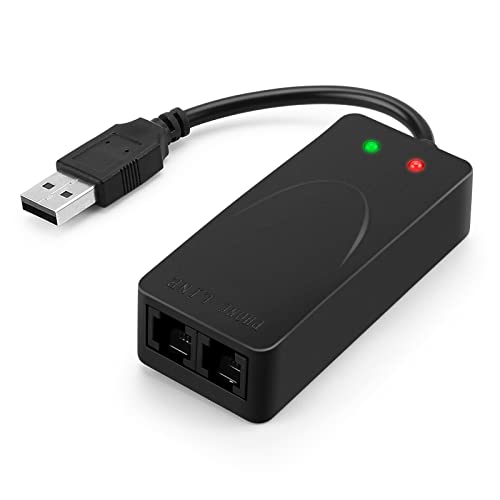
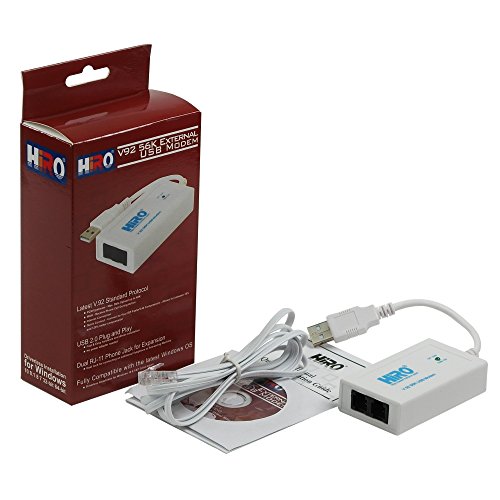
A single RJ11 jack is sufficient for a basic modem-to-phone-line connection. StarTech and Zoom specify one RJ11 telephone connection. Dual-port models such as HIRO H50228, HIRO H50364, AGPtek, V BESTLIFE, Tyenaza, and ciciglow can provide an additional connection for a telephone or answering machine, depending on the setup.
Two jacks do not automatically mean two independent fax lines. In the supplied evidence, the feature is described as an expansion or telephone connection. Treat it as wiring flexibility, not as a promise of simultaneous faxing.
Consider calling and automation features
Caller ID, auto-dial, tone and pulse dialing, auto-answer, and automatic fax sending or receiving are useful when supported by the software and telephone service. AGPtek documents the broadest set of these functions, while V BESTLIFE and Tyenaza also list automatic dialing, answering, and fax operation. StarTech adds voice and Caller ID support, and the HIRO H50364 lists Caller ID and TAPI-related operation.
Voice support is not universal. The V BESTLIFE listing says voice calls are not supported, and the Tyenaza listing similarly describes a data/fax focus without establishing voice calling. The HIRO H50228 includes a built-in buzzer, but that is not the same as speakerphone capability. Read these distinctions carefully if the modem will share a line with calls.
Look at hardware design and documentation
A controller-based model, such as the USRobotics USR5637, processes communications within the modem rather than placing that work on the computer. StarTech also describes its unit as hardware-based. These descriptions can matter in systems where predictable modem processing is preferred, but the supplied evidence does not establish comparative real-world performance.
Traditional external designs remain relevant. The USRobotics USR5686E provides a conventional external V.92 format and explicitly describes faxing from Windows applications. The Zoom 3095 is a smaller USB option that emphasizes compactness and V.92 data features. Neither format is universally better; the right choice depends on the computer port, software, and telephone-line arrangement.
Final recommendation
StarTech USB 2.0 Fax Modem 56K V.92 ranks first overall in this specification-based comparison under the published weighted criteria.
The final choice among the best fax modems depends on the documented features that match your intended use.
StarTech USB 2.0 Fax Modem 56K V.92 is the highest-scoring returned product and the first overall specification-based choice. It has the broadest documented operating-system coverage in this comparison, multiple fax standards, hardware-based processing, USB power, and Caller ID support.
For newer computers, the HIRO H50364 is the leading USB-C alternative, especially when dual RJ11 ports and Windows 11 compatibility are important. AGPtek is a strong feature-focused option for automatic dialing and two phone-line connections. Buyers who prefer a traditional external unit can consider the USRobotics USR5686E, while the USR5637 offers a broader platform listing in a controller-based USB design.
The top fax modems are not interchangeable in every setup. Confirm the operating system, available USB port, fax software, telephone-line type, and whether voice or answering-machine connectivity is required. For Linux or macOS, prioritize products whose supplied listing explicitly names those platforms rather than assuming compatibility from a USB connector.
Frequently Asked Questions
What should I check before buying one of the best fax modems?
Check four items: the computer’s USB port, the listed operating system, the fax software you plan to use, and the available telephone connection. Also verify whether you need one or two RJ11 ports, Caller ID, voice support, or automatic answering. The StarTech model is the most broadly documented across operating systems, while the HIRO H50364 is specifically positioned for USB-C and newer Windows systems.
Can these modems send and receive faxes without a separate fax machine?
The selected listings describe external computer modems that add fax functionality to a computer. Several explicitly state fax sending and receiving, including the StarTech, HIRO H50228, HIRO H50364, V BESTLIFE, and Tyenaza models. You still need compatible computer software and a supported telephone-line connection; the modem itself is not a scanner or standalone fax appliance.
Is 56K the same as a 14.4 Kbps fax rate?
No. In these listings, 56K refers to the data-modem side, while 14.4 Kbps is identified as a fax communication rate on several models. Compare the stated fax standards and fax rate separately from the data connection specification.
Do dual RJ11 fax modems support two fax lines at once?
The supplied evidence describes dual RJ11 ports as expansion connections for a telephone or answering machine. It does not establish simultaneous operation across two independent fax lines. Treat the second port as connection flexibility unless the manufacturer provides more specific multi-line documentation.
Are USB fax modems compatible with Windows 11 or Linux?
Compatibility depends on the specific model and driver. The HIRO H50364 lists Windows 11, and ciciglow lists Windows 11 and Linux. StarTech lists Windows, macOS, and Linux driver availability, while the USRobotics USR5637 lists Windows, Mac, and Linux. Other models in this comparison focus on older Windows versions, so confirm support before ordering.