Buying Guide
Choosing among the best fax printers starts with the work you expect the machine to do. Every selection here is a multifunction printer rather than a fax-only device, so the comparison considers printing, scanning, copying, and faxing together. The rankings use listed specifications and features only; they are not based on hands-on testing or customer opinions.
Decide between laser, inkjet, and tank designs
Monochrome laser models are the clearest fit for text-heavy office work. The Canon imageCLASS MF287dw, HP LaserJet Pro MFP 3101fdw, and Brother MFC-L2820DW all document black-and-white laser printing, duplex output, faxing, scanning, and copying. Their listed speeds reach 35, 35, and 36 pages per minute respectively. That makes them useful when most documents are letters, forms, reports, or other text pages.
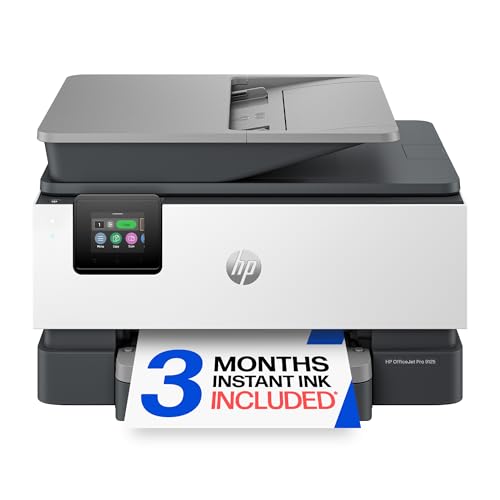
Color inkjet models are more flexible for presentations, flyers, graphics, and photographs. The HP OfficeJet Pro 9135, HP OfficeJet Pro 9125, and Brother INKvestment 4355 combine faxing with color output and automatic document features. The Canon PIXMA TR8620a is another color option with photo and document support, but it is not included in the final ten because the selected models provide stronger documented workflow evidence for this comparison.
Refillable-tank printers change the supply workflow. The Epson EcoTank ET-4903 and HP Smart Tank 7603 use tank systems rather than standard small cartridges, while the supplied descriptions list substantial included ink capacities. This can suit users who print color documents regularly, although tank printers may have lower listed speeds than laser alternatives.
Match speed and paper capacity to workload
Print speed matters most when several people share a device or when documents arrive in batches. The Brother MFC-L2820DW lists up to 36 ppm, while both selected HP and Canon monochrome laser models list up to 35 ppm. Color office models are generally slower in their supplied specifications, although the HP OfficeJet Pro 9135 reaches up to 25 ppm black and 20 ppm color.
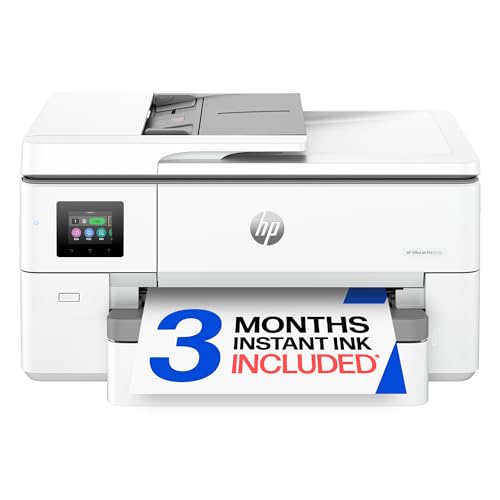
Paper capacity reduces how often the input tray must be replenished. The HP OfficeJet Pro 9135 has two 250-sheet trays, which can help separate paper types or sizes. The HP OfficeJet Pro 9125, HP OfficeJet Pro 9720, and Epson WorkForce Pro WF-4830 each document a 250-sheet capacity or tray. More compact options such as the Brother INKvestment 4355 list a 150-sheet tray, while the Epson EcoTank ET-4903 lists 100 sheets.
Check the automatic document feeder
An ADF is important for multi-page faxing, copying, and scanning because it lets you process a stack rather than placing every page individually. The Brother MFC-L2820DW lists a 50-page ADF, the Epson WorkForce Pro WF-4830 lists 35 pages, and the Brother INKvestment 4355 lists 20 pages. Several other models confirm an ADF without giving a capacity, so do not assume all feeders hold the same amount.
Duplex handling is another useful distinction. The HP OfficeJet Pro 9135 documents automatic two-sided printing and single-pass two-sided scanning. The HP OfficeJet Pro 9125 documents automatic two-sided printing and scanning, while the Epson WorkForce Pro WF-4830 lists automatic two-sided print, copy, scan, and fax capabilities. These features can reduce manual page turning for double-sided documents.
Choose the right connectivity
Wireless access is common across the list, but connection details vary. The Canon imageCLASS MF287dw supports Canon mobile services, Apple AirPrint, and Mopria. The HP LaserJet Pro MFP 3101fdw adds Ethernet and Bluetooth, making it a strong choice where a wired connection is useful. The Epson WorkForce Pro WF-4830 lists Ethernet, USB, Bluetooth Low Energy, and Wi-Fi.
Cloud and direct-mobile options can matter in a home office. The Brother MFC-L2820DW supports printing and scanning with listed cloud apps, while the Brother INKvestment 4355 includes cloud connections, USB, mobile control, and Wi-Fi Direct. Before buying, verify that the intended computers and mobile devices are supported by the manufacturer’s current software.
Consider page size and color needs
Most office documents use standard letter-size paper, but the HP OfficeJet Pro 9720 is the specialist choice when wide-format output is required. Its listing states support for documents up to 11 by 17 inches and mentions floorplans, mood boards, and spreadsheets. That extra flexibility comes with a larger physical footprint than compact home-office printers.
For color photos and graphics, inkjet models offer the broader fit. The Epson EcoTank ET-4903 lists photo printing and a 5760 by 1440 dpi resolution, while the Canon PIXMA TR8620a lists photo and borderless document printing. For primarily black text, a monochrome laser model may be the more appropriate design.
Review ongoing supply requirements
The evidence includes refillable tanks, replaceable toner, and cartridge-based ink systems. Tank models can reduce the frequency of cartridge changes, but they require bottle refills. Laser models use toner, and the Canon imageCLASS MF287dw lists a high-capacity toner option. HP and Brother listings also mention optional ink or toner delivery services. These services may involve recurring fees after an included trial, so check the terms before enrollment.
Final Recommendation
HP OfficeJet Pro 9135 ranks first overall in this specification-based comparison under the published weighted criteria.
HP OfficeJet Pro 9135 is the highest-scoring returned product and the first overall specification-based choice among the best fax printers. Its combination of faxing, duplex printing and scanning, a document feeder, two 250-sheet trays, fast color output, wireless access, and mobile tools gives it the most specification-aligned documented office-oriented profile in this comparison.
For text-heavy work, the Brother MFC-L2820DW and Canon imageCLASS MF287dw are compelling top fax printers because their monochrome laser engines list speeds of up to 36 and 35 ppm. Choose the HP OfficeJet Pro 9720 when 11-by-17-inch output is essential. For refillable color printing, compare the Epson EcoTank ET-4903 with the HP Smart Tank 7603. The final decision should follow your paper size, color needs, document volume, connection preferences, and tolerance for cartridge, toner, or bottle-based supplies.
Frequently Asked Questions
What makes the best fax printers different from a fax-only machine?
The best fax printers in this comparison add printing, scanning, and copying to fax functionality. Models such as the HP OfficeJet Pro 9135, Canon imageCLASS MF287dw, and Epson EcoTank ET-4903 also document automatic document handling, while some add duplex printing, mobile apps, cloud access, or wired networking.
Is a laser or inkjet fax printer better for office documents?
A monochrome laser model is generally the more directly documented fit for high-volume black-and-white documents because the selected laser printers list speeds from 35 to 36 ppm. Inkjet and tank models are better suited when color, graphics, photos, or refillable supplies are more important than maximum listed text speed.
Do all fax printers have an automatic document feeder?
All ten selected products document an ADF or automatic document feeder in their supplied evidence. Capacities vary or may not be stated: the Brother MFC-L2820DW lists 50 pages, the Epson WorkForce Pro WF-4830 lists 35, and the Brother INKvestment 4355 lists 20. Check the specific capacity when scanning or faxing large stacks.
The HP OfficeJet Pro 9720 documents color printing up to 11 by 17 inches. It also includes faxing, scanning, copying, an ADF, duplex printing, wireless connectivity, and a 250-sheet input tray. It is the specialized choice here for larger office pages rather than standard letter-size work alone.