Buying Guide
Choosing among the best workgroup printers starts with the way your team handles documents. A shared printer for invoices and internal forms has different needs from a department producing color presentations or scanning signed paperwork. The products above range from enterprise monochrome lasers to a color multifunction model and a specialized dot-matrix printer, so compare the documented capabilities rather than relying on the category label alone.
Match the printer type to the workflow
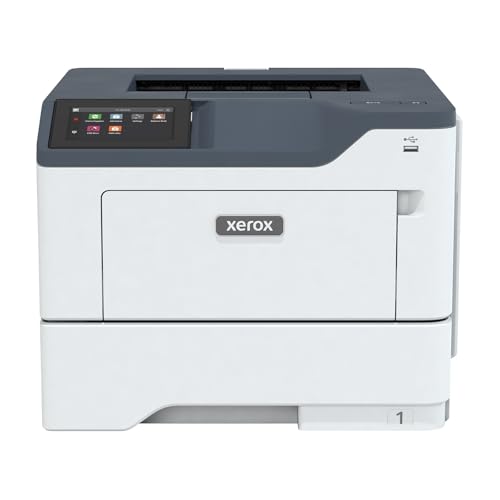
Monochrome laser printers are a practical fit when the workload is mostly text, reports, shipping documents, or internal records. The Brother HL-L6310DW reaches up to 52 pages per minute, while the Brother HL-L6210DW lists up to 50 ppm and the HP LaserJet 4250N lists up to 45 ppm. The Xerox B410 lists 1200 x 1200 dpi output and is designed for compact business placement.
An all-in-one can reduce the number of separate devices in a department. The Brother MFC-L6810DW adds printing, copying, scanning, and duplex scanning, with an 80-page ADF and listed scanning up to 200 images per minute. The Xerox C303a adds color printing, scanning, copying, and faxing, plus a duplex ADF. Choose this type when document capture and redistribution are regular parts of the job.
The Epson FX-890N is a different type of tool. Its nine-pin dot-matrix design and roll-media support are relevant to specialized forms workflows, but it is not a general substitute for a color laser or multifunction office printer. The Epson WorkForce WF-C5890 is another business-oriented candidate, although its supplied listing does not provide enough detail to confirm speed, capacity, or workflow features.
Consider speed and paper capacity together
A high page-per-minute figure helps when several people send jobs to one device, but tray capacity affects how often someone must refill it. The Brother HL-L6310DW and MFC-L6810DW each list a 520-sheet main tray, a 100-sheet multipurpose tray, and expansion up to 1,660 sheets with optional trays. The HL-L6210DW lists the same core paper arrangement and expansion range.
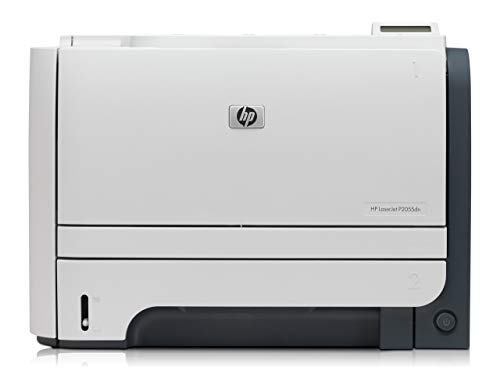
The HP LaserJet P2055dn lists a 300-page capacity, while several other selected listings do not provide a capacity figure. Do not assume that a compact printer has the same refill profile as a larger enterprise model. If your team prints continuously, prioritize documented input capacity and expansion options. If jobs are occasional, a compact design such as the Xerox B410 may make more sense for a desk, counter, or reception area.
Review networking and administration
Shared-office printers need more than a basic USB connection. The Brother HL-L6210DW lists Gigabit Ethernet and dual-band wireless networking. The HP LaserJet P2055dn lists USB and Gigabit Ethernet. The Xerox C303a lists dual-band Wi-Fi, Apple AirPrint, Mopria, cloud scanning, and smartphone setup through the Xerox Easy Assist App.
Administration also matters as the number of users grows. The Brother HL-L6310DW lists device-management tools for distributing configurations, security settings, firmware updates, and automated tasks. The MFC-L6810DW lists cloud destinations from its touchscreen, while the Xerox B410 lists app-based monitoring for printer status and toner levels. These details can help centralized administration, although the supplied evidence does not quantify setup time or IT labor.
Give security appropriate weight
The Brother enterprise models provide the most detailed security evidence in this comparison. The MFC-L6810DW and HL-L6310DW list Triple Layer Security and integrated NFC card readers for badge authentication. The HL-L6210DW also lists Triple Layer Security. Those features are relevant when documents contain confidential employee, financial, or client information.
The other listings provide less security detail. That does not establish that they lack security controls; it means the supplied evidence does not describe them. For a regulated or security-sensitive office, confirm authentication, encrypted transmission, administrator controls, and update policies before purchase. Avoid selecting solely on speed when the printer will serve many users or handle sensitive documents.
Decide whether color is necessary
Color can be useful for presentations, charts, marketing documents, and forms, but it is not essential for every shared office. The Xerox C303a is the clearest documented color multifunction option here, while the Dell S3840CDN is explicitly identified as a color laser network printer with duplex printing. The Epson WorkForce WF-C5890 is another color-oriented business option, but its listing is sparse.
If most pages are text, the Brother, Xerox B410, and HP monochrome models offer a more focused match. If color is occasional, consider whether a dedicated color device or an all-in-one better fits the office layout. The supplied evidence does not provide enough information to compare consumable yields across all selected models, so verify operating requirements separately.
Check space, warranty, and listing condition
Physical size and condition can change the practical choice. The Xerox B410 is described as compact, while enterprise models such as the Brother MFC-L6810DW are larger multifunction machines with more extensive paper handling. Renewed HP models may offer a lower-commitment route to a network laser, but the selected listings specify 90-day limited warranties. Newer Brother and Xerox models list one-year limited or manufacturer warranties, while the Epson FX-890N listing does not show a warranty in the supplied evidence.
Measure the available space and allow room for paper access, cable routing, and output. For renewed products, verify the included accessories, return terms, and service coverage before ordering.
Final recommendation
Brother MFC-L6810DW ranks first overall in this specification-based comparison under the published weighted criteria.
Brother MFC-L6810DW is the first overall specification-based choice among the best workgroup printers. It combines up to 52 ppm printing and copying, large expandable paper capacity, fast two-sided scanning, cloud destinations, NFC authentication, and enterprise security in one device.
The Brother HL-L6310DW is a strong fit when scanning and copying are unnecessary but centralized management and secure monochrome printing matter. Choose the HL-L6210DW for similar expandable capacity with a slightly lower listed print speed. For color multifunction work, the Xerox C303a is the clearest documented option, while the Dell S3840CDN is a simpler color laser network choice.
The Xerox B410 suits compact black-and-white placement, and the HP LaserJet 4250N or P2055dn can make sense when renewed hardware is acceptable. The Epson FX-890N should be reserved for specialized dot-matrix and roll-media needs. These are the top workgroup printers in this comparison by the supplied specifications and editorial scoring, not by hands-on testing or customer feedback.
Frequently Asked Questions
What should I look for in the best workgroup printers?
Start with print volume, speed, paper capacity, network connectivity, and the functions your team actually uses. If scanning is frequent, an ADF and duplex scanning can matter more than a small difference in print speed. For confidential documents, look for documented authentication and security controls such as those listed for the Brother enterprise models.
Are monochrome laser printers suitable for a shared office?
Yes, when the office mostly prints text documents, reports, forms, or internal records. The Brother HL-L6310DW, Brother HL-L6210DW, Xerox B410, HP LaserJet P2055dn, and HP LaserJet 4250N are monochrome laser options in this selection. Confirm paper capacity, network features, and support terms for your particular workload.
Which selected model supports color and multifunction work?
The Xerox C303a is the clearest documented match because it lists color printing, scanning, copying, faxing, and a duplex ADF. The Brother MFC-L6810DW is multifunction but monochrome. The Dell S3840CDN is identified as a color laser network printer, although the supplied listing does not describe scan or copy functions.
Is a dot-matrix printer still useful for workgroups?
It can be useful for specialized forms and roll-media workflows. The Epson FX-890N lists nine-pin monochrome dot-matrix technology, roll media up to 8.5 inches, and character-per-second speeds. It is not a general replacement for a modern laser or color multifunction printer, so select it only when that media and output type match the workflow.
Should I choose a renewed workgroup printer?
A renewed model may fit a basic shared-printing requirement, but review the listing condition, included accessories, and warranty carefully. The selected renewed HP models list 90-day limited warranties. Newer models in the comparison list one-year manufacturer or limited warranties, though warranty coverage should still be confirmed before purchase.