Buying Guide
The best usb-to-usb adapters are defined first by connector direction. USB-C-to-USB-A adapters place a USB-C male plug into a newer computer, tablet, phone, or other host and provide a USB-A female port for an older cable or peripheral. USB-A-to-USB-C adapters do the reverse: they let a USB-C cable or accessory connect to a traditional USB-A port on a charger, computer, car charger, hub, or power bank. A few kits, such as the UGREEN USB-to-USB-C Adapter Combo 4-Pack, include both directions.
Match the connector direction
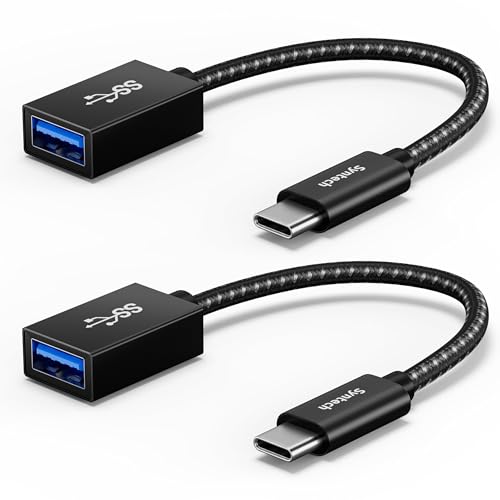
Check both ends before comparing speed or construction. The Syntech USB-C to USB-A Adapter 2-Pack, Anker USB-C Adapter 2-Pack, JSAUX USB-C to USB 3.0 Adapter 2-Pack, Basesailor USB-C to USB 3.0 Adapter 3-Pack, and UGREEN USB-C to USB Adapter 4-Pack all document a USB-C male-to-USB-A female arrangement. These designs are appropriate when a USB-C host must accept a USB-A drive, mouse, keyboard, card reader, hub, printer, or cable.
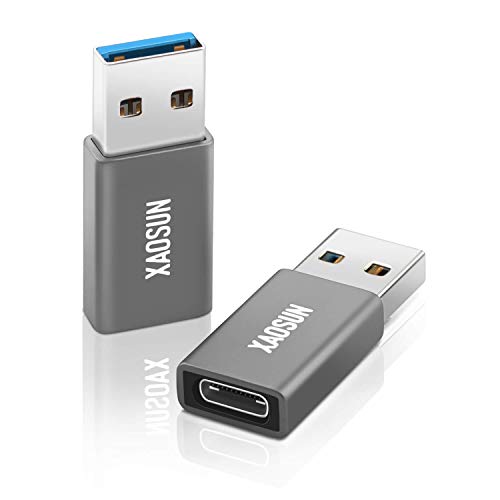
The XAOSUN 10Gbps USB-A to USB-C Adapter 2-Pack and UGREEN USB-to-USB-C Adapter 3-Pack document the opposite direction. They are intended to place a USB-C cable or peripheral on a USB-A port. This is especially relevant for older chargers and computers. The mixed UGREEN USB-to-USB-C Adapter Combo 4-Pack is the most flexible format when both directions are part of the same setup.
Choose a documented speed standard
Transfer speed should be matched to the host port, peripheral, and cable. A 10Gbps claim does not make a USB 2.0 drive operate at 10Gbps. It indicates the adapter is specified for that ceiling when the rest of the chain supports it. Syntech identifies USB 3.2 Gen 2 and up to 10Gbps. UGREEN’s mixed four-pack, UGREEN USB-to-USB-C Adapter 3-Pack, UGREEN USB-C to USB Adapter 4-Pack, and XAOSUN adapter also list up to 10Gbps.
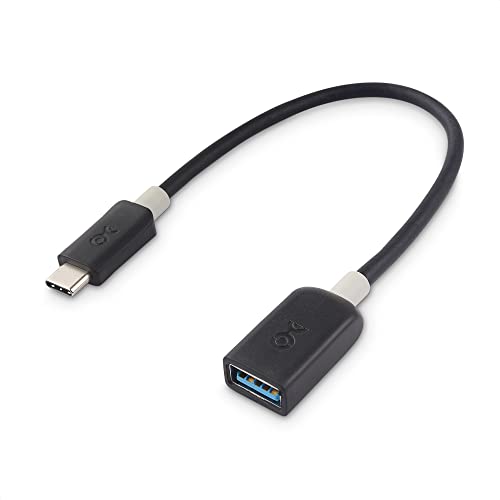
The Amazon Basics USB-C to USB-A Adapter Cable and Cable Matters 5Gbps USB-C to USB-A Adapter list up to 5Gbps. That remains a clearly documented USB 3.x class, but it is a lower stated ceiling than the 10Gbps models. The JSAUX and Basesailor three-pack also specify up to 5Gbps. For keyboards, mice, printers, and many ordinary accessories, the connector and host compatibility may matter more than the maximum number.
Check charging details carefully
Data conversion and charging are related but not identical. The Amazon Basics cable specifies up to 15W, while the UGREEN USB-to-USB-C Adapter 3-Pack and UGREEN mixed four-pack specify up to 3A. XAOSUN lists up to 100W but also explains that protocol support affects high-power use and that USB-A conversion does not provide PD protocol support after conversion. Those qualifications should be treated as part of the specification, not ignored.
Several USB-C-to-USB-A listings focus on data and general charging without giving a specific wattage. That includes Anker, Cable Matters, JSAUX, and the Basesailor USB-C to USB 3.0 Adapter 3-Pack. Do not infer a particular charging rate merely from a USB 3.0 label. The charger, cable, host, device, and charging protocol all remain part of the connection.
Consider port clearance and cable shape
A rigid thumb-sized adapter keeps the connection close to the port. That can be convenient, but a wide housing may interfere with a neighboring port. Anker and Syntech specifically address side-by-side use, while the UGREEN USB-C to USB Adapter 4-Pack describes an extremely slim design. The Basesailor three-pack also identifies a slim profile that helps reduce obstruction.
A short cable creates a little distance between the host and the connected USB-A device. Cable Matters uses a six-inch format, Amazon Basics supplies a 5.5-inch cable, and JSAUX uses a braided cable design. UGREEN’s 10Gbps wired adapter also describes a nylon-braided cable. These designs may be easier to position when a direct rigid adapter would press against another device or port.
Evaluate construction claims without overreading them
Aluminum, zinc alloy, and braided materials appear throughout the selected products. They can describe the housing or outer cable design, but they do not independently prove a particular transfer result. The practical comparison is whether the listing also supplies connector, speed, and compatibility information. Syntech combines aluminum housings with a braided cable; XAOSUN identifies an aluminum shell and a 20,000-cycle claim; Anker, UGREEN, JSAUX, and Basesailor specify aluminum construction in their respective formats.
If repeated plugging is part of the use case, documented cycle claims may be relevant. Anker, UGREEN, and JSAUX list 10,000 plug-and-unplug cycles, while XAOSUN lists more than 20,000. These are supplied design specifications, not independent durability test results. A warranty can also help identify the manufacturer’s stated support period, but it should not be treated as proof of performance.
Understand what these adapters do not provide
The selected listings describe USB data, charging, and OTG connections. They do not establish video output. Basesailor’s USB-A-to-USB-C adapter says it is not for HDMI, DisplayPort, VGA, or video output; JSAUX explicitly says it is not compatible with video output. If a monitor, dock, or display signal is the goal, verify that the product is a purpose-built video adapter rather than assuming USB connector compatibility is enough.
Also check the host device’s role. A USB-C port may support charging, data, display, or only some of those functions. An adapter cannot add a protocol that the host, cable, or accessory does not support. For the best usb-to-usb adapters, the most suitable specification comparison is therefore connector direction first, followed by the lowest supported standard in the complete connection.
Final recommendation
UGREEN USB-to-USB-C Adapter Combo 4-Pack ranks first overall in this specification-based comparison under the published weighted criteria.
UGREEN USB-to-USB-C Adapter Combo 4-Pack is the first overall specification-based choice among the selected products.
Among the top usb-to-usb adapters, the ranked products differ under documented connector fit and direction, documented data speed, charging and power support, device and peripheral compatibility, and construction and portability.
The UGREEN USB-to-USB-C Adapter Combo 4-Pack ranks first under the published weighted criteria. It combines both connector directions with documented 10Gbps transfer, 3A charging, aluminum construction, and broad compatibility. Syntech USB-C to USB-A Adapter 2-Pack follows with USB 3.2 Gen 2 support up to 10Gbps, side-by-side clearance, aluminum housings, and a braided cable. The XAOSUN 10Gbps USB-A to USB-C Adapter 2-Pack stands out for detailed charging and durability specifications.
For a shorter 5Gbps cable, Amazon Basics and Cable Matters provide clearly documented cable-format alternatives. Anker, UGREEN, JSAUX, and Basesailor emphasize compact housings or multi-pack utility. The best usb-to-usb adapters still depend on the exact ports and protocols in the devices being connected, so confirm those details before selecting a format.
Frequently Asked Questions
What are the best usb-to-usb adapters for USB-C laptops?
The Syntech USB-C to USB-A Adapter 2-Pack, Anker USB-C Adapter 2-Pack, UGREEN USB-C to USB Adapter 4-Pack, and Basesailor USB-C to USB 3.0 Adapter 3-Pack all document USB-C-to-USB-A use. Syntech and Anker specifically address side-by-side port access, while UGREEN specifies a slim design. Select among them based on the stated speed, pack format, and whether a cable or rigid body suits the workspace.
Can a USB-C-to-USB-A adapter connect a flash drive?
Yes, when the host device supports the required USB data or OTG function. Syntech, Anker, JSAUX, Basesailor, and UGREEN list flash drives or other USB-A peripherals among compatible uses. The adapter changes the physical connector arrangement; it does not ensure that every phone, tablet, drive, or host supports every USB mode.
Do these adapters support video output?
The supplied evidence does not support treating these products as video adapters. Basesailor and JSAUX explicitly exclude video output, and the other selected listings describe USB data, charging, or OTG rather than HDMI, DisplayPort, or VGA conversion. Use a product whose specifications specifically identify the display protocol when a monitor connection is required.
Is 10Gbps always faster in daily use?
Not necessarily. The host port, cable, peripheral, and file device must all support the same standard. A 10Gbps-rated adapter such as Syntech, XAOSUN, or the selected UGREEN models provides a higher documented ceiling, but a USB 2.0 drive or host can still limit the connection. Treat the listed rate as an interface specification rather than an assured real-world result.
Which direction is best for an older USB-A charger?
Use a USB-A male-to-USB-C female adapter when the charger has a USB-A port and the cable or device uses USB-C. The XAOSUN 10Gbps USB-A to USB-C Adapter 2-Pack and UGREEN USB-to-USB-C Adapter 3-Pack document this arrangement. Check their charging notes and the charger’s own protocol before expecting a particular charging mode.