Buying Guide
Choosing among the best google home security cameras starts with the location and viewing goal, not simply the highest resolution. A camera for a nursery or living room has different requirements from one watching a driveway. The listings in this comparison cover fixed indoor cameras, pan-and-tilt designs, wired Nest models, a battery-powered Nest model, and multi-camera packages.
Start with Google Home compatibility
Google Home compatibility does not mean every camera offers the same experience. The Google Nest Cam models are Google products and document direct use with the Google Home app. The Tapo, Wyze, and GNCC listings describe Google Assistant compatibility, generally for viewing a live feed on compatible Chromecast or Nest displays.
That distinction matters if you want Google Home to be the main place for camera management. The Google Nest Cam Indoor (Wired, 3rd Gen) and Google Nest Cam Outdoor (Wired, 2nd Gen) also document Google-specific security and intelligence features. By contrast, third-party cameras may rely more heavily on their own apps for setup, notifications, storage, and settings.
Before buying, check whether your intended screen is supported. The Tapo listings specifically limit Google streaming to Chromecast and Nest devices, while the older wired indoor Nest listing says it requires the Google Home app and is not compatible with the Nest app or Nest site.
Match resolution to the scene
Resolution is most useful when it supports the details you actually need to see. The selected Google Nest Cam Indoor (Wired, 3rd Gen) and both 2025 outdoor wired Nest listings specify 2K HDR. The Tapo C210P2 and GNCC four-pack also document 2K video. Several other choices use 1080p, including the battery Nest Cam, Tapo C500, Tapo C100, Tapo C200, and WYZE Cam Pan v3.
For a small indoor room, 1080p may be sufficient for general movement, pets, or communication. A larger room, driveway, or yard may benefit from the higher-resolution choices, particularly when the camera has a wider view or pan and tilt. Resolution alone does not determine coverage, so consider the field of view and camera movement at the same time.
Night vision varies in the supplied evidence. The Nest models document night vision without a listed distance. The Tapo C500 specifies night vision up to 98 feet, while the Tapo C100 and Tapo C200 list up to 30 feet. WYZE Cam Pan v3 and the WYZE Duo Cam Pan specify color night vision. These are documented features, not independent low-light test results.
Decide between fixed, pan/tilt, and dual-camera views
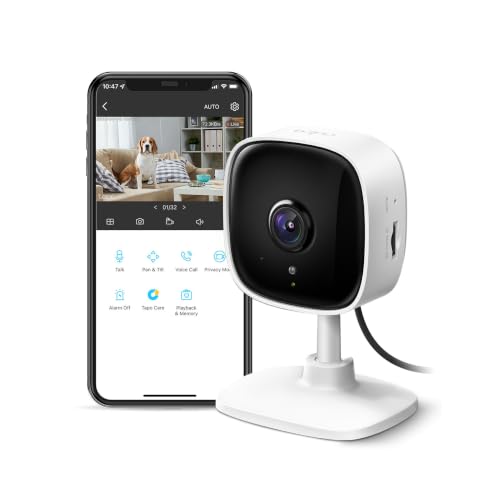
A fixed camera is usually the simplest design for a specific doorway, crib, desk, or pet area. The Tapo C100 is a straightforward example. Its view does not sweep across a room, but it includes detection, two-way audio, a siren, and night vision.
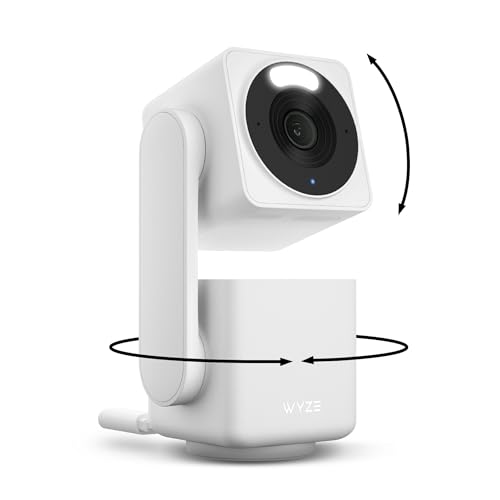
Pan-and-tilt cameras can cover more of a room or yard from one mounting point. The Tapo C500 documents 360-degree horizontal and 130-degree vertical movement. WYZE Cam Pan v3 documents 360-degree pan and 180-degree tilt, while Tapo C210P2 documents 360-degree horizontal and 114-degree vertical movement. The Tapo C200 also documents 360-degree horizontal and 114-degree vertical movement, and GNCC’s four-pack lists 355-degree horizontal and 90-degree vertical rotation.
Movement can be useful for large rooms, but it is not the same as seeing every area simultaneously. The WYZE Duo Cam Pan addresses that trade-off with two cameras: one can follow motion while the other maintains a steady view. A multi-camera package such as the Tapo C210P2 or GNCC four-pack may be a better fit when you need separate rooms covered at once.
Choose wired or battery power
Power affects placement and maintenance. The wired Google Nest Cam Indoor and wired outdoor Nest models are designed for always-on operation near a suitable power connection. That is useful for permanent installations where continuous availability matters.
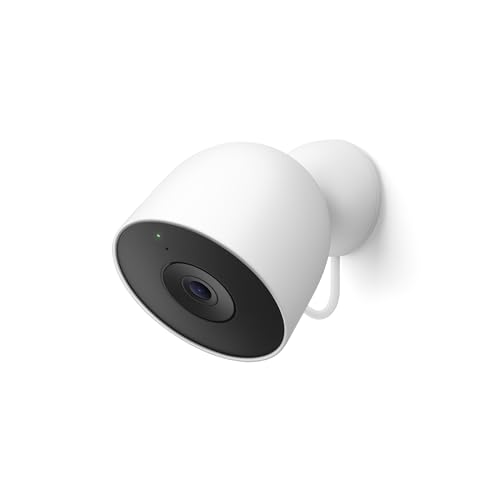
The Google Nest Cam Outdoor or Indoor, Battery is more flexible because it does not need to be installed near an outlet. Its magnetic mount also supports easier repositioning. The trade-off is that battery placement introduces recharge planning, and the listing says continuous power and 24/7 recording require separately sold accessories and a subscription.
Third-party indoor cameras in this list use wired power, while the WYZE Cam Pan v3 requires an outdoor power adapter for outdoor use. Think through cable routing, mounting height, and whether an outlet remains accessible before selecting a camera for an exterior wall or high shelf.
Compare storage before installation
Storage determines how far back you can review events. The battery Nest Cam includes three hours of free event history, and the wired indoor Nest listing describes the same type of free event history. The battery model can also store up to an hour of recorded events during a Wi-Fi outage or power outage, according to its listing.
Local storage is a central feature of several third-party choices. Tapo C500, Tapo C210P2, Tapo C100, Tapo C200, WYZE Cam Pan v3, WYZE Duo Cam Pan, and GNCC’s four-pack all document microSD or TF-card recording. Capacity limits vary, and cards are generally sold separately. WYZE Duo Cam Pan and WYZE Cam Pan v3 list support up to 512GB, while GNCC lists 24/7 microSD recording without supplying the card.
Cloud storage can provide remote access and event history, but the listings indicate that some cloud features require a separate service. Read the included-history terms and subscription requirements carefully if you want searchable recordings or longer retention.
Review detection and communication features
Most selected cameras document some combination of motion detection, person detection, sound alerts, or object recognition. The battery Nest Cam specifically distinguishes people, animals, and vehicles. Tapo C100 lists motion, person, and baby-crying detection. The Tapo C500 and WYZE models add motion tracking, while the newer Google Nest models describe richer event summaries with Google Home Premium.
Two-way audio is useful for speaking to family members, calming pets, or addressing someone at the door. It is documented on the Tapo, WYZE, GNCC, and older wired Nest selections. Sirens appear on several third-party models, but a siren is a deterrence feature rather than a guarantee that an unwanted visitor will leave.
Privacy controls also differ. The newer wired Google Nest Indoor listing describes encrypted video, two-step verification, and a green processing or streaming indicator. Tapo C500 includes a physical privacy mode that blocks the lens, while the WYZE and other models document app-based controls or storage choices. Give these controls as much attention as video resolution when placing a camera inside a private area.
Final Recommendation
Google Nest Cam Indoor (Wired, 3rd Gen) ranks first overall in this specification-based comparison under the published weighted criteria.
Google Nest Cam Indoor (Wired, 3rd Gen) is the highest-scoring returned product and the first overall specification-based choice among the best google home security cameras. It combines 2K HDR, night vision, a wide and tall indoor view, and Google-specific features in a focused wired design.
For outdoor monitoring, Google Nest Cam Outdoor (Wired, 2nd Gen) is the clearest match when continuous power is available. Choose Google Nest Cam Outdoor or Indoor, Battery when placement flexibility matters more than always-on wired operation. The WYZE Duo Cam Pan is a strong alternative when dual views, pan and tilt, local recording, and outdoor-rated construction are priorities.
The top google home security cameras are not interchangeable. Tapo C500 and WYZE Cam Pan v3 suit broad pan-and-tilt coverage, while Tapo C210P2 and GNCC’s four-pack make more sense for multiple indoor rooms. For a simpler fixed indoor installation, Tapo C100 keeps the feature set focused. Confirm app compatibility, power access, storage requirements, and any subscription-dependent functions before ordering.
Frequently Asked Questions
What are the best google home security cameras for Google Home displays?
Google Nest Cam models are the most direct Google-centered choices because they use Google Home and document Google-specific features. Tapo, Wyze, and GNCC models also list Google Assistant compatibility, but their listings describe viewing through compatible Chromecast or Nest displays and continued use of their own apps for camera functions.
Should I choose a wired or battery-powered camera?
Choose a wired model for a permanent location with convenient power and a preference for continuous operation. Choose the Google Nest Cam Outdoor or Indoor, Battery when you need more placement freedom or do not have an outlet nearby. Remember that the battery model’s listing requires separately sold power accessories and a subscription for continuous recording.
Are pan-and-tilt cameras better than fixed cameras?
They can cover a wider area from one mounting point, but movement does not show every direction simultaneously. Fixed models such as Tapo C100 are appropriate when one specific area matters. Pan-and-tilt models such as Tapo C500 or WYZE Cam Pan v3 suit larger rooms and yards. A dual-camera design or multi-camera pack may be preferable when simultaneous views are important.
Do these cameras require a subscription?
Requirements vary. The listings document free event history for selected Nest models, optional local microSD recording for several Tapo, Wyze, and GNCC models, and subscription-based cloud or advanced intelligence features on some products. Check the exact camera’s storage limits and which functions remain available without a paid plan.
What should I check before installing an outdoor camera?
Confirm that the selected model documents outdoor suitability, that power and cable routing are practical, and that the camera’s viewing range covers the intended area. WYZE Cam Pan v3 lists IP65 protection and an outdoor power-adapter requirement. The wired and battery Google Nest outdoor models document outdoor use, while indoor-only models should not be treated as exterior cameras.