Buying Guide
The best high-definition webcams differ less by their broad labels than by the specific imaging, audio, and mounting details documented in their listings. Start with the way the camera will be used, then compare resolution with lens control, lighting support, microphone information, and connection requirements.
Choose the right resolution
Resolution describes how many pixels the camera can deliver, but the listing should also state a frame rate or output format when possible. The SVPRO 4K USB Camera with 10X Optical Zoom and the SVPRO 4K Web Camera with Sony IMX317 Sensor both document 3840x2160 capture at 30fps. These are the clearest choices in this group when maximum image detail is the priority.
The SECFOU 4K Webcam lists output up to 2592x1944, which is a different format from 3840x2160. The High-Definition USB Camera with 1080P/2K/4K Modes lists several output modes, but its supplied evidence does not state a frame rate. For a more conventional Full HD setup, the Logitech Brio 101, SVPRO 1080P Webcam, JINGBOFENG-NO1 camera, Alipis, and Xweiryn K1 all document 1080p capability. The Xweiryn K1 additionally states up to 30fps, while the JINGBOFENG-NO1 camera specifies 1920x1080 at 30fps.
Decide between fixed, automatic, and manual focus
Autofocus is useful when the subject may move toward or away from the camera. The SECFOU model and the High-Definition USB Camera with Touch-up Beauty Lighting both list autofocus. The Logitech Brio 101 also provides app-based zoom, framing, and camera-setting controls, although the supplied evidence does not call out an autofocus system.
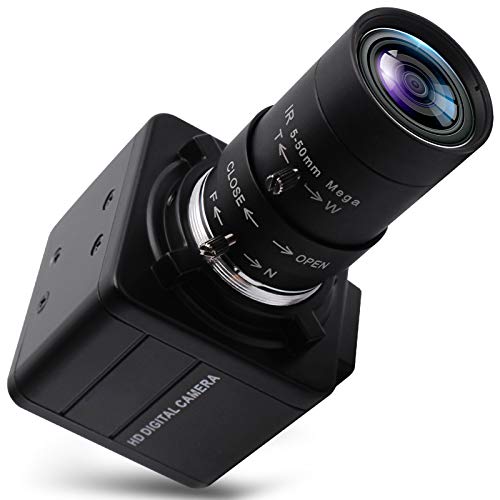
Manual or varifocal control is more appropriate when the camera will stay in a planned position. The SVPRO 4K USB Camera with 10X Optical Zoom has a 5-50mm lens and manual focal adjustment. The SVPRO 1080P Webcam uses a 2.8-12mm varifocal lens with manual focus, iris, and focal-length adjustment. These designs can help frame a presenter, workbench, or distant subject, but they require deliberate adjustment rather than relying entirely on automatic behavior.
A fixed-focus camera can be simpler for a stable desk position. Those two cameras were not selected because their supplied evidence is less detailed overall, but fixed-focus webcams remain a legitimate design type for consistent subject distances.
Treat lighting as a separate buying decision
Resolution alone does not describe how a webcam handles a dim room. The Logitech Brio 101 lists RightLight automatic light balance and says it boosts brightness by up to 50% compared with previous-generation Logitech webcams. The High-Definition USB Camera with Touch-up Beauty Lighting includes a touch-controlled ring light, and the SECFOU model lists a fill-in light with an adjustable base.
Those candidates are not in the final ten, so they are not used as recommendations here. The practical distinction is simple: an integrated light is documented hardware, whereas a lens or image-processing claim does not necessarily mean the camera includes illumination. If the desk location is poorly lit, prioritize a selected model with a named light or documented automatic light balancing.
Check the microphone evidence
For calls and classes, look for a specific microphone description rather than assuming every webcam has equivalent audio. The Logitech Brio 101 lists a built-in microphone. The High-Definition USB Camera with 1080P/2K/4K Modes specifies a noise-cancelling microphone, while the SECFOU model lists a built-in microphone. The JINGBOFENG-NO1 camera documents two digital stereo microphones with automatic noise reduction.
Several specialist cameras in the ranking do not list an integrated microphone. That includes both selected SVPRO 4K models and the SVPRO 1080P Webcam. They may therefore be better suited to a setup that already uses a separate audio device, but the supplied evidence does not establish audio performance beyond the listed hardware. The Xweiryn K1 likewise does not provide a microphone design in its supplied features.
Review setup, connection, and mounting
Plug-and-play or UVC support can reduce installation steps. The SVPRO cameras document UVC, driver-free operation, and compatibility with Windows, macOS, Linux, or Android in their respective listings. Logitech Brio 101 works with common platforms including Microsoft Teams, Zoom, and Google Meet. The Xweiryn K1 and Alipis also list USB plug-and-play setup.
Cable length affects placement. Both selected SVPRO 4K cameras include a 3-meter cable, and the JINGBOFENG-NO1 camera lists a 5-foot cable. The Xweiryn K1 includes a 1.5-meter braided cable. A longer cable can help when the computer is not directly beside the monitor, while a shorter cable may keep a compact desk neater.
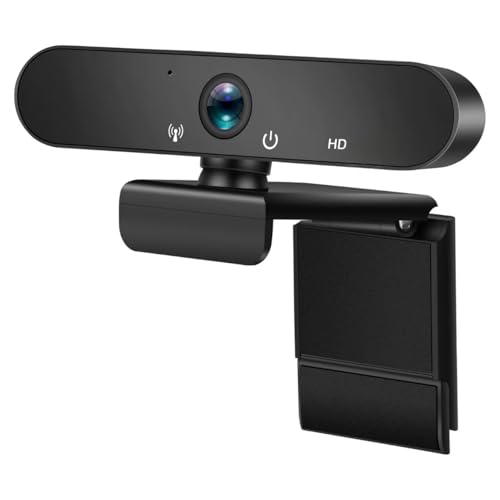
Mounting information varies considerably. The SVPRO 4K USB Camera with 10X Optical Zoom and the SVPRO 1080P Webcam provide tripod-related mounting information. The High-Definition USB Camera with 1080P/2K/4K Modes lists an adjustable clip and rotating camera head. The ring-light model documents 360-degree horizontal rotation and 90-degree vertical flip-down. Alipis lists an adjustable base, and the Xweiryn K1 lists an adjustable clip. Match these documented mechanisms to whether the camera will sit on a monitor, desk, tripod, or dedicated stand.
Match the camera to the job
For a fixed 4K recording position, the SVPRO 4K Web Camera with Sony IMX317 Sensor has the most direct specification match. For a presenter who needs changing framing, the SVPRO 4K USB Camera with 10X Optical Zoom adds optical range and manual focal control. For ordinary meetings with privacy protection, Logitech Brio 101 has the most balanced documented set of features.
For dim rooms, the High-Definition USB Camera with Touch-up Beauty Lighting or SECFOU 4K Webcam documents the most direct lighting hardware. For Full HD lens adjustment, choose the SVPRO 1080P Webcam. For a straightforward class or meeting camera, Alipis and Xweiryn K1 document the essential USB and mounting features without specialized lens systems.
Final Recommendation
SVPRO 4K USB Camera with 10X Optical Zoom ranks first overall in this specification-based comparison under the published weighted criteria.
The final choice among the best high-definition webcams depends on the documented features that match your intended use.
The SVPRO 4K USB Camera with 10X Optical Zoom is the highest-scoring returned product and the first overall specification-based choice. Its 3840x2160-at-30fps output, Sony IMX317 sensor, 5-50mm optical zoom, manual focus, IR-cut filter, long USB cable, and UVC compatibility give it the broadest documented control set in this comparison. The top high-definition webcams also include more convenient choices: Logitech Brio 101 for privacy and automatic light balance, the ring-light model for illumination and rotation, and the SVPRO 4K fixed-lens model for a stable 4K position. Choose according to whether control, simplicity, or integrated lighting matters most.
Frequently Asked Questions
What should I look for in the best high-definition webcams?
Compare the documented maximum resolution, frame rate, focus type, lighting, microphone, operating-system compatibility, cable length, and mounting method. A 4K label is most useful when the listing also identifies the output format and frame rate. For meetings, privacy and audio may matter more than maximum pixels. For studio or presentation work, lens control and mounting flexibility can be more important.
Is 4K necessary for video calls?
Not always. The selected Full HD models provide 1080p capability, which is adequate for many calls and classes. 4K can provide more image detail or flexibility for recording, but the practical benefit depends on the software, connection, display, and intended framing. The SVPRO 4K models document 3840x2160 at 30fps, while the SECFOU listing specifies a different maximum output of 2592x1944.
Is autofocus better than manual focus?
Neither is universally better. Autofocus, as listed on SECFOU and the touch-light model, can accommodate changing subject distances. Manual focus and optical adjustment, as documented on the SVPRO zoom models, allow a stable installation to be tuned deliberately. Fixed focus may be simpler when the camera and subject remain in consistent positions.
Do all high-definition webcams include a microphone?
No. Some selected products explicitly list microphones, including Logitech Brio 101, SECFOU, the 1080P/2K/4K USB camera, and the JINGBOFENG-NO1 camera. The selected SVPRO cameras focus their supplied specifications on imaging and connectivity and do not document built-in microphones. Check the feature list before assuming audio hardware is included.
Why does cable length matter?
Cable length affects where the camera can be placed relative to the computer. The selected SVPRO cameras list 3-meter cables, while the JINGBOFENG-NO1 camera lists a 5-foot cable and the Xweiryn K1 lists a 1.5-meter cable. Choose a documented length that reaches the intended USB port without requiring an extension.