Buying Guide
The best male-to-male parallel cables are selected by matching the physical ports first, then checking the parallel standard, device type, cable length, and construction details. The supplied listings cover two broad designs: direct legacy parallel cables and USB-to-parallel adapters. A direct cable joins two parallel interfaces, while an adapter cable places USB on the computer side and DB25 or CN36 on the peripheral side.
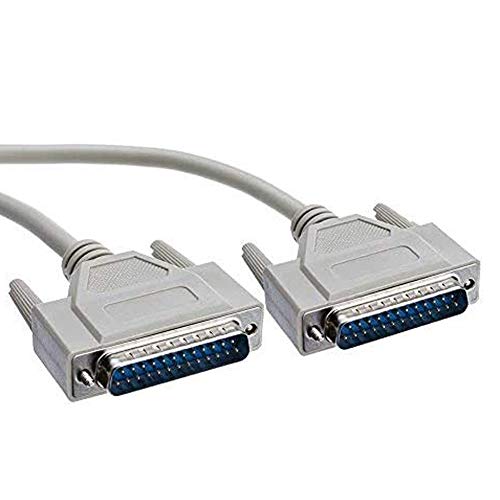
A DB25 connector has 25 contacts and is common on older computers and some parallel equipment. A CN36, also called Centronics 36-pin, is common on older printers and scanners. XMSJSIY, Dahszhi, and similar DB25-to-CN36 products are intended for a computer with a DB25 female port and a printer or peripheral with a CN36 socket. The connector genders matter: the listed cables use male plugs at both ends.
For two DB25 female ports, PNGKNYOCN and Yohii are the most directly aligned options in this group. PNGKNYOCN specifically describes all 25 lines as connected and identifies the cable as non-NULL-modem, while Yohii adds two ferrite cores and foil shielding. Do not substitute a DB25-to-CN36 model when both devices have DB25 ports.
Decide whether you need USB
Many modern computers do not include a traditional parallel port. In that situation, a USB-to-parallel adapter is the relevant design. StarTech.com and SABRENT use USB-A on the computer side and CN36 on the printer side. CybNemo and SinLoon offer the same general USB-to-CN36 arrangement, while RUITEXUN and GXMRHWY provide USB-to-DB25 connections.
USB adapters are not interchangeable between CN36 and DB25 peripherals. Confirm the printer or scanner socket before choosing. StarTech.com lists a Prolific PL2305 chipset and support across Windows, Linux, and macOS versions. GXMRHWY identifies an FT232RL chip and lists Windows, Linux, Mac OS, and Android. Those details can help when an older peripheral must connect to a newer computer, but the listing evidence does not establish compatibility with every application or operating-system revision.
Check IEEE-1284 and bidirectional details
IEEE-1284 is a useful compatibility indicator for parallel printers and scanners. XMSJSIY, PNGKNYOCN, and the DB25-to-CN36 listings identify IEEE-1284-compatible equipment. SABRENT specifically lists an IEEE-1284 bi-directional parallel interface, while RUITEXUN lists both USB and IEEE-1284 compliance with bi-directional transfer.
A cable marked for a parallel printer is not automatically suitable for every legacy device. Check whether the target equipment requires bidirectional communication, a particular driver, or a specific connector arrangement. The supplied evidence supports the listed device categories, but it does not confirm results for unlisted hardware.
Choose the right length and construction
Cable length should cover the actual distance without creating an awkward route. The USB adapters range from about 80cm to 1.8 meters. Direct printer cables include the 140cm PNGKNYOCN model, the 1.5-meter XMSJSIY model, and the 14.7-foot Dahszhi and Yohii models. Longer cables can simplify placement, but they may be more difficult to manage around a desk or equipment rack.
Shielding is most clearly documented on XMSJSIY, Dahszhi, and Yohii. XMSJSIY lists an aluminum-magnesium braided mesh and pure-copper core; Dahszhi lists foil shielding; and Yohii lists foil shielding with two ferrite cores. These are construction descriptions, not independent test results, so they should be treated as specification differences rather than assured signal outcomes.
Review installation and system requirements
Several listings describe plug-and-play setup, including PNGKNYOCN, CybNemo, SABRENT, and RUITEXUN. Other listings note that a printer driver may still be needed. StarTech.com provides the most detailed operating-system range in the supplied data, while SinLoon emphasizes support for older Windows and Mac OS versions. Read the computer and peripheral requirements together instead of relying only on the cable title.
Final Recommendation
XMSJSIY DB25-to-CN36 Parallel Printer Cable ranks first overall in this specification-based comparison under the published weighted criteria.
XMSJSIY DB25-to-CN36 Parallel Printer Cable is the first overall specification-based choice in this comparison.
The best male-to-male parallel cables depend on the documented features that match your intended use. XMSJSIY is a technically detailed choice, with DB25-to-CN36 connectors, a pure-copper core, braided shielding, and 1.5-meter length.
StarTech.com ICUSB1284 is the first overall specification-based choice for a USB-A computer connecting to a CN36 parallel printer. It documents the connector format, IEEE-1284 support, chipset, bus-powered operation, six-foot length, and broad operating-system coverage. Those details make it a clear fit when the computer lacks a traditional parallel port.
For a direct legacy connection, PNGKNYOCN is the direct match for two DB25 female ports because it states that all 25 lines are connected. If additional reach is needed, Dahszhi and Yohii both list 14.7-foot cables, with Yohii adding ferrite cores.
Among the top male-to-male parallel cables, the correct connector arrangement remains more important than length or construction. Select USB-to-CN36 for a CN36 printer, USB-to-DB25 for a DB25 peripheral, and a direct DB25 cable only when both devices expose compatible parallel ports.
Frequently Asked Questions
Among the best male-to-male parallel cables, are male-to-male parallel cables the same as USB printer adapters?
No. A direct male-to-male cable joins two parallel interfaces, such as DB25-to-DB25 or DB25-to-CN36. A USB adapter joins a USB-A computer port to a parallel printer or peripheral. StarTech.com, SABRENT, CybNemo, SinLoon, RUITEXUN, and GXMRHWY are USB-based choices in this comparison, while PNGKNYOCN and Yohii are direct DB25 models.
Which connector should I choose for an older printer?
Check the printer socket. A 36-pin Centronics socket requires a CN36 cable, while a 25-pin parallel socket requires DB25. XMSJSIY and Dahszhi are DB25-to-CN36 examples. If the computer has only USB-A, choose a USB-to-CN36 or USB-to-DB25 adapter that matches the printer end.
Do these cables support IEEE-1284 devices?
Several do, according to their listings. XMSJSIY, PNGKNYOCN, Dahszhi, and SABRENT identify IEEE-1284 support or compatibility. RUITEXUN lists USB and IEEE-1284 compliance. The exact device and operating-system requirements should still be checked before installation.
Does a longer cable provide a better connection?
Not necessarily. A longer cable provides more placement flexibility, but the supplied evidence does not establish that length alone improves connection quality. Dahszhi and Yohii list 14.7-foot lengths, while most other direct options are about 140cm to 1.5 meters. Choose the shortest length that comfortably reaches both devices unless the installation requires additional distance.
Will a USB adapter work without installing a driver?
Some listings describe plug-and-play setup, but requirements vary by product and system. StarTech.com identifies a Prolific chipset, GXMRHWY identifies an FT232RL chip, and PNGKNYOCN notes that a printer driver may be needed. Review the adapter’s stated operating-system support and the peripheral’s driver requirements before connecting it.