Buying Guide
Choosing the best plug-and-play external hard drives starts with the connection and setup details, not just the capacity printed on the enclosure. In this comparison, the most specification-aligned candidates explicitly describe no-software use, automatic recognition, drag-and-drop saving, or plug-and-play expandability. Those phrases indicate a simpler first connection, but they do not mean every device will use the same file format or work identically with every host.
This is a specification-based comparison drawn from the supplied public listing information. It is not a hands-on test, and it does not summarize customer opinions. The editorial scores focus on documented product characteristics: setup, compatibility, capacity, physical design, stated transfer capability, and warranty information.
Choose portable or desktop storage
Portable HDDs generally use a compact enclosure and draw power through the data cable. The WD 2TB Elements, WD 5TB Elements, WD_BLACK P10, Seagate Game Drive for Xbox, Seagate Game Drive for PS4, ModusTech Facet, YOTUO, NRICO, and Kosbees models all document portable designs or bus-powered use. These are appropriate when the drive may move between a laptop, console, office, or travel bag.
The Seagate 8TB Expansion Desktop Hard Drive takes a different approach. Its listing says to connect both the power adapter and USB cable, and its dimensions and listed weight are much larger than the portable drives. That trade-off supports a larger stationary collection, such as a desktop backup set or media archive, but it is less convenient for carrying between locations.
Match capacity to the job
Capacity should reflect what you plan to store and how often you expect to add files. The Seagate 8TB Expansion Desktop Hard Drive has the largest documented capacity here. The WD 5TB Elements and WD_BLACK P10 provide a middle ground for larger libraries while retaining portable form factors. The WD 2TB Elements and both Seagate gaming drives are more focused choices for everyday backups or a defined console library.
The 1TB ModusTech Facet and the 500GB YOTUO, NRICO, and Kosbees drives are better suited to lighter storage duties. They can hold documents, photos, selected media, or a smaller game collection, but their listed capacities leave less room for a large archive. The listing data also notes that operating systems may show less usable space than the marketed decimal capacity.
Check the connector before ordering
USB 3.0 and USB 3.2 Gen 1 appear throughout the selection, with the WD Elements listings identifying USB 3.2 Gen 1 and the Seagate models identifying USB 3.0. These standards are useful for common computer and console connections, but the supplied evidence does not establish identical real-world performance across products.
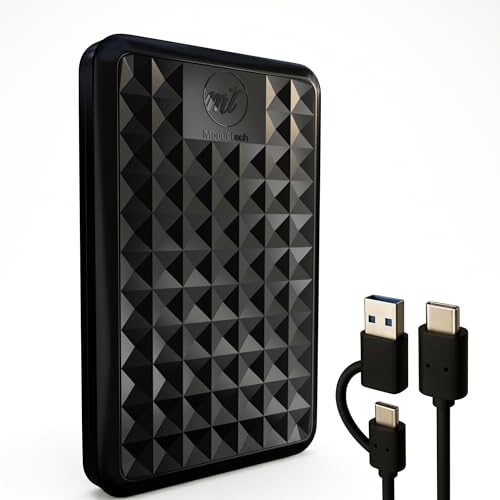
For newer devices, the ModusTech Facet is the clearest connector-flexibility pick because its listing includes a USB-C to USB-C cable and a tethered USB-A adapter. YOTUO also documents USB 3.0 and USB-C support. By contrast, the WD and Seagate drives specify USB connections without documenting a USB-C cable in the supplied fields. Check the host port and included cable details before choosing a drive.
Review operating-system and console requirements
Compatibility language needs careful reading. The WD Elements models identify Windows and Mac use, while the Seagate Expansion Desktop lists automatic recognition for Windows and Mac and notes that reformatting is required for Time Machine. ModusTech lists Windows, macOS, Chromebook, iPhone, tablet, and several other platforms. YOTUO, NRICO, and Kosbees also list multiple operating systems.
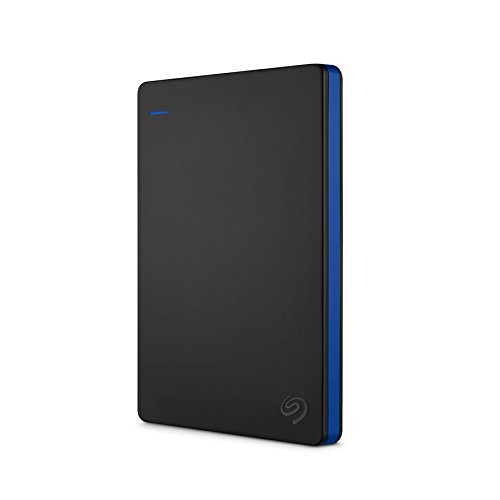
Console support can be more specific. The WD_BLACK P10 is documented for PlayStation, Xbox, and PC. The Seagate Game Drive for Xbox is tailored to Xbox, and the Seagate Game Drive for PS4 is tailored to PS4. Several listings explain that current-generation console games may need to be copied to internal storage before they can be played, while older-generation games can be played directly from an external drive. Treat those platform notes as part of the setup decision.
Consider the physical design
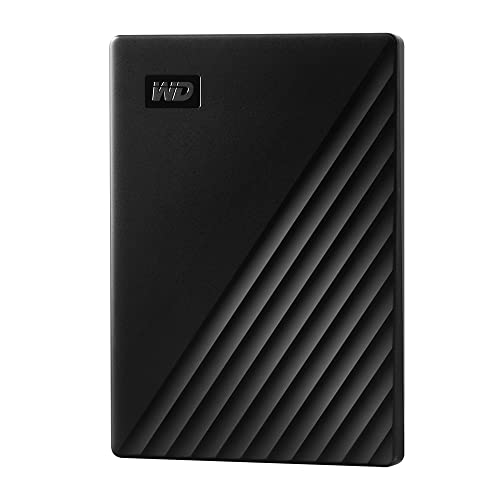
The WD 2TB Elements is listed at 0.29 pounds, the Seagate PS4 drive at 0.298 pounds, and the ModusTech Facet at 160g. These details make them easier to carry than the desktop Seagate model. NRICO describes a plastic-and-aluminum enclosure with a 0.51-inch thickness, while YOTUO describes a silicone sleeve intended to cushion the drive. The WD_BLACK P10 lists a metal top covering.
These are design descriptions, not verified durability tests. A compact or shock-oriented enclosure can still require normal care because the underlying storage type is a mechanical HDD in the supplied product descriptions. Avoid treating enclosure language as a guarantee against damage or data loss.
Read the warranty terms
Warranty length varies. The WD 5TB and WD 2TB Elements drives list two-year limited warranties. The WD_BLACK P10 and NRICO list three-year coverage. Seagate’s 8TB Expansion Desktop model lists a two-year manufacturer warranty, while the Xbox and PS4 Game Drives list one-year limited warranties. ModusTech lists one year, and Kosbees lists 12 months.
Warranty duration is only one specification. It does not replace a separate backup strategy. If the files matter, keep another copy on a different storage device or location rather than relying on one external drive.
Final Recommendation
WD_BLACK P10 5TB Game Drive ranks first overall in this specification-based comparison under the published weighted criteria.
The final choice among the best plug-and-play external hard drives depends on the documented features that match your intended use.
The Western Digital WD 5TB Elements Portable is the highest-scoring returned product and the first overall specification-based choice for buyers who want substantial capacity in a portable HDD. Its documented USB 3.2 Gen 1 connection, plug-and-play expandability, PC and Mac support, and two-year limited warranty give it a balanced profile.
The Seagate 8TB Expansion Desktop Hard Drive is the better fit when stationary capacity matters more than portability. It requires a power adapter, but its 8TB capacity and simple drag-and-drop workflow are clearly documented. For gaming, the WD_BLACK P10 has the broadest stated console coverage, while the Seagate Game Drive for Xbox and Seagate Game Drive for PS4 provide more focused platform matches.
Among the top plug-and-play external hard drives, the WD 2TB Elements is the most straightforward lightweight everyday option. The ModusTech Facet is the most flexible connector choice because its included cable arrangement covers USB-C and USB-A hosts. YOTUO, NRICO, and Kosbees are smaller-capacity alternatives when a compact enclosure and basic file expansion are the main requirements.
Frequently Asked Questions
What makes the best plug-and-play external hard drives easy to set up?
Look for explicit listing language such as plug-and-play expandability, no software installation, automatic recognition, or drag-and-drop saving. The WD Elements models and the Seagate Expansion Desktop document these types of setup features. Compatibility can still depend on formatting, the host port, and the operating system.
Should I choose a portable or desktop external hard drive?
Choose a portable model when you need to move the drive between computers or consoles. The WD 2TB Elements, WD 5TB Elements, WD_BLACK P10, and Seagate gaming drives document compact portable designs. Choose the Seagate 8TB Expansion Desktop when a stationary setup and larger capacity are more important; its listing requires a power adapter and USB cable.
Do external hard drives work with USB-C devices?
Some do, but the supplied evidence differs by product. ModusTech explicitly includes USB-C and USB-A connection options, and YOTUO lists USB 3.0 and USB-C. Other selected models specify USB 3.0 or USB 3.2 Gen 1 without documenting a USB-C cable. Confirm both the host port and the included cable before use.
Can a console play games directly from an external hard drive?
The answer depends on the console and game generation. The Seagate Xbox listing says the drive is for storage and that a game must be installed to play. The Kosbees and other gaming listings state that older-generation titles can be played directly, while current-generation titles may need to be copied to the console’s internal storage. Follow the platform-specific instructions for your console.
Is an external hard drive a complete backup plan?
No. The selected products provide external storage, but one drive should not be the only copy of important files. Maintain another copy on separate storage or in another location, and verify that your computer or console supports the drive’s format and connection before transferring important data.