Buying Guide
The best remote control tvs depend first on the device they must operate. A replacement made for one television brand may be easier to use than a universal model, while a multi-device remote can reduce clutter when a television shares space with a soundbar, disc player, cable box, or streaming device. Start with the television’s brand and model, then compare the documented control method and feature set.
Compatibility is the most important filter. The Roku TV Remote Control is explicitly for Roku TV models only; its listing excludes Roku streaming players, Roku Audio, and other smart TVs. That makes it a focused option for a Roku television but a poor choice for a separate Roku player. The Amazon Fire TV Alexa Voice Remote Pro similarly works with most Fire TV streaming media players, Amazon Fire TV smart TVs, and smart TVs with Fire TV built in, but its listing names several incompatible Fire TV devices and television series. Check those exclusions before buying.
Brand-specific models require the same care. The Samsung BN59-01199F listing supplies a detailed list of compatible Samsung televisions, including numerous UN and JU models. The Sony RMT-TX100U is intended for listed XBR and KDL sets rather than every Sony television. The LG Magic Remote MR20GA is limited to supported 2018, 2019, and 2020 LG Smart TVs, and the listing warns that it does not work with LG televisions made in 2021 or later. The original LG AKB75095307 has a broader description, but less detailed model information. When a listing provides a part number, compare it with the label on the original remote.
Choose official, brand-specific, or universal
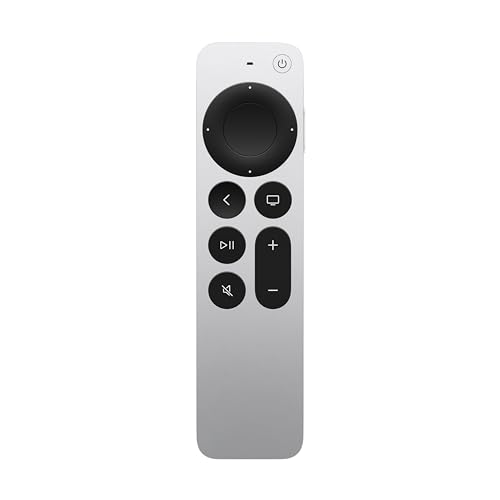
An official remote is often the clearest fit for a defined platform. Roku and Apple each provide focused options, while Amazon’s Fire TV model adds more controls than a basic replacement. The Apple TV Siri Remote is made for Apple TV 4K generations one through three and Apple TV HD; it is therefore best considered a media-device remote, not a universal television remote.
A brand-specific replacement can be preferable when the original remote’s button arrangement matters. The Samsung and Sony options preserve their respective platform shortcuts, while the two LG models target LG television families. This approach can reduce uncertainty, but only if the model match is accurate.
Universal remotes are more flexible. UltraPro’s OneTouch model lists six supported TV brands: Samsung, LG, Sony, VIZIO, Fire TVs, and Roku TVs. It also has preset buttons for four streaming platforms. The GE remote goes further in a different direction by controlling up to four compatible audio and video devices. Its code library covers major brands and thousands of devices, although the listing excludes radio-frequency products such as Roku Streaming Sticks and Amazon Fire TV Sticks.
Consider setup and batteries
Setup ranges from inserting batteries to entering codes or pairing through an on-screen process. The Roku remote comes with pre-installed batteries and is described as ready in one step. VIZIO’s remote is preprogrammed and works after batteries are inserted, but its batteries and manual are not included. UltraPro states that no programming is required for its standard supported-brand setup, while some Sharp and Insignia Roku TVs may need direct code entry.
The GE model supports automatic code search and direct code entry, which is helpful when automatic setup does not identify the television. The LG Magic Remote uses the Wheel button to initiate automatic connection. Apple’s remote uses a USB-C port for recharging rather than relying on replaceable batteries. For the other remotes, verify whether AA or AAA batteries are supplied. Several listings specifically say they are not included.
Button visibility matters for evening viewing. Amazon’s Fire TV remote uses a motion-activated backlight, and UltraPro describes its keypad as fully backlit. GE uses blue LED backlighting. These three models are the most specification-aligned choices here when seeing the controls in a dark room is a priority.
The other selected remotes do not document backlighting in the supplied evidence, so do not assume it is present. The Apple remote instead emphasizes a touch-enabled clickpad and circular gesture control. This can appeal to Apple TV users who prefer swiping and touch navigation over a traditional numeric keypad. For replacement remotes with a conventional layout, confirm that the key functions you use most—power, volume, mute, channel navigation, app access, or Smart Hub—are actually listed.
Smart-TV shortcuts can save steps, but they also make compatibility more specific. Amazon provides Alexa voice control, customizable buttons, a headphone shortcut, and integrated TV power and volume controls. UltraPro includes Netflix, Prime Video, Disney+, and YouTube hotkeys. VIZIO includes SmartCast Home and WatchFree controls, along with several app-channel shortcuts. Samsung’s remote includes Smart Hub, and Sony’s model has a Netflix button that depends on Netflix being pre-installed on the television.
Multi-device control is another kind of smart feature. GE can operate up to four compatible devices and provides master-volume control across them. Apple’s Siri function can search for content by voice, but the remote remains centered on Apple TV hardware. Match the feature to your setup instead of assuming every shortcut works on every television.
Final recommendation
Amazon Fire TV Alexa Voice Remote Pro ranks first overall in this specification-based comparison under the published weighted criteria.
The final choice among the best remote control tvs depends on the documented features that match your intended use.
Amazon Fire TV Alexa Voice Remote Pro is the highest-scoring returned product and the first overall specification-based choice for compatible Fire TV setups. It combines voice control, remote finding, backlighting, integrated television controls, customizable buttons, and a headphone shortcut. For a mixed-brand household, UltraPro OneTouch Backlit Remote Control is the more flexible alternative because its listing covers six TV brands and four streaming hotkeys.
Among the other top remote control tvs, Apple TV Siri Remote is the focused choice for Apple TV hardware, while Roku TV Remote Control suits owners who want an official, simple Roku TV replacement. GE Backlit Buttons Universal Remote is better when several compatible home-entertainment devices must share one handset. VIZIO, LG, Samsung, and Sony selections are more targeted: verify the exact television model and part number before ordering. The basic LG AKB75095307 is a reasonable no-reprogramming option when its part number matches, but it documents fewer advanced features.
Frequently Asked Questions
What should I check before buying one of the best remote control tvs?
Check the television brand, model number, original remote part number, and whether the set uses a dedicated TV platform or a separate streaming device. Also confirm battery type, included batteries, and any listed exclusions. A remote described as universal may still exclude particular radio-frequency devices or older television models.
Is a universal remote better than an official replacement?
Neither is automatically better. An official or brand-specific remote is generally the clearer match when you need the television’s native controls and shortcuts. A universal model is more useful when one handset must operate multiple brands or several devices. UltraPro emphasizes six TV brands, while GE documents control for up to four compatible audio and video devices.
Which remote is suitable for dark rooms?
Amazon Fire TV Alexa Voice Remote Pro, UltraPro OneTouch Backlit Remote Control, and GE Backlit Buttons Universal Remote each document backlighting. Amazon and UltraPro describe motion-activated or full keypad illumination, while GE specifies blue LED backlighting. Do not assume backlighting on the other selected models because it is not stated in their supplied listings.
Can the Apple TV Siri Remote replace any television remote?
It is designed for compatible Apple TV 4K and Apple TV HD devices, not as a general replacement for every television remote. Its documented strengths are the touch-enabled clickpad, circular gesture, Siri search, and USB-C charging. Confirm that the Apple TV model is among the listed compatible generations.
No. App shortcuts depend on the remote’s compatibility and the television or streaming platform. Sony’s Netflix button, for example, is stated to work when Netflix software is pre-installed. VIZIO’s SmartCast and WatchFree controls are intended for VIZIO televisions, while Amazon’s Alexa features are tied to compatible Fire TV products.