Buying Guide
Choosing among the best voice-controlled remote controls starts with the device the remote must operate. A voice button alone does not make a remote universal. The listings in this comparison cover Fire TV, Roku, VIZIO, TCL, Sony Bravia, Samsung, LG, Xfinity, and DirecTV Stream equipment, but each platform has different compatibility boundaries. Treat the model information as a shopping checklist, not as a guarantee that every television in a brand’s catalog will work.
For a Roku setup, the Roku Voice Remote Pro (2nd Edition) is the most feature-oriented selection, while the standard Roku model in the candidate pool was not selected because the Pro version documents more convenience features. Roku’s listing specifically describes control of the Roku device, TV power, and volume, along with voice commands and remote finding. It is therefore a better fit for a household that wants one control for the primary TV functions and streaming navigation.
Amazon Fire TV owners should begin with the Amazon Fire TV Alexa Voice Remote Pro. Its compatibility statement includes most Fire TV streaming media players, Amazon Fire TV smart TVs, and smart TVs with Fire TV built in, but it also names several exclusions. Check the generation and TV model before ordering. The remote’s Alexa integration extends beyond searching: the listing says it can open apps, manage volume, and control compatible smart-home devices.
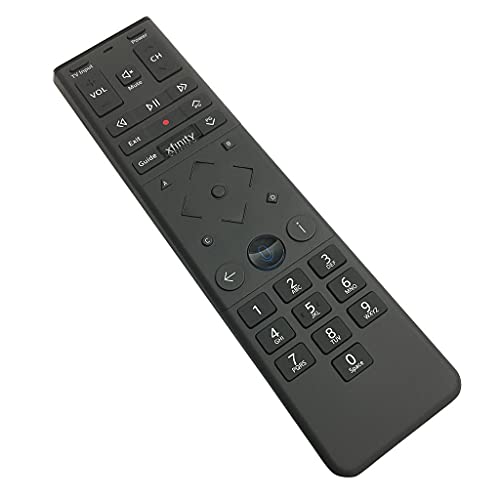
For a cable or live-TV receiver, platform-specific options are safer than a generic replacement. The Xfinity Comcast XR15 is intended for listed X1, Xi6, Xi5, and XG2 equipment. The DirecTV Stream RC82V is aimed at C71KW-200 and C71KW-400 receivers. These choices are less broadly applicable, but their published compatibility descriptions are more actionable for owners of those systems.
Check brand and model compatibility
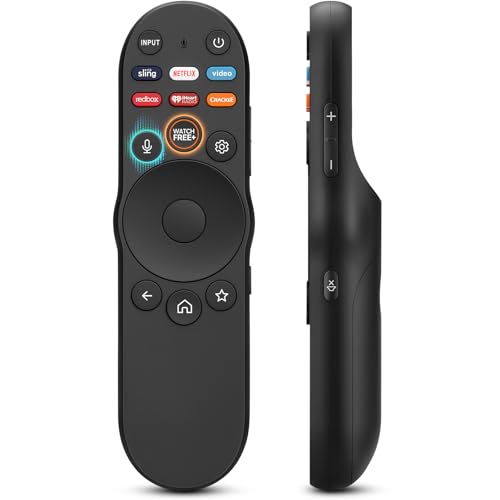
Brand-specific smart-TV remotes require closer inspection. The VIZIO Voice Remote XRT260 lists V-Series, M-Series, and P-Series televisions, while the OMAIC XRT270 listing expands its stated coverage to FHD, 4K, Quantum, and Quantum Pro models across D-, M-, P-, and V-Series lines. That makes the XRT270 a potentially broader VIZIO replacement, but shoppers should still compare their TV’s exact model and the remote model number.
The Samsung VIVCASE remote lists a wide selection of Samsung families, including Frame, Neo QLED, OLED, QLED, Crystal UHD, The Serif, The Terrace, The Sero, and Micro LED. Its listing describes pairing through the Back or Exit and Play/Pause buttons. The Sony Bravia replacement takes a narrower approach, naming Bravia Google Smart TV lines and several RMF-TX remote families. Model-level confirmation matters more than the brand name alone.
LG shoppers have two selected pointer-style choices in the broader candidate pool, but this comparison includes the Nettech model. It lists 2019–2025 LG Smart TVs that support voice control and provides a Home-and-Back pairing sequence followed by the Wheel button. Because voice and pointer features depend on pairing with a compatible TV, verify the original remote family or television model first.
Decide whether you need a pointer
A conventional directional pad is familiar and works well for lists and menus. A pointer remote changes the interaction style: the Nettech LG model documents point, click, and scroll functions, and the listing also identifies a wheel. This design may be useful for browsing a smart-TV interface, but it is not automatically the right replacement for every LG television. The television must support the relevant Magic Remote functions.
The DirecTV Stream RC82V also documents a directional pad, making it a conventional navigation choice for its receiver ecosystem. The Amazon and Roku selections emphasize dedicated streaming and TV controls rather than a pointer. Choose based on the interface you use most often instead of assuming that more control styles are always better.
Look for controls that matter in dim rooms
Backlighting is a practical feature when the room is dark. The Amazon Fire TV Alexa Voice Remote Pro uses a motion-activated backlight, the Roku Voice Remote Pro lists backlit buttons, and the TCL replacement also describes motion-activated backlighting. These implementations are documented in the product listings, but no hands-on brightness or response comparison was supplied, so this guide does not rank one as brighter than another.
Remote finding can be equally useful. Amazon describes a ring emitted after an Alexa command, and Roku describes voice or app-based finding. If the remote commonly disappears between cushions, these features may matter more than an additional shortcut button.
Compare power and pairing requirements
Battery information can affect setup. The Roku Pro listing describes USB-C charging and months of operation. Several replacement remotes require AA or AAA batteries, and some explicitly say batteries are not included. The Xfinity XR15 listing says batteries are included. Confirm the requirement before ordering so the remote can be paired immediately.
Pairing procedures vary. VIZIO’s XRT260 listing says no programming or pairing is required, while the Amazon and Roku products are designed for their respective ecosystems. The Samsung, Sony, LG, TCL, and several replacement models require pairing steps. Keep the instructions available and verify that the remote’s required connection method matches the TV or receiver.
Consider shortcuts and accessibility
Dedicated app buttons can reduce menu navigation. The Sony replacement lists six shortcuts, Samsung’s VIVCASE model lists four, the LG Nettech model lists six hotkeys, and the TCL and VIZIO listings describe shortcut buttons. These buttons are useful only when they match the services you actually use, so count practical shortcuts rather than assuming a larger number is automatically preferable.
Accessibility can also be a deciding factor. The Xfinity XR15 listing specifically mentions access to closed captioning, video description, and voice guidance. That is a documented advantage for users who need those controls readily available. Do not infer accessibility performance beyond the features stated in the listing.
Understand what this comparison does not test
This is a specification-based comparison using public listing data. It does not measure microphone sensitivity, Bluetooth reliability, button feel, battery longevity beyond the claims supplied, voice-recognition accuracy, or real-world range. Technical range statements are reported only where a listing supplied them. Marketplace ratings, review activity, prices, and popularity signals were not used as public scoring criteria.
Final Recommendation
Amazon Fire TV Alexa Voice Remote Pro ranks first overall in this specification-based comparison under the published weighted criteria.
Amazon Fire TV Alexa Voice Remote Pro is the first overall specification-based choice among the selected best voice-controlled remote controls. Its combination of Alexa commands, integrated TV controls, remote finding, backlighting, customizable buttons, and a headphone shortcut gives it the most complete documented feature package, provided the Fire TV compatibility exclusions do not apply.
The Roku Voice Remote Pro (2nd Edition) is the most specification-aligned alternative for Roku households because it combines hands-free commands, TV power and volume control, backlit keys, app-based or voice remote finding, and USB-C charging. For brand-specific TVs, choose by exact model: the TCL B Brainice option emphasizes broad listed TCL operating-system coverage, the VIZIO XRT260 favors simple Bluetooth setup, and the Samsung VIVCASE model lists extensive Samsung family compatibility.
The LG Nettech model is the clearest choice when pointer navigation matters. Sony shoppers get a focused Bravia replacement with six listed shortcuts, while Xfinity and DirecTV Stream owners should favor their respective platform-specific remotes. The practical lesson is simple: select the documented fit first, then use backlighting, shortcuts, charging, accessibility features, or remote finding as the tie-breaker. These are the top voice-controlled remote controls in this comparison by specification coverage, not by customer sentiment or hands-on testing.
Frequently Asked Questions
Are the best voice-controlled remote controls universal?
No. The selected products are mostly platform- or brand-specific. Amazon’s remote is for compatible Fire TV equipment, Roku’s is for Roku devices and compatible TVs, and the VIZIO, Samsung, Sony, LG, TCL, Xfinity, and DirecTV Stream models each document particular product families or receiver models. Always compare the exact television, streaming device, or receiver model before purchase.
Do voice remotes need internet access?
The supplied listings do not establish one universal requirement. The EWO’S LG listing mentions a network connection for voice recognition, while other products describe voice control within their device ecosystems without stating a general network rule. Check the instructions for the exact remote and connected device rather than assuming that every voice feature works offline.
The Amazon Fire TV Alexa Voice Remote Pro and Roku Voice Remote Pro list backlit buttons. The TCL B Brainice replacement and Amazon model describe motion-activated illumination. The Xfinity XR15 title identifies a backlight, although its supplied feature points do not provide the same detail about activation. No brightness or usability testing was supplied.
Do replacement remotes include batteries?
It depends on the model. The Xfinity XR15 listing says batteries are included. The LG Nettech, OMAIC Vizio, Sony, and EWO’S LG listings state or imply that batteries are required, with some explicitly saying batteries are not included. The Roku Pro uses USB-C charging. Review the package contents and battery type before ordering.
Is a pointer remote better than a standard voice remote?
Neither design is universally better. A pointer can make point-and-click and scrolling easier on a compatible smart-TV interface; the LG Nettech listing documents those functions. A standard directional remote may be preferable for familiar menu navigation or receiver control, as described for the DirecTV Stream RC82V. Choose the design supported by your television and suited to your preferred navigation method.