Buying Guide
Pointer remotes fall into two useful design groups in this comparison. Presentation clickers send commands to a computer and usually combine slide navigation with a visible red laser. Smart-TV magic remotes use motion sensing or mouse-like navigation to move an on-screen cursor. The best pointer remote controls for a conference room are not necessarily the right choice for a living room, so start with the device being controlled.
Choose the pointer type for the job
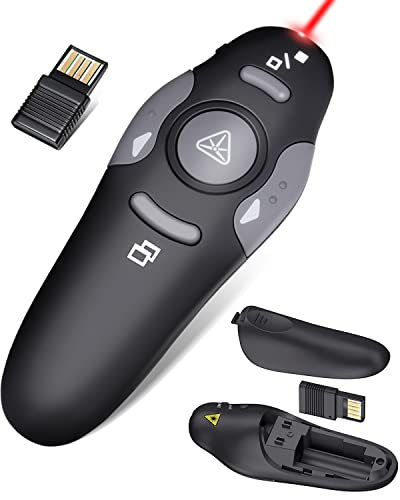
For presentations, look for a red laser pointer and dedicated page-forward and page-back buttons. The ELISWEEN E600, CLIKBUTM WP08-R, Logitech R400, VILNIU WP71-R, QUI BK600, and DinoFire D05 all document a red pointer or laser function. Several also add screen, hyperlink, window, or volume controls. A laser pointer can help direct attention to slide content, but the supplied evidence for the DinoFire D05 specifically says it is not recommended for LCD, LED, or TV screens.
For television navigation, choose a remote that documents a cursor, point-and-click behavior, or motion-sensor control for the intended TV family. The Fesasn, HESUNSE, and KOOMOER models are LG replacements with point, click, and scroll functions. The Anderic SR7557 is a Samsung Smart Pointer replacement that supports mouse, menu, and app functions. These products are not general-purpose computer presentation clickers; their compatibility depends on the television and its supported remote system.
Check compatibility before comparing features
Compatibility is the most important filter for TV pointer remotes. LG replacement listings identify model families and remote references such as MR20GA, MR21GA, MR24GA, or MR25GA. That information is more useful than a broad claim that a remote is universal. Match the TV model or original remote number against the supplied compatibility list, and confirm whether the television supports voice control when that feature matters.
The Anderic SR7557 uses a different Samsung setup and is described as compatible with several BN59 Smart Pointer models. Its listing also warns that it may not provide every button or voice function found on the original remote. That makes model matching especially important for replacement buyers.
Presentation clickers have a different compatibility checklist. The ELISWEEN E600 lists USB-A and USB-C connectors and support for Mac OS, Windows, Linux, PowerPoint, Keynote, and Google Slides. The VILNIU WP71-R and CLIKBUTM WP08-R also list broad computer and presentation-software support. The Logitech R400 is a USB-A presenter with no software installation required. If a laptop has only USB-C ports, the E600 has the clearest fit among the selected presentation models.
Compare operating range carefully
A listed range is useful for estimating freedom of movement, but range figures are not interchangeable. A wireless control distance describes how far a remote can send commands to its receiver. A laser distance describes how far the light may be visible or projected. The VILNIU WP71-R lists a 98-foot control distance and a separate 328-foot laser range. The QUI BK600 lists up to 328 feet of control distance, while the Logitech R400 lists up to 50 feet.
The LG TV replacements use different terminology. For a television, room layout, receiver position, and exact TV support can matter as much as a published distance. Treat the figure as a specification for comparison rather than a guarantee of identical results in every room.
Decide which controls are genuinely useful
Basic slide navigation may be enough for short talks, while training sessions and lectures can benefit from more direct controls. The QUI BK600 lists page navigation, hyperlinks, volume, power, and full- or black-screen switching. The DinoFire D05 lists similar presentation functions, including window switching. The ELISWEEN E600 adds volume and screen controls alongside slide advancement. These features can reduce the need to return to the computer during a presentation.
TV buyers may value a wheel, voice input, and shortcut buttons more than a laser. Fesasn documents a scroll wheel and voice support, while HESUNSE lists wheel control, voice functions, and two shortcut buttons. KOOMOER lists six shortcut buttons. Consider whether you prefer direct button access or cursor-based navigation, and verify that voice functions match the TV’s supported services and network requirements.
Review batteries, receiver storage, and setup
Battery requirements vary across the selected products. The CLIKBUTM WP08-R uses one AAA battery, the QUI BK600 uses one AAA battery, and the DinoFire D05 uses one AAA battery. The ELISWEEN E600, VILNIU WP71-R, and Logitech R400 use two AAA batteries; the VILNIU listing says its batteries are included, while the E600 listing says they are not. LG and Samsung TV replacements generally require AA or AAA batteries depending on the model, and the selected TV listings commonly state that batteries are not included.
Receiver storage is a practical detail for presentation kits. The E600 has magnetic receiver storage, the Logitech R400 has a built-in docking bay, the DinoFire D05 lists magnetic USB storage, and the CLIKBUTM WP08-R stores its dongle in the battery compartment. The QUI BK600 instead emphasizes a carrying clip. For frequent travel, these small design choices can help prevent a receiver from being misplaced.
Setup is usually simple, but the type differs. Presentation models generally use plug-and-play USB receivers without software installation. TV remotes require pairing steps, often involving the Wheel, Home, Back, or another specified button combination. Read the pairing instructions before discarding the old remote, and keep the exact TV model available when checking replacement compatibility.
Final recommendation
ELISWEEN E600 Presentation Clicker ranks first overall in this specification-based comparison under the published weighted criteria.
The ELISWEEN E600 is the first overall specification-based choice among the best pointer remote controls because it combines USB-A and USB-C receiver support, a red pointer, broad software compatibility, presentation controls, and receiver storage. It is the most specification-aligned general presentation fit in this group.
For LG television navigation, Fesasn is the most complete pointer-focused option in the selected list, with motion-sensor control, a wheel, voice support, and broad stated compatibility. HESUNSE is a close alternative when its listed Bluetooth range and warranty details align with your TV. KOOMOER is worth considering when six shortcut buttons are more useful than a simpler layout.
For presentations, choose QUI when the listed long control distance is the priority, VILNIU when separate laser and wireless range figures matter, or CLIKBUTM when low weight and one-battery operation are more important. Logitech R400 and DinoFire D05 provide simpler layouts with receiver storage. Samsung owners should start with Anderic SR7557, while confirming that its documented mouse and app functions cover the controls needed on the specific television.
The top pointer remote controls are therefore defined by fit rather than one universal feature list: match the remote to the TV or computer, confirm the receiver connection, and then weigh pointer behavior, controls, range, and power needs.
Frequently Asked Questions
Are presentation clickers and TV magic remotes the same type of device?
No. Presentation clickers such as ELISWEEN E600 and Logitech R400 control slide software through a computer receiver and use a visible red laser. TV magic remotes such as Fesasn use pointer or motion navigation to move an on-screen cursor. They serve different control systems, so they should not be treated as interchangeable.
What should I verify before buying one of the best pointer remote controls for an LG TV?
Check the exact TV model, WebOS compatibility, and the remote model references listed by the seller. Also confirm whether your television supports voice control if you need that feature. Fesasn, HESUNSE, and KOOMOER each document LG compatibility, but their listed model coverage and functions differ.
Does a longer laser range mean a longer wireless control range?
Not necessarily. The VILNIU WP71-R lists separate figures for wireless control and laser distance, showing why the two specifications should be read independently. A remote may project a laser farther than it can reliably send commands to its USB receiver.
Which features matter most for a presentation clicker?
At minimum, look for forward and back slide controls, a visible pointer, compatible software, and a receiver that fits the computer. Volume, hyperlink, window, and screen controls can be useful additions. USB-C support is particularly relevant when the computer lacks a USB-A port, which is why the ELISWEEN E600 has a practical advantage for mixed-device users.
Do these pointer remotes include batteries?
Battery inclusion varies. The VILNIU WP71-R listing says its two AAA batteries are included, while several other presentation and TV models state that batteries are not included. Check the individual product listing and battery type before use.