Buying Guide
The best smartphone baby monitors are not all designed around the same connection method. Some use a phone app as the main viewing interface, while others pair remote access with a dedicated parent screen. Start by deciding whether you want app-only convenience, local viewing without Wi-Fi, or a hybrid system that provides both.
Choose the monitoring interface
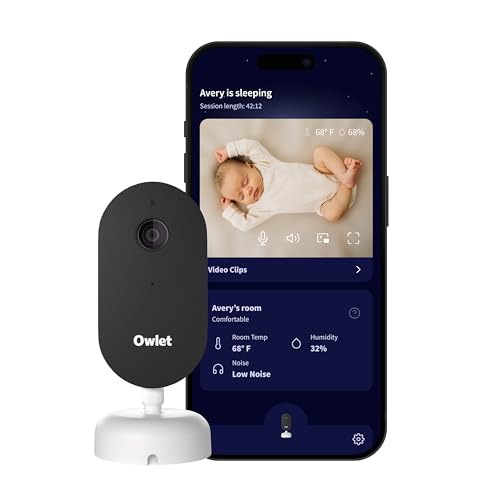
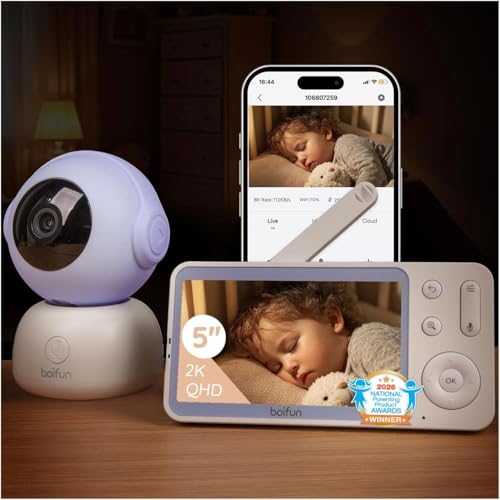
A dedicated display can be convenient during overnight care because it avoids unlocking a phone. The VTech VM901, VTech RM7764HD, BOIFUN Baby 2TM, BOIFUN Baby 4TM, Momcozy BM04, Motorola Nursery VM85-2, ieGeek Baby 7, and ieGeek split-screen system all document a parent unit or display. The Owlet Dream Sight and nooie NB2 are presented in the supplied evidence as app-based camera systems without a listed dedicated parent screen.
App access matters when you are away from home. The Owlet, Motorola, Momcozy, VTech, BOIFUN, ieGeek, and nooie listings describe smartphone viewing or remote access. Check the connection requirements carefully: several systems specify 2.4GHz Wi-Fi, while the nooie NB2 listing documents both 2.4GHz and 5GHz Wi-Fi plus Bluetooth. A phone app may also be useful for shared access, but the number of users and storage arrangements differ by product.
Compare video resolution and night viewing
Resolution is only one part of a monitor’s viewing specification, but it is a useful starting point. The Owlet Dream Sight, BOIFUN Baby 2TM, BOIFUN Baby 4TM, BOIFUN 2K model, nooie NB2, and ieGeek split-screen model list 2K video. The VTech VM901, Motorola systems, and ieGeek Baby 7 list 1080p camera video. Night vision is documented across the selected products, generally through infrared technology.
A larger display can make local viewing easier, but do not assume the parent-unit resolution matches the camera resolution. For example, the VTech RM7764HD listing specifies a 1080p camera and a 720p parent-unit display. The Motorola VM85-2 provides a 5-inch screen, while the VTech RM7764HD uses a 7-inch display. These distinctions are worth checking if screen size or local image detail is a priority.
Look at pan, tilt, zoom, and tracking
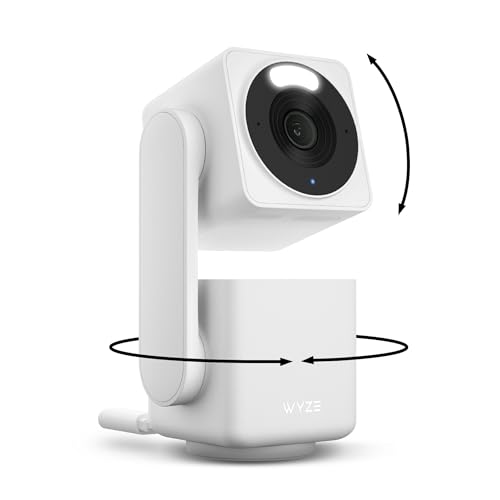
Camera movement helps when a baby changes position or when the camera must cover more of a room. The Motorola VM85-2 documents remote pan, tilt, and zoom for both the parent unit and app. VTech’s RM7764HD lists 360-degree pan, up to 100 degrees of tilt, and 10x zoom. VTech’s VM901 also supports pan-tilt-zoom, while the BOIFUN, ieGeek, and nooie models document motorized movement or rotation.
Auto-tracking is a separate feature from manual camera control. The BOIFUN Baby 2TM, BOIFUN Baby 4TM, nooie NB2, and ieGeek models document tracking capabilities. Treat this as a convenience feature rather than a substitute for checking placement, camera view, and alert settings yourself.
Basic sound or motion alerts are common in this group. More specialized alert systems add cry detection, danger zones, or environmental readings. The Momcozy BM04 documents danger-zone and motion alerts. The ieGeek Baby 7 and ieGeek split-screen model also list customizable danger areas. BOIFUN’s Baby 4TM specifically documents AI alerts related to prone sleeping and facial coverage, while the Owlet Dream Sight lists configurable crying, sound, and movement notifications.
Temperature sensing appears on several selected models, including Owlet, Momcozy, VTech VM901, Motorola VM85-2, BOIFUN Baby 2TM, ieGeek Baby 7, and nooie NB2. Some products also list humidity tracking. These features report room conditions; the supplied evidence does not establish that they measure medical or safety conditions, so use them as informational nursery-monitoring tools.
Consider storage and privacy
Recording can be useful when a monitor documents event clips or lets you save video. The Momcozy BM04 lists continuous or motion-activated recording. The VTech RM7764HD documents motion-triggered clips. The nooie NB2 and ieGeek systems list microSD or cloud storage options, with the relevant listings noting that memory cards may be separate purchases. Cloud storage can add convenience, while local storage may appeal to users who prefer keeping recordings on removable media.
Privacy specifications vary. The Owlet lists 256-bit encryption and the SGS Cybersecurity Mark. BOIFUN, ieGeek, and other selected systems list AES128 encryption, while the Motorola VM85-2 describes encrypted Wi-Fi and closed-loop FHSS communication. The Momcozy BM04 also describes encryption. Read the app, account, and storage requirements before setup, especially if several relatives will receive access.
Match the design to your home
For two rooms or two children, the Motorola VM85-2 and ieGeek split-screen system include two cameras. These setups can reduce the need to move one camera, but they also require additional placement and power connections. A single-camera system may be simpler for one nursery, particularly if it provides broad pan and tilt coverage.
Also check mounting instructions. Momcozy documents a minimum crib-mounting height and distance guidance for wall or floor stands. Other cameras may be designed for table, wall, or ceiling mounting. The correct position affects the view, so confirm that the supplied cable, stand, and mounting location suit your nursery before relying on the monitor.
Final Recommendation
Owlet Dream Sight Smart Baby Monitor ranks first overall in this specification-based comparison under the published weighted criteria.
Owlet Dream Sight Smart Baby Monitor is the first overall specification-based choice among these best smartphone baby monitors because it combines 2K video, night vision, configurable alerts, environmental tracking, two-way talk, and documented security features. It is best suited to shoppers who want a feature-rich app camera and do not require a listed parent display.
For two-room coverage, the Motorola Nursery WiFi Baby Monitor VM85-2 and ieGeek 2K Split-Screen Baby Monitor are the most specification-aligned fits because each includes two cameras and a dedicated viewing approach. The BOIFUN Baby 4TM is a distinctive option for documented sleep-position and facial-coverage alerts, while the VTech VM901 offers a balanced screen-and-app design.
Among the top smartphone baby monitors, the right choice depends on your connection preferences. Choose a hybrid model if local no-Wi-Fi viewing matters, an app-first model if remote access is your priority, and a two-camera system if one nursery view is not enough. Treat resolution, alert types, storage, and privacy controls as separate specifications rather than assuming one feature guarantees better results.
Frequently Asked Questions
What should I look for in the best smartphone baby monitors?
Start with the connection method, app compatibility, night vision, camera movement, alert types, and privacy controls. A dedicated screen may be useful at home, while app access matters for viewing away from the nursery. Also check whether the product supports one or two cameras, local or cloud storage, and the Wi-Fi band required for setup.
Do smartphone baby monitors need Wi-Fi?
Not always. The Motorola VM85-2, BOIFUN Baby 2TM, BOIFUN Baby 4TM, Momcozy BM04, ieGeek Baby 7, and ieGeek split-screen model document a parent unit or local viewing method that can operate without Wi-Fi. Remote smartphone viewing generally requires the app connection described by the manufacturer. Confirm the exact local and remote modes before choosing.
Are 2K baby monitors better than 1080p models?
2K models document higher camera resolution, which may provide more image detail on compatible displays or phones. However, viewing experience also depends on night vision, zoom, connection, screen resolution, and app behavior. The supplied evidence supports comparing these specifications, but it does not support a hands-on claim that one resolution performs better in every nursery.
Can more than one person use a baby monitor app?
Some selected models document sharing. Momcozy BM04 lists shared access for up to 20 family members, while the ieGeek systems and nooie models describe family or multi-user sharing. The exact invitation process and permissions are not supplied here, so review the app’s access controls before sharing video.
Are baby monitor temperature alerts medical alerts?
No such medical function is documented in the supplied listings. Temperature and humidity features should be treated as room-condition information. Use the monitor’s stated alert ranges and follow appropriate nursery-safety guidance rather than interpreting a monitor notification as a medical assessment.