Buying Guide
The best projector stand mounts are not interchangeable. A compact mini projector, a full-size home theater unit, and a presentation projector can require different support surfaces, connections, and placement heights. Start by identifying whether your projector has a 1/4-inch threaded socket, mounting holes, or neither. Then compare the stand’s stated capacity and adjustment system with the projector’s physical requirements.
Choose the placement style first
A tabletop stand is suitable when the projector already has a stable desk, shelf, or media console. The JUBOR uses a threaded connection and folds nearly flat, while the 2-Be-Best uses an enlarged shelf with end stoppers. The Yibracki is different: its desktop clamp elevates the projector from the desk edge and leaves more surface available for other equipment.
Floor stands are useful when the image must rise above furniture or when drilling into a wall is undesirable. The PUTORSEN Heavy-Duty Projector Stand provides a 27.6-to-47.2-inch stepless range and a storage shelf. The REHOSEUP reaches 55 inches and uses a tripod base, making it suitable for elevated temporary placement. The listed height range, tray size, and base footprint should be checked against the room before setup.
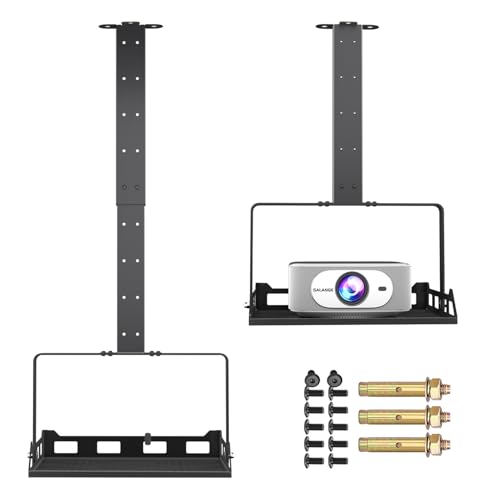
Wall and ceiling mounts create a more permanent arrangement. The WALI is designed for projectors with mounting-hole spacing between 8.9 and 12.4 inches. The Salange PCM20B provides recessed, telescopic-arm, and wall mounting. If the projector has no mounting holes, the VIVO ceiling tray is the relevant design because it supports the projector on a platform instead of depending on a bolt pattern.
Check the connection and load limit
A 1/4-inch thread appears on several selected models, including the JUBOR, BAISHUN, and Yibracki-compatible designs. This is a useful standard, but it should not be treated as universal for every projector. The VIVO tray is specifically designed for projectors without mounting holes, while the AMADA and 2-Be-Best provide platforms that can hold equipment directly.
Load figures are listing specifications, not a substitute for checking the projector itself. The WALI lists up to 44 pounds, REHOSEUP lists 33 pounds, and both AMADA and JUBOR list 22 pounds. By contrast, BAISHUN lists different limits by installation mode: 6.6 pounds on a desktop and 4.4 pounds on a wall or ceiling. Use the lower applicable figure when a stand has separate surface limits.
Compare adjustment systems
Height adjustment determines whether the projected image clears a sofa, table, audience, or other obstruction. Stepless adjustment, as documented for the PUTORSEN floor stand, allows fine positioning. Fixed settings, such as the six positions on the AMADA, can provide a straightforward repeatable setup. The WALI and Salange models use extension ranges for mounted installations rather than floor-stand height controls.
Angle adjustment matters when the projector cannot sit directly in line with the screen. The JUBOR and 2-Be-Best offer broad rotational and tilt movement. The Yibracki supplies 360-degree rotation with 15-degree forward and backward tilt. The VIVO tray focuses more on vertical placement than on multi-axis aiming, so it may be better suited to a carefully aligned ceiling installation.
Consider stability and the room surface
Look beyond the maximum load number. A broad base, tripod geometry, reinforced legs, locking knobs, and anti-slip pads all affect how the stand is intended to stay in position. JUBOR documents a dual-pole structure and protective pads. REHOSEUP describes a triangular tripod structure, while the floor models from PUTORSEN and the selected tabletop stands use non-slip or protective padding.
For a desk, confirm that the clamp can fit the edge and that the surface can accept the stand’s footprint. For a floor, measure the available area around furniture and walkways. For a ceiling or wall, verify the stated surface limitations. WALI and the BAISHUN wall or ceiling mount both note restrictions involving certain ceiling or drywall conditions, so the installation surface should be confirmed before choosing either design.
Look at cables and portability
Cable handling is more important when the projector will remain installed. PUTORSEN includes cable clips, Salange documents concealed cable management, and VIVO routes cables through the pole. These features can reduce visible cable loops, but they do not eliminate the need to plan the outlet and signal-cable path.
For occasional use, folding designs are easier to store. JUBOR folds to approximately 0.9 inches, BAISHUN weighs about 0.85 pounds, and the 2-Be-Best is described as foldable. Heavy floor and ceiling designs are less suited to frequent relocation, but they may offer larger trays, higher support figures, or better cable organization. Match portability to how often the projector changes rooms.
Final Recommendation
WALI Universal Ceiling and Wall Projector Mount ranks first overall in this specification-based comparison under the published weighted criteria.
The final choice among the best projector stand mounts depends on the documented features that match your intended use.
JUBOR Foldable Projector Stand is the first overall specification-based choice among these top projector stand mounts because it combines a 22-pound stated capacity, broad angle adjustment, 1/4-inch compatibility, protective pads, and a compact foldable design. Its main limitation is the lack of a documented height range, so it is most suitable when the existing desk or shelf already provides the needed elevation.
Choose the AMADA HOMEFURNISHING stand when a large platform and fixed height settings are more important than a threaded connection. The REHOSEUP is a better match for elevated placement and a higher stated load limit, while the PUTORSEN adds stepless height control and cable organization. For permanent installation, WALI offers the highest stated capacity, and Salange adds three mounting configurations with concealed cable routing.
The VIVO tray is the clearest option for a projector without mounting holes. BAISHUN is the most adaptable when one stand may move between desk, wall, and ceiling use, provided the lower wall or ceiling capacity is sufficient. Yibracki suits a compatible desktop edge, and 2-Be-Best is a practical platform design for tabletop use. In every case, confirm the projector’s mounting method, weight, placement surface, and required viewing height before installation.
Frequently Asked Questions
What should I check before choosing the best projector stand mounts?
Check the projector’s weight, mounting connection, dimensions, and desired position. A 1/4-inch thread supports threaded stands such as JUBOR or BAISHUN, while a tray design such as VIVO or AMADA may suit a projector without mounting holes. Also compare the stand’s applicable load limit for the exact installation mode.
Are floor stands or tabletop stands better for a home theater?
That depends on the room. A tabletop stand works when a console or table already places the projector at a suitable height. A floor stand can raise the projector above furniture and may provide a larger height range. PUTORSEN offers stepless adjustment, while REHOSEUP reaches 55 inches. Measure the floor area and screen alignment before selecting a format.
Can a ceiling tray hold a projector without mounting holes?
Yes, the VIVO MOUNT-VP08B is documented as a ceiling-mounted tray for projectors without mounting holes. It uses a 13.8-by-8.7-inch steel tray and lists support up to 11 pounds. Its listing also says it is not intended for sloped or pitched ceilings, so the ceiling shape and projector weight must be checked first.
Which top projector stand mounts are easiest to move?
Foldable tabletop models are generally the most portable based on the supplied specifications. JUBOR folds to about 0.9 inches, BAISHUN weighs about 0.85 pounds, and 2-Be-Best is described as foldable. Larger tripod and floor models can also be moved, but their wider bases or heavier construction may require more storage space.
Do projector stands need cable management?
Not always, but it can help with a permanent installation. PUTORSEN includes cable clips, Salange documents concealed cable management, and VIVO routes cables through its pole. A portable tabletop stand may prioritize folding and quick relocation instead, so cable handling should be matched to how the projector will be used.