Buying Guide
A USB hub is useful when a computer has fewer physical connections than the devices on your desk. The best usb networking hubs in this comparison fall into two practical groups: Ethernet-equipped multiport adapters and USB expansion hubs that concentrate on adding data ports. Choose according to the connection your host actually supports, then check how the hub handles bandwidth and power.
Start with the host connector
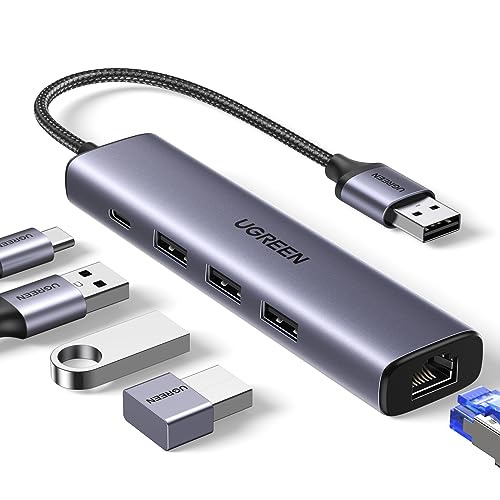
The host connection determines whether the hub can be used directly. The Acer model is a USB-C multiport adapter, while the TP-Link UE330 and UGREEN Ethernet model are USB Ethernet hubs designed to turn a compatible USB connection into wired networking while adding USB ports. The Plugable model includes a USB-B-to-USB-C host cable, which is useful when connecting its powered hub to a newer USB-C computer.
A USB-A-only expansion hub is appropriate when the computer or other host has a USB-A port available. The UGREEN four-port model specifically documents USB-A host compatibility, while the Aceele, RSHTECH, Atolla, and SABRENT products focus on expanding a host USB connection into additional USB-A ports. Confirm the host port before choosing a design; a physical connector alone does not establish support for every function.
Decide whether Ethernet is required
If wired network access is part of the job, choose a product that explicitly includes RJ45 Ethernet. Acer documents 10/100/1000Mbps Ethernet, UGREEN documents a Gigabit Ethernet port, and TP-Link identifies its UE330 as a USB 3.0 to Gigabit Ethernet adapter. These models also add USB data ports, making them more than single-purpose network adapters.
The remaining selected products are USB expansion hubs rather than Ethernet adapters. They can add ports for keyboards, mice, storage, printers, cameras, or other peripherals, but the supplied evidence does not document built-in networking. Do not assume that a general USB hub provides Ethernet simply because it is described as a networking or expansion hub.
Compare data-transfer tiers
Most selected hubs document USB 3.0 transfer rates up to 5Gbps. That includes UGREEN, TP-Link, SABRENT, Plugable, RSHTECH, both Atolla models, and the compact UGREEN hub. These figures describe the USB standard and maximum listed rate, not a result for every device or workload.
Aceele documents USB 3.2 Gen 2 with up to 10Gbps shared across four USB-A ports. It is the clearest fit when the host, cable, and connected devices all support the faster tier. The Acer adapter documents 5Gbps USB-A and USB-C data ports alongside its display and Ethernet functions. When several devices operate at once, the available connection bandwidth is shared, so port count and headline speed should be considered together.
Match the power design to your peripherals
Bus-powered hubs draw power through the host and may suit low-power devices such as keyboards, mice, and flash drives. A powered hub uses a separate adapter, which is more suitable for a desk with several connected devices or storage equipment. SABRENT includes a 60W adapter; Atolla’s seven-port model includes a 5V/4A adapter; and the Atolla five-port model includes a 5V/3A adapter. RSHTECH includes a 5V/2A adapter and can operate bus-powered or self-powered.
Some hubs distinguish data ports from charging ports. Atolla’s seven-port model has seven USB 3.0 data ports plus one smart charging port rated up to 2.4A. The five-port Atolla similarly provides four data ports and one smart charging port. Acer’s USB-C power input is different: the listing states up to 100W input and up to 85W output to a compatible laptop, with the proper charger and cable required. UGREEN’s Ethernet hub has an auxiliary USB-C input for high-power peripherals, but explicitly does not charge the host. Aceele’s USB-C port supplies power to the hub and does not transfer data or charge other devices.
Look for control and placement features
Individual switches are useful when you regularly disconnect peripherals without removing cables. SABRENT, RSHTECH, and both Atolla models document individual port switches and indicator LEDs. Plugable has a physical power button and status LEDs, while Aceele includes a four-foot cable and UGREEN’s compact hub emphasizes portability.
Cable length affects where the hub can sit. A longer cable may help place the hub beside a monitor or at the edge of a desk, while a short integrated cable can be easier to carry. The right choice depends on whether the hub will stay fixed or move between locations.
Check operating-system and device notes
Compatibility claims vary by model. UGREEN’s Ethernet hub lists plug-and-play support for Windows 11, Windows 10, Windows 8.1, macOS, and Chrome OS, with drivers needed for some older Windows versions and Linux. TP-Link lists Windows, macOS, Linux, and Chrome OS support. The selected USB expansion hubs generally document Windows, macOS, and Linux support, while Aceele also lists Android.
Some devices have special requirements. Acer’s 4K@60Hz mode depends on compatible host hardware, and its Ethernet speed requires suitable cabling. Plugable notes that certain Apple SuperDrive uses may not work through a generic USB hub. Read these qualifications before treating a port specification as universal.
Final Recommendation
Acer 6-in-1 USB-C Hub with Ethernet ranks first overall in this specification-based comparison under the published weighted criteria.
The final choice among the best usb networking hubs depends on the documented features that match your intended use.
Acer 6-in-1 USB-C Hub with Ethernet is the first overall specification-based choice. It documents the most complete mix of functions, including 4K@60Hz HDMI, Gigabit Ethernet, three 5Gbps data ports, and USB-C power delivery. For users who need wired networking plus several USB connections, the UGREEN 5-in-1 USB Ethernet Hub is the more focused alternative, while TP-Link’s UE330 emphasizes a compact Ethernet-and-three-port layout.
For storage-heavy USB work, Aceele’s four USB 3.2 Gen 2 ports provide the highest documented transfer tier, subject to shared bandwidth and compatible equipment. SABRENT is the practical choice for a large desktop peripheral collection because it supplies ten USB 3.0 data ports and individual switches. Plugable, RSHTECH, and the Atolla powered hubs offer different combinations of external power, charging ports, LEDs, and port controls.
Among the top usb networking hubs, the UGREEN four-port hub is the simplest travel-oriented selection. It adds four USB-A ports in a slim design and documents broad operating-system support, but it does not provide Ethernet or external power. In every case, select the product whose documented port functions match the host, network, display, storage, and power requirements of your setup.
Frequently Asked Questions
What should I check before choosing the best usb networking hubs?
Check the host connector first, then confirm whether you need RJ45 Ethernet, display output, USB-A data ports, USB-C data, or charging. Also compare the documented USB speed, power arrangement, cable length, and operating-system support. A hub with many ports is not automatically suitable if the computer lacks the required host connection or if the desired function is not listed.
Do all USB hubs provide wired networking?
No. The Acer, UGREEN five-in-one, and TP-Link UE330 products explicitly document Ethernet ports. The other selected products are USB expansion hubs whose supplied evidence describes data, charging, or power features but not built-in networking. Choose an Ethernet-equipped model when RJ45 connectivity is required.
Is a powered hub necessary for external storage?
It depends on the connected equipment and the hub design. Powered models such as SABRENT, Plugable, RSHTECH, and the Atolla hubs include separate adapters intended to support multiple connected devices. Aceele documents a USB-C power input for SSDs and HDDs. A bus-powered hub can still be appropriate for lower-power peripherals, but the supplied evidence does not establish one universal power requirement for every storage device.
Does a 10Gbps hub make every transfer run at 10Gbps?
No. Aceele documents up to 10Gbps shared across four USB-A ports. The connected host, cable, and device must also support the relevant USB standard, and simultaneous devices share available bandwidth. Other selected hubs document up to 5Gbps, which can be adequate for ordinary peripherals and compatible storage.
Can a USB-C hub charge the laptop it is connected to?
Only when the specific model documents host charging or power delivery. Acer lists up to 85W output to a compatible laptop from 100W input. By contrast, UGREEN’s Ethernet hub states that its USB-C power input is for high-power peripherals and cannot charge the host, while Aceele states that its power port supplies the hub and does not charge other devices.