Buying Guide
A wired switch expands the number of Ethernet devices connected to a router or network gateway. In a gaming setup, the useful distinction is not the word “hub” alone but the documented port speed, port count, switching capacity, and installation design. The best gaming networking hubs in this list are unmanaged Ethernet switches: connect power and cables, and the ports automatically negotiate a supported link rate.
Start with the speed of every connected device
The multi-gigabit products here document 2.5Gbps support. That is the key specification for a newer wired setup containing a 2.5G gaming PC, NAS, workstation, or compatible access point. A 2.5G switch can also accept slower 100Mbps and 1Gbps devices when the listing states automatic link support, as it does for YuLinca, Walfront, Eujgoov, ZAICOLER, Badafaci, Hamwesh, Jeanoko, and ITEFDTUTNE.
Do not assume that a 2.5G switch makes every connection 2.5Gbps. The connected device, router or gateway, Ethernet adapter, and cable all affect the negotiated link. The listings state Cat5e compatibility for several selections, including Walfront, Eujgoov, ZAICOLER, Hamwesh, Jeanoko, and ITEFDTUTNE. That describes cable compatibility in the product evidence; it does not establish a particular real-world transfer result.
Match port count to the whole setup
Count the wired devices that need connections now, then leave room for the layout you expect to build. An eight-port model such as the YuLinca, Walfront, or Eujgoov B0FNDF3WJD selection can connect more devices than a five-port design. Potential connections named in the listings include gaming PCs, TVs, NAS systems, workstations, access points, and other wired equipment.
The YuLinca is unusual in this group because it lists eight 2.5G RJ45 ports plus a 10G SFP port and a 60Gbps backplane. The SFP port requires a compatible module, which the listing says is not included. That makes it important to distinguish copper-port count from uplink or fiber expansion when planning a network.
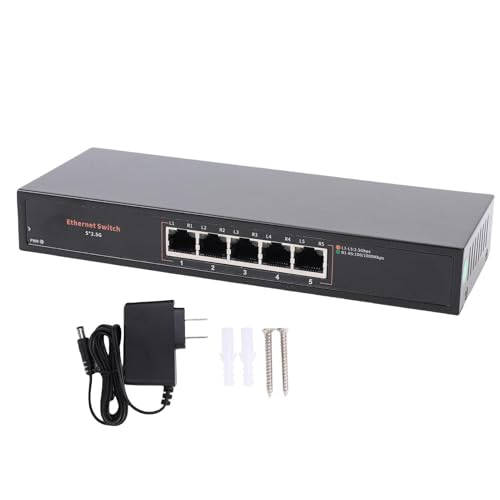
Five-port switches can be a better physical fit when the network contains only a router connection and a few wired devices. Eujgoov B0FPP6G4ZL, Badafaci, ZAICOLER, Hamwesh, YDuupxe, Jeanoko, and ITEFDTUTNE all document five-port designs. Their listed 40Gbps switching capacity is consistent with the multi-gigabit focus of this category, but the smaller port count leaves less expansion space.
Check switching capacity and link behavior
Switching capacity is the aggregate figure supplied in the listings. Walfront, Eujgoov, and the other 2.5G five-port choices generally list 40Gbps, while YuLinca lists 60Gbps backplane bandwidth. Use these numbers as specification points rather than as a promise of a particular game or file-transfer result.
Automatic negotiation and Auto MDI/MDIX are useful for a simple installation. They allow compatible ports to select the supported link rate and avoid requiring a special uplink port arrangement. YuLinca, Walfront, Eujgoov, ZAICOLER, and ITEFDTUTNE document automatic behavior or multi-speed compatibility. The products are unmanaged, so the supplied evidence does not describe VLAN controls, traffic dashboards, or advanced configuration features.
Consider cooling and enclosure design
Every selected multi-gigabit model documents fanless or quiet operation, with aluminum alloy specifically identified for Walfront, Eujgoov B0FPP6G4ZL, Badafaci, Hamwesh, and YDuupxe. A fanless enclosure avoids a mechanical fan, which may be useful in a bedroom, media room, or quiet office. It does not establish a measured temperature or noise level, so those performance questions require separate testing.
Housing material also affects how a switch fits the installation. Aluminum-alloy cases are described as durable or useful for heat dissipation in the supplied evidence. YuLinca identifies a metal casing, while some other listings do not name their enclosure material. Keep the switch in a suitable ventilated location and follow the manufacturer’s installation guidance.
Plan desktop or wall placement
Placement details vary. Eujgoov B0FPP6G4ZL and Badafaci explicitly list desktop or wall mounting, with mounting hardware identified in the supplied points. YDuupxe lists screws and anchors, while Walfront and ZAICOLER document wall-mount support. YuLinca provides no supplied evidence of mounting hardware, so it is better suited to a location where a desktop or shelf position is practical.
Before selecting a wall-mounted design, check cable direction, power-adapter reach, and access to the port indicators. For a desk or media console, compact five-port options can reduce cable spread. For a gaming room with several fixed Ethernet runs, eight ports may be easier to organize over time.
Method and specification limits
This comparison uses public listing titles, feature points, and technical specifications. The scoring criteria emphasize documented speed, capacity, compatibility, cooling, and placement. It is not a hands-on test and does not infer latency, throughput, reliability, or thermal behavior beyond what the listings state. Terms such as “gaming” and “lag-free” appear in some listing language, but they are treated as stated use cases rather than verified results.
Final Recommendation
YuLinca 8-Port 2.5G Switch with 10G SFP+ ranks first overall in this specification-based comparison under the published weighted criteria.
YuLinca 8-Port 2.5G Switch with 10G SFP+ is the first overall specification-based choice. Its eight adaptive 2.5G RJ45 ports, 10G SFP port, 60Gbps backplane, metal casing, and fanless unmanaged design give it a particularly extensive documented connection profile in this comparison.
For a larger multi-gigabit layout without the SFP requirement, Walfront and Eujgoov B0FNDF3WJD provide eight 2.5G ports and 40Gbps switching capacity. For a compact five-port installation, Eujgoov B0FPP6G4ZL and Badafaci stand out for their documented mounting flexibility, while ZAICOLER and Hamwesh emphasize Cat5e compatibility and quiet fanless operation. These are the top gaming networking hubs here when the final choice depends on port count, mounting, or the devices already in the network.
The best gaming networking hubs are therefore not interchangeable: select by the slowest required link, the number of wired devices, the available mounting position, and whether an SFP or other uplink is actually needed.
Frequently Asked Questions
What should I look for in the best gaming networking hubs?
Start with the port speed and count. The selected 2.5G models document 2.5Gbps ports and generally list automatic support for 100Mbps and 1Gbps devices as well. Then check switching capacity, Cat5e compatibility, cooling, and whether the enclosure can be placed where your Ethernet cables and power adapter will reach.
Is an eight-port switch better than a five-port switch for gaming?
It depends on the number of wired devices. YuLinca, Walfront, and Eujgoov B0FNDF3WJD provide eight ports, which gives more room for gaming PCs, TVs, NAS systems, workstations, and access points. Five-port models such as Badafaci or ZAICOLER may fit a smaller setup. Port count alone does not establish lower latency or faster gameplay.
Do these switches require software configuration?
The selected products are described as unmanaged and plug-and-play. YuLinca, Walfront, Eujgoov, ZAICOLER, Hamwesh, Jeanoko, and ITEFDTUTNE state that no software or manual configuration is needed. Connect the power adapter and Ethernet cables, then confirm that the connected devices support the desired link speed. Advanced network controls are not documented for these models.
Can a Cat5e cable work with a 2.5G switch?
Several selected listings explicitly say their switches support existing Cat5e cables, including Walfront, Eujgoov B0FPP6G4ZL, ZAICOLER, Hamwesh, Jeanoko, and ITEFDTUTNE. The actual negotiated connection still depends on the cable run and both connected network devices. The listing evidence supports compatibility, not a particular transfer rate in every installation.