Buying Guide
Choosing among the best ethernet hubs starts with identifying how many wired devices must connect and whether the network needs only expansion or also traffic controls. In modern listings, “hub” often describes an Ethernet switch: a powered network device that lets several wired endpoints communicate through a router or other network connection. The products above are compared from supplied specifications and feature statements, not from hands-on testing or customer commentary.
Match port count to the installation
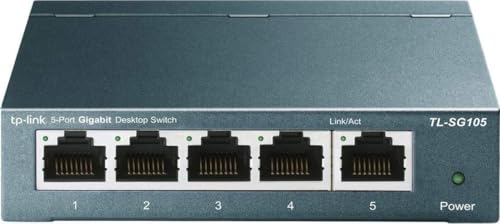
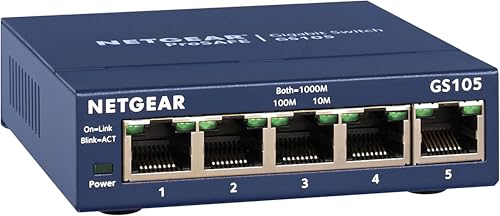
Five-port models are suitable when a router, computer, television, console, printer, or NAS needs a few additional wired connections. Remember that one connection generally links the switch to the existing network, leaving fewer ports for endpoint devices. The TP-Link TL-SG105, NETGEAR GS305, TP-Link LS1005G, NETGEAR GS105NA, UGREEN five-port model, and BENFEI five-port model all document five RJ45 ports.
For offices, workstations, or media areas with many endpoints, a larger design avoids quickly filling every socket. The UGREEN 16-Port Gigabit Switch provides 16 ports, while the NETGEAR GS324 provides 24. Larger units require more physical room, so check the listed dimensions and decide whether desktop, wall, or rack placement fits the installation.
Confirm the speed standard
Gigabit Ethernet means the listed ports support up to 1000Mbps link speed under suitable network conditions and connected equipment. Every selected product documents Gigabit connectivity, while the TP-Link TL-SG105, TP-Link LS1005G, UGREEN five-port switch, and BENFEI model explicitly describe 10/100/1000Mbps operation or automatic adjustment. The NETGEAR models also specify 1.0Gbps ports and automatic negotiation.
A switch cannot make an internet connection faster than the service, router, cables, or endpoint hardware allow. For file transfers between local devices, however, matching Gigabit ports across the network can provide a consistent specification baseline. Check that existing cables are appropriate; the NETGEAR GS305 listing specifically mentions Cat5e and Cat6 compatibility.
Decide whether management controls matter
Unmanaged switches are generally the simplest option. The NETGEAR GS305, TP-Link LS1005G, NETGEAR GS105NA, UGREEN five-port model, and BENFEI switch document plug-and-play operation without software or configuration. They suit a network where devices should simply receive wired connectivity.
Managed or feature-enhanced designs are more appropriate when the network needs segmentation or traffic handling. The NETGEAR GS305E documents VLAN configuration, QoS, port monitoring, and security controls. The TP-Link TL-SG105 documents port-based 802.1p/DSCP QoS and IGMP Snooping. The UGREEN 16-Port Gigabit Switch adds Standard and VLAN modes, including port isolation behavior. These capabilities can be useful for separating groups of devices or giving certain traffic handling priority, but they also add decisions during setup.
Consider PoE requirements separately
Power over Ethernet can carry power and data to compatible devices through one network cable. The UGREEN 10-Port PoE Switch is the selected specialist option: it documents eight PoE+ ports, two Gigabit uplinks, a 60W total PoE allocation, automatic PoE detection, port isolation, and an Extend mode. This makes it relevant to installations involving security cameras, IP phones, or wireless access points.
PoE is not necessary for ordinary computers, televisions, printers, or consoles. The five-port UGREEN and BENFEI listings explicitly state that PoE is not supported, which is a specification limitation rather than a defect for standard wired expansion. Confirm the connected device’s PoE requirement and the switch’s available power allocation before selecting this design type.
Check noise, enclosure, and mounting
Fanless cooling is documented across all selected products except where the listing does not explicitly provide that detail. Fanless operation can be a useful design consideration for bedrooms, offices, media cabinets, or other quiet areas, but it does not by itself describe network throughput. Metal enclosures appear on the TP-Link TL-SG105, NETGEAR GS305 and GS305E, NETGEAR GS105NA, and BENFEI models. The TP-Link LS1005G emphasizes a particularly small and light body.
Mounting choices vary. The TP-Link TL-SG105, NETGEAR GS305, NETGEAR GS305E, NETGEAR GS105NA, UGREEN five-port switch, UGREEN 16-port model, and NETGEAR GS324 document desktop or wall placement. The GS324 additionally documents rack mounting. Before installation, allow room for the power adapter, Ethernet cable bends, indicator visibility, and ventilation around the enclosure.
Final recommendation
UGREEN 16-Port Gigabit Switch ranks first overall in this specification-based comparison under the published weighted criteria.
The final choice among the best ethernet hubs depends on the documented features that match your intended use.
The TP-Link TL-SG105 is the highest-scoring returned product and the first overall specification-based choice. It combines five Gigabit ports, automatic negotiation, QoS, IGMP Snooping, flow control, fanless cooling, a metal case, and desktop or wall mounting. Those features make it a balanced fit for many small wired networks.
The top ethernet hubs for different layouts are not identical. Choose the NETGEAR GS305E when VLAN and QoS controls matter, the UGREEN 16-Port Gigabit Switch or NETGEAR GS324 when many devices must connect, and the UGREEN 10-Port PoE Switch for compatible powered equipment. For a compact installation, the TP-Link LS1005G documents a notably small enclosure. The unmanaged five-port NETGEAR, UGREEN, and BENFEI models remain straightforward alternatives when basic Gigabit expansion is the main requirement.
Frequently Asked Questions
Are Ethernet hubs and switches the same for this comparison?
In retail listings, “Ethernet hub” is often used alongside “switch,” “splitter,” or “network hub” for devices that expand wired network connections. This comparison includes products whose supplied titles and features independently describe multi-port Ethernet switching or hub operation. A traditional repeater hub and a passive cable splitter are different technologies, so check the technical description rather than relying on the label alone.
How many ports do the best ethernet hubs need?
Choose based on connected devices and the network uplink. A five-port unit can add several connections, but one port may connect back to the router or existing network. The UGREEN 16-port model and NETGEAR GS324 are better suited to offices or equipment areas with many endpoints. Leave some spare capacity if more wired devices may be added later.
Do these Ethernet hubs require configuration?
Several selected unmanaged models document plug-and-play setup with no software or configuration, including the NETGEAR GS305, TP-Link LS1005G, and UGREEN five-port switch. Feature-enhanced products can require additional setup for VLAN, QoS, port monitoring, or related controls. The NETGEAR GS305E and TP-Link TL-SG105 document those types of network features, so read the setup requirements for the intended configuration.
Do I need a PoE Ethernet hub?
You need PoE only when compatible equipment should receive power through the Ethernet connection. The UGREEN 10-Port PoE Switch documents eight PoE+ ports and a 60W allocation for that use. Standard computers, televisions, printers, and consoles generally need ordinary data connectivity instead. Verify the powered device’s PoE standard and required power before choosing a PoE model.
Can a Gigabit switch provide Gigabit internet?
A Gigabit switch documents support for links up to 1000Mbps, but actual transfer speed also depends on the router, internet service, cable, and connected devices. The switch can provide Gigabit-capable wired links between compatible equipment; it does not increase an internet plan or upgrade slower hardware.