Buying Guide
The best apple networking hubs are not all built for the same workspace. Some are compact Ethernet adapters with a few USB ports, while others are full docking stations that add displays, card readers, charging, and many peripheral connections. The right type depends on the ports on your Apple host and how many devices you plan to connect at once.
Match the hub to the host port
Start with the connector and the physical layout. The NXPGKEA model is designed specifically around MacBook use and is described as avoiding obstruction of the MagSafe port. The BENFEI model adds both USB-C and USB-A host connectivity, which is useful if one hub must serve more than one type of Apple-compatible device. The UGREEN Revodok and uni models are USB-C options, while the UGREEN 5-in-1 hub is described for USB-A host devices.
Compatibility statements still need careful interpretation. A listing may name MacBook, iPad, iMac, or other USB-C equipment, but the host must also support the relevant functions. For video, the computer needs a compatible display mode such as DisplayPort Alt Mode, and the available resolution or refresh rate can depend on the host. The CODi dock makes this especially clear by requiring DP1.4/HBR3 support for its two-display configuration.
Choose the Ethernet tier
Gigabit Ethernet is the main specification across most selected hubs. The UGREEN Revodok, NXPGKEA, CODi, BENFEI, uni, and UGREEN 5-in-1 models all document Gigabit-class wired networking. This is generally the practical baseline when replacing inconsistent wireless connectivity with a cable connection.
The XikeStor and Blackjet models move to 2.5GbE. That higher tier is relevant only when the rest of the network, cabling, and host connection can support it, but it gives these models a higher stated ceiling. The Blackjet RX-4 is the more workstation-oriented implementation, while XikeStor places 2.5GbE in a smaller USB-C dock.
For a basic desk setup, Gigabit Ethernet may be sufficient. For large local transfers or a fast network infrastructure, the 2.5GbE choices provide more headroom on paper. Ethernet speed alone should not decide the purchase: host compatibility and the number of simultaneous peripherals matter just as much.
Count the expansion ports you actually need
A hub with more ports is not automatically a better fit. The UGREEN Revodok has three USB-A ports, which suits keyboards, mice, flash drives, and similar accessories. The uni model follows a similarly focused approach. These are easier to place in a travel bag or beside a laptop because they avoid the larger footprint of a full dock.
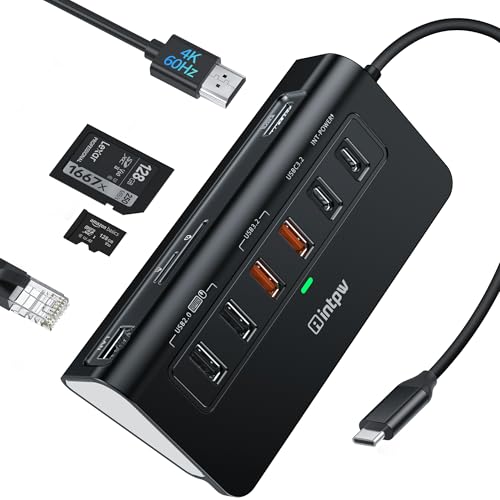
For storage-heavy workflows, the Satechi and XikeStor models add card readers, while the Blackjet RX-4 specifies UHS-II SD and microSD readers. The Satechi also lists several USB-C data ports rated up to 10Gbps. The intpw P9R PRO offers a particularly broad arrangement with three high-speed USB ports, two USB 2.0 ports, and SD/TF access. Its listing notes that SD and TF cards cannot be used simultaneously.
The CODi CentroM3 takes a different approach: it prioritizes two HDMI outputs and three USB-A ports rather than card readers. Decide whether your setup centers on storage cards, USB accessories, external screens, or a combination before paying attention to the port count.
Check charging and power allocation
Power specifications can describe different functions. Several selected hubs list up to 100W Power Delivery input, but the amount passed to the host may be lower after the hub reserves power for its own operation. UGREEN Revodok specifies up to 85W pass-through from a 100W input, and Satechi similarly describes up to 85W pass-through with a dedicated PD port.
The XikeStor, intpw, and NXPGKEA listings also identify 100W PD support. The UGREEN 5-in-1 model is different: its USB-C power port is intended for high-power peripherals and cannot charge the host laptop. BENFEI likewise describes its power slot as supplying connected devices. Read this distinction carefully if laptop charging is a central requirement.
Consider display requirements
For a single external screen, the UGREEN Revodok’s 4K/30Hz output may be adequate for office work, while XikeStor, intpw, and NXPGKEA list 4K/60Hz HDMI. Satechi goes further with modes up to 8K/30Hz and 4K/120Hz, subject to host capability. The Blackjet RX-4 supports two displays through HDMI 2.1 and DisplayPort 1.4, and CODi lists two 4K/60Hz HDMI outputs.
Display specifications should be matched to the computer, monitor, cable, and desired refresh rate. A hub cannot create a display mode the host does not support. If you do not need an external screen, a simpler Ethernet-and-USB hub such as uni or UGREEN’s 5-in-1 model avoids paying attention to unused video hardware.
Final recommendation
Satechi 8-in-1 USB-C Hub V3 ranks first overall in this specification-based comparison under the published weighted criteria.
The final choice among the best apple networking hubs depends on the documented features that match your intended use.
Blackjet RX-4 Thunderbolt 4 Docking Station is the highest-scoring returned product and the first overall specification-based choice for a full Apple workstation. Its 17 ports, 2.5G Ethernet, dual-display support, 40Gbps Thunderbolt connection, UHS-II readers, and 60W laptop charging make it the most comprehensive documented option, though its desktop format is less compact.
Among the top apple networking hubs, Satechi 8-in-1 USB-C Hub V3 is the better fit for high-resolution single-display work and fast USB-C accessories. XikeStor is the compact pick when 2.5GbE matters, while CODi is the specialist choice for two external 4K displays. For a simpler everyday setup, UGREEN Revodok, uni, or BENFEI provide a more focused combination of wired networking and USB expansion.
Frequently Asked Questions
What should I look for in the best apple networking hubs?
Prioritize the correct host connector, documented Apple compatibility, Ethernet speed, required USB ports, charging behavior, and display support. Confirm that the Apple device supports the video and power functions you intend to use.
Is Gigabit Ethernet enough for a MacBook hub?
Gigabit Ethernet is the stated networking tier on most selected models and is a practical match for many wired setups. Choose a 2.5GbE model such as XikeStor or Blackjet when the network equipment, cabling, and host connection also support the higher tier.
Can these hubs charge an Apple laptop?
Some models list USB-C Power Delivery pass-through, including Satechi, XikeStor, intpw, NXPGKEA, and UGREEN Revodok. Check the distinction between input capacity and host output. The UGREEN 5-in-1 listing specifically says its power port supports peripherals rather than charging the host.
Which selected hub supports two monitors?
Blackjet RX-4 and CODi CentroM3 document dual-display connections. CODi specifies two 4K/60Hz HDMI outputs but requires DP1.4/HBR3 support from the host. Blackjet lists HDMI 2.1 and DisplayPort 1.4 connections with support for two external displays.
Do I need a display port on an Ethernet hub?
No. If your goal is wired networking plus USB accessories, uni, BENFEI, or UGREEN’s 5-in-1 model may be a better-aligned design. A display-equipped hub is useful only when the Apple device and monitor setup require that additional connection.