Buying Guide
Selecting the best 2-port network cards requires more than counting RJ45 connectors. A useful comparison starts with the network speed you need, then checks the host slot, chassis bracket, operating system, connector standard, and server features. The products in this guide are PCIe network adapters or purpose-built storage adapters with two documented network ports. The ranking is based on supplied specifications and feature descriptions, not hands-on testing.
Match port speed to the network
Gigabit cards remain suitable for ordinary wired LAN connections, management networks, and systems whose switches and cabling operate at 1Gbps. The H!Fiber.com Intel 82576 card and StarTech ST1000SPEXD4 both provide two 10/100/1000Mbps RJ45 ports. Their lower link ceiling can simplify compatibility, but they are not appropriate when the rest of the network is designed for 2.5GbE or faster.
The 2.5GbE models sit between conventional gigabit and 10GbE. QFly and Binardat use Realtek RTL8125B controllers and support 2.5Gbps with backward operation at 1Gbps and 100Mbps. That makes them useful when a switch or NAS has multi-gigabit ports but existing cabling does not justify a 10GbE deployment. Confirm the switch port and cable category before expecting the higher link rate.
For heavier transfers, virtualization, or server traffic, the 10GbE group offers more headroom. The 10Gtek, GLOTRENDS, Binardat 10G, and StarTech X540 cards use dual RJ45 ports and list 10GBASE-T operation. The StarTech Marvell card goes further by documenting six speeds, including 2.5Gbps and 5Gbps. Synology’s E25G30-F2 is different: it uses two 25GbE SFP28 ports and is intended for compatible Synology systems.
Check PCIe lanes and physical clearance
PCIe compatibility is a practical filter. The QFly and Binardat 2.5G cards document operation in x1 slots while fitting larger x4, x8, or x16 sockets. The StarTech Marvell adapter uses PCIe 3.0 x4. Several 10GbE Intel-controller cards specify PCIe x8 and can fit x16 slots. A physical x16 connector does not automatically mean every card can run in every x16 slot, so verify the listed lane requirement and motherboard layout.
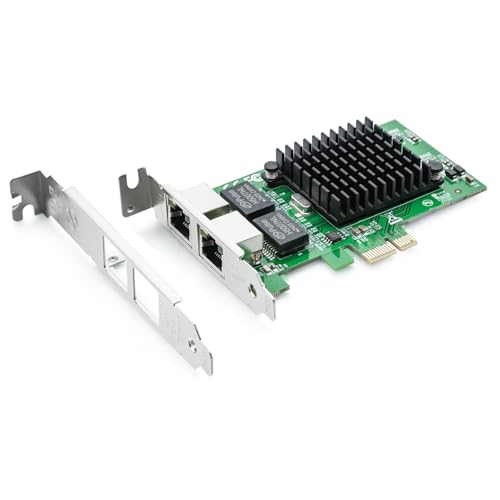
Bracket height matters in compact cases. The 10Gtek, Binardat 10G, QFly, and Binardat 2.5G listings include standard and low-profile brackets. The StarTech Marvell card also lists a low-profile bracket. Measure the available clearance and check whether an adjacent slot or large heat sink could obstruct installation. These are PCIe devices, not legacy PCI cards; the Binardat 10G and other listings explicitly distinguish PCIe from PCI.
Operating-system claims vary considerably. The 10Gtek and GLOTRENDS listings cover Windows, Windows Server, Linux, and ESXi, while the StarTech 10GbE cards list Windows, Windows Server, and Linux support. The 2.5GbE cards list Windows and Linux versions, but their feature and hypervisor coverage is not identical. Check the exact driver and kernel requirements before deployment, especially for a server or NAS.
The Synology adapter needs a separate platform check because its listing identifies Synology systems and a DSM 7.1.1-42962 Update 5 or newer requirement. It should not be treated as a general-purpose desktop NIC without confirming hardware compatibility. Conversely, the H!Fiber.com card lists several older operating systems and VMware ESXi 5/6, but specifically excludes ESXi 7.0, Mac OS, and bypass mode.
Consider server and management features
Two ports can serve different roles: separate networks, redundancy, traffic division, or a linked configuration where supported. StarTech ST20000SPEXI specifically documents linking both ports to the same router without third-party software. Synology lists port failover and load balancing. These claims describe documented functions, not a guarantee for every switch, driver, or network design.
PXE is useful for network boot and deployment workflows. VLAN tagging helps separate traffic logically, while jumbo-frame support can be relevant to environments configured for larger packets end to end. The StarTech Marvell card lists PXE, VLAN tagging, WoL, 16K jumbo frames, secure boot, PTP, and AVB. Binardat’s 2.5G card lists PXE, VLAN tagging, flow control, and 16KB jumbo frames. The Intel-based 10GbE options add features such as iSCSI, FCoE, virtualization technology, SR-IOV, or VMDq where specified.
Do not assume that every dual-port card supports the same management functions. That illustrates why a feature checklist is more useful than relying on port count alone.
Confirm cabling and connector type
RJ45 10GBASE-T cards use twisted-pair Ethernet cabling. The 10Gtek listing specifies Cat6A up to 100 meters and Cat6 up to 55 meters; the GLOTRENDS listing also specifies Cat6A up to 100 meters. The StarTech Marvell card documents 10Gbps on Cat6/6a and lower multi-gigabit rates on Cat5e. Actual link negotiation depends on the connected switch, cable, and system configuration.
SFP28 is a different connector ecosystem. Synology’s E25G30-F2 uses two 25GbE SFP28 ports, so the network side must provide compatible transceivers, cables, or direct-attach connections. Do not substitute an SFP28 requirement for an RJ45 card simply because both are described as 25GbE or 10GbE-class networking products.
Decide whether two ports have a clear role
Before installing a card, identify what each port will do. Two connections may serve separate LANs, storage and management traffic, redundancy, or a supported link arrangement. If you only need one additional connection, a dual-port card still provides flexibility, but it may require more PCIe lanes or physical space than a single-port design. For a NAS or server, also check whether the operating system exposes both ports and supports the intended VLAN, failover, load-balancing, or virtualization configuration.
Final Recommendation
StarTech 2-Port 10GbE PCIe Network Card ranks first overall in this specification-based comparison under the published weighted criteria.
StarTech 2-Port 10GbE PCIe Network Card (ST10GSPEXNDP2) is the first overall specification-based choice among these best 2-port network cards because it combines dual RJ45 ports, six-speed negotiation, PCIe 3.0 x4, independent controllers, and a broad management feature list. It is the most flexible general-purpose option when the host supports the interface and the network includes mixed 10GbE and multi-gigabit equipment.
Choose Synology E25G30-F2 when the adapter is destined for a compatible Synology storage system and SFP28 infrastructure. Select 10Gtek X540-10G-2T or GLOTRENDS ST7318 when server features such as iSCSI, FCoE, PXE, or virtualization are central. StarTech ST20000SPEXI is a logical fit when its documented port-linking function matches the network design.
For 2.5GbE, QFly and Binardat NA2G2 provide different balances of PCIe flexibility and management features. The H!Fiber.com and StarTech ST1000SPEXD4 cards are sensible specification matches for conventional dual-gigabit networks. These are among the top 2-port network cards only when their connector, speed, slot, operating system, and platform requirements align with the installation.
Frequently Asked Questions
What should I check before choosing the best 2-port network cards?
Check the required link speed, connector type, PCIe lane requirement, bracket height, operating-system support, and switch compatibility. For 10GbE RJ45, verify the cable category and documented distance. For SFP28, confirm that the host platform and optical or direct-attach hardware are compatible.
Are dual-port 2.5GbE cards compatible with gigabit networks?
The supplied QFly and Binardat 2.5G listings both document backward operation at 1Gbps and 100Mbps. The connected switch and cable still need to support the negotiated mode. A 2.5GbE label alone does not establish compatibility with every network device.
Is an RJ45 10GbE card interchangeable with an SFP28 card?
No. RJ45 10GBASE-T cards use copper twisted-pair Ethernet connections, while the Synology E25G30-F2 uses SFP28 ports. The switch, cable or transceiver, and platform must match the card’s connector and signaling standard.
Do all two-port adapters support link aggregation or failover?
No. StarTech ST20000SPEXI documents linking both ports to the same router, and Synology E25G30-F2 documents port failover and load balancing. Other cards list two independent ports or server functions without making the same specific claim. Confirm support in the operating system and network equipment before planning the configuration.
When is a low-profile bracket important?
It matters when installing the card in a small-form-factor or slim server case. Several selected models, including StarTech ST10GSPEXNDP2, 10Gtek X540-10G-2T, QFly, and Binardat NA2G2, list low-profile bracket support. The slot layout and available clearance should still be checked before installation.